<?xml version="1.0" encoding="utf-8"?>
<feed xmlns="http://www.w3.org/2005/Atom">
  <title>bmwlog</title>
  
  
  <link href="https://bmwant.link/atom.xml" rel="self"/>
  
  <link href="https://bmwant.link/"/>
  <updated>2026-01-28T09:32:18.110Z</updated>
  <id>https://bmwant.link/</id>
  
  <author>
    <name>bmwant</name>
    
  </author>
  
  <generator uri="https://hexo.io/">Hexo</generator>
  
  <entry>
    <title>FastAPI middleware</title>
    <link href="https://bmwant.link/fastapi-middleware/"/>
    <id>https://bmwant.link/fastapi-middleware/</id>
    <published>2024-05-08T12:37:36.000Z</published>
    <updated>2026-01-28T09:32:18.110Z</updated>
    
    <content type="html"><![CDATA[<blockquote><p><strong>NOTE</strong>: Python <code>3.11.9</code> and FastAPI <code>0.111.0</code> is used throughout this article.</p></blockquote><p>Creating middleware within <a href="https://fastapi.tiangolo.com/">FastAPI</a> framework is really simple: you just create a regular handler with extra <code>call_next</code> parameter and decorate it with <code>@app.middleware(&quot;http&quot;)</code>.</p><figure class="highlight python"><table><tr><td class="gutter"><pre><span class="line">1</span><br><span class="line">2</span><br><span class="line">3</span><br><span class="line">4</span><br><span class="line">5</span><br><span class="line">6</span><br><span class="line">7</span><br><span class="line">8</span><br><span class="line">9</span><br><span class="line">10</span><br><span class="line">11</span><br><span class="line">12</span><br></pre></td><td class="code"><pre><span class="line"><span class="keyword">import</span> time</span><br><span class="line"><span class="keyword">from</span> fastapi <span class="keyword">import</span> FastAPI, Request</span><br><span class="line"></span><br><span class="line">app = FastAPI()</span><br><span class="line"></span><br><span class="line"><span class="meta">@app.middleware(<span class="params"><span class="string">&quot;http&quot;</span></span>)</span></span><br><span class="line"><span class="keyword">async</span> <span class="function"><span class="keyword">def</span> <span class="title">add_process_time_header</span>(<span class="params">request: Request, call_next</span>):</span></span><br><span class="line">    start_time = time.monotonic()</span><br><span class="line">    response = <span class="keyword">await</span> call_next(request)</span><br><span class="line">    process_time = time.monotonic() - start_time</span><br><span class="line">    response.headers[<span class="string">&quot;X-Took&quot;</span>] = <span class="built_in">str</span>(process_time)</span><br><span class="line">    <span class="keyword">return</span> response</span><br></pre></td></tr></table></figure><p>Then you make sure to invoke rest of the processing chain by calling <code>await call_next(request)</code> and return <code>response</code> and the very end.</p><p>On the other hand, when it comes to something more complex like transforming existing body or modifying immutable headers, it’s not that straightforward to do.</p><p>Usage of such a middleware is still simple, so in case you want to add automatic redirect to <em>https</em> endpoints you can use provided <a href="https://fastapi.tiangolo.com/advanced/middleware/#httpsredirectmiddleware">HTTPSRedirectMiddleware</a> one:</p><figure class="highlight python"><table><tr><td class="gutter"><pre><span class="line">1</span><br><span class="line">2</span><br><span class="line">3</span><br></pre></td><td class="code"><pre><span class="line">app = FastAPI()</span><br><span class="line"></span><br><span class="line">app.add_middleware(HTTPSRedirectMiddleware)</span><br></pre></td></tr></table></figure><p>But writing your own sophisticated middleware is a bit trickier.</p><h3 id="Modifying-request-body"><a href="#Modifying-request-body" class="headerlink" title="Modifying request body"></a>Modifying request body</h3><p>Let’s imagine that we want to strip all the whitespace characters within the payload body we send to our server. First we would create a simple helper function which recursively modifies input data in place.</p><figure class="highlight python"><table><tr><td class="gutter"><pre><span class="line">1</span><br><span class="line">2</span><br><span class="line">3</span><br><span class="line">4</span><br><span class="line">5</span><br><span class="line">6</span><br><span class="line">7</span><br><span class="line">8</span><br><span class="line">9</span><br></pre></td><td class="code"><pre><span class="line"><span class="function"><span class="keyword">def</span> <span class="title">strip_whitespace</span>(<span class="params">data: <span class="type">Any</span></span>) -&gt; <span class="type">Any</span>:</span></span><br><span class="line">    <span class="keyword">if</span> <span class="built_in">isinstance</span>(data, <span class="built_in">str</span>):</span><br><span class="line">        <span class="keyword">return</span> data.strip()</span><br><span class="line">    <span class="keyword">elif</span> <span class="built_in">isinstance</span>(data, <span class="built_in">dict</span>):</span><br><span class="line">        <span class="keyword">return</span> &#123;k: strip_whitespace(v) <span class="keyword">for</span> k, v <span class="keyword">in</span> data.items()&#125;</span><br><span class="line">    <span class="keyword">elif</span> <span class="built_in">isinstance</span>(data, <span class="built_in">list</span>):</span><br><span class="line">        <span class="keyword">return</span> [strip_whitespace(item) <span class="keyword">for</span> item <span class="keyword">in</span> data]</span><br><span class="line"></span><br><span class="line">    <span class="keyword">return</span> data</span><br></pre></td></tr></table></figure><p>Just to be clear: you should use <a href="https://fastapi.tiangolo.com/tutorial/body/#create-your-data-model">Pydantic</a> models in order to coerce/validate the data you pass to the handlers, so this is just an illustrative example here.</p><p>To define middleware you need to create a class that accepts <a href="https://asgi.readthedocs.io/en/latest/">ASGI</a> app and make it callable by implementing <code>async def __call__(self, scope: Scope, receive: Receive, send: Send)</code> method</p><figure class="highlight python"><table><tr><td class="gutter"><pre><span class="line">1</span><br><span class="line">2</span><br><span class="line">3</span><br><span class="line">4</span><br><span class="line">5</span><br><span class="line">6</span><br><span class="line">7</span><br><span class="line">8</span><br><span class="line">9</span><br><span class="line">10</span><br><span class="line">11</span><br><span class="line">12</span><br><span class="line">13</span><br><span class="line">14</span><br><span class="line">15</span><br><span class="line">16</span><br><span class="line">17</span><br><span class="line">18</span><br><span class="line">19</span><br><span class="line">20</span><br><span class="line">21</span><br><span class="line">22</span><br><span class="line">23</span><br><span class="line">24</span><br><span class="line">25</span><br><span class="line">26</span><br><span class="line">27</span><br><span class="line">28</span><br></pre></td><td class="code"><pre><span class="line"><span class="keyword">from</span> starlette.types <span class="keyword">import</span> ASGIApp, Message, Receive, Scope, Send</span><br><span class="line"></span><br><span class="line">PAYLOAD_METHODS = [<span class="string">&quot;PUT&quot;</span>, <span class="string">&quot;POST&quot;</span>, <span class="string">&quot;PATCH&quot;</span>]</span><br><span class="line"></span><br><span class="line"><span class="class"><span class="keyword">class</span> <span class="title">WhitespaceStripMiddleware</span>:</span></span><br><span class="line">    <span class="function"><span class="keyword">def</span> <span class="title">__init__</span>(<span class="params">self, app: ASGIApp</span>) -&gt; <span class="literal">None</span>:</span></span><br><span class="line">        self.app = app</span><br><span class="line"></span><br><span class="line">    <span class="keyword">async</span> <span class="function"><span class="keyword">def</span> <span class="title">__call__</span>(<span class="params">self, scope: Scope, receive: Receive, send: Send</span>) -&gt; <span class="literal">None</span>:</span></span><br><span class="line">        <span class="keyword">if</span> scope[<span class="string">&quot;type&quot;</span>] != <span class="string">&quot;http&quot;</span> <span class="keyword">or</span> scope[<span class="string">&quot;method&quot;</span>] <span class="keyword">not</span> <span class="keyword">in</span> PAYLOAD_METHODS:</span><br><span class="line">            <span class="keyword">await</span> self.app(scope, receive, send)</span><br><span class="line">            <span class="keyword">return</span></span><br><span class="line"></span><br><span class="line">        <span class="keyword">async</span> <span class="function"><span class="keyword">def</span> <span class="title">update_body</span>() -&gt; Message:</span></span><br><span class="line">            message = <span class="keyword">await</span> receive()</span><br><span class="line">            <span class="keyword">assert</span> message[<span class="string">&quot;type&quot;</span>] == <span class="string">&quot;http.request&quot;</span></span><br><span class="line"></span><br><span class="line">            <span class="keyword">try</span>:</span><br><span class="line">                body: <span class="built_in">bytes</span> = message[<span class="string">&quot;body&quot;</span>].decode()</span><br><span class="line">                json_body = json.loads(body)</span><br><span class="line">            <span class="keyword">except</span> (UnicodeDecodeError, json.JSONDecodeError):</span><br><span class="line">                <span class="keyword">return</span> message</span><br><span class="line"></span><br><span class="line">            json_stripped = strip_whitespace(json_body)</span><br><span class="line">            message[<span class="string">&quot;body&quot;</span>] = json.dumps(json_stripped).encode()</span><br><span class="line">            <span class="keyword">return</span> message</span><br><span class="line"></span><br><span class="line">        <span class="keyword">await</span> self.app(scope, update_body, send)</span><br></pre></td></tr></table></figure><p>Note that we are also using <a href="https://www.starlette.io/">Starlette</a> types here as FastAPI itself is based on the Starlette framework and heavily use its toolkit.</p><p>Main part here is <code>update_body</code> closure (just to simplify access to <code>receive</code> function, but it can be a method or a separate function as well).</p><figure class="highlight python"><table><tr><td class="gutter"><pre><span class="line">1</span><br><span class="line">2</span><br></pre></td><td class="code"><pre><span class="line">body: <span class="built_in">bytes</span> = message[<span class="string">&quot;body&quot;</span>].decode()</span><br><span class="line">json_body = json.loads(body)</span><br></pre></td></tr></table></figure><p>We load json payload from our request first</p><figure class="highlight python"><table><tr><td class="gutter"><pre><span class="line">1</span><br><span class="line">2</span><br></pre></td><td class="code"><pre><span class="line">json_stripped = strip_whitespace(json_body)</span><br><span class="line">message[<span class="string">&quot;body&quot;</span>] = json.dumps(json_stripped).encode()</span><br></pre></td></tr></table></figure><p>and then transform it using previously implemented helper function. All of the downstreamed middleware alongside with route handlers will receive request containing our adjusted payload.</p><h3 id="Modifying-response-body"><a href="#Modifying-response-body" class="headerlink" title="Modifying response body"></a>Modifying response body</h3><p>Now let’s check even more complex middleware where we need to both modify response body and adjust response headers accordingly to the changes made.</p><p>We start by defining a similar middleware class which accepts app and has <code>__call__</code> method on it</p><figure class="highlight python"><table><tr><td class="gutter"><pre><span class="line">1</span><br><span class="line">2</span><br><span class="line">3</span><br><span class="line">4</span><br><span class="line">5</span><br><span class="line">6</span><br><span class="line">7</span><br><span class="line">8</span><br><span class="line">9</span><br><span class="line">10</span><br></pre></td><td class="code"><pre><span class="line"><span class="class"><span class="keyword">class</span> <span class="title">ListWrapMiddleware</span>:</span></span><br><span class="line">    <span class="function"><span class="keyword">def</span> <span class="title">__init__</span>(<span class="params">self, app</span>):</span></span><br><span class="line">        self.app = app</span><br><span class="line"></span><br><span class="line">    <span class="keyword">async</span> <span class="function"><span class="keyword">def</span> <span class="title">__call__</span>(<span class="params">self, scope, receive, send</span>):</span></span><br><span class="line">        <span class="keyword">if</span> scope[<span class="string">&quot;type&quot;</span>] == <span class="string">&quot;http&quot;</span>:</span><br><span class="line">            responder = ListWrapResponder(self.app)</span><br><span class="line">            <span class="keyword">await</span> responder(scope, receive, send)</span><br><span class="line">            <span class="keyword">return</span></span><br><span class="line">        <span class="keyword">await</span> self.app(scope, receive, send)</span><br></pre></td></tr></table></figure><p>Here instead of having all the logic defined within middleware class we offload processing to a custom responder</p><figure class="highlight python"><table><tr><td class="gutter"><pre><span class="line">1</span><br><span class="line">2</span><br><span class="line">3</span><br><span class="line">4</span><br><span class="line">5</span><br><span class="line">6</span><br><span class="line">7</span><br><span class="line">8</span><br><span class="line">9</span><br><span class="line">10</span><br><span class="line">11</span><br><span class="line">12</span><br><span class="line">13</span><br><span class="line">14</span><br><span class="line">15</span><br><span class="line">16</span><br><span class="line">17</span><br><span class="line">18</span><br><span class="line">19</span><br><span class="line">20</span><br><span class="line">21</span><br><span class="line">22</span><br><span class="line">23</span><br><span class="line">24</span><br><span class="line">25</span><br><span class="line">26</span><br><span class="line">27</span><br><span class="line">28</span><br><span class="line">29</span><br><span class="line">30</span><br><span class="line">31</span><br><span class="line">32</span><br><span class="line">33</span><br><span class="line">34</span><br><span class="line">35</span><br></pre></td><td class="code"><pre><span class="line"><span class="keyword">from</span> starlette.datastructures <span class="keyword">import</span> MutableHeaders</span><br><span class="line"></span><br><span class="line"><span class="class"><span class="keyword">class</span> <span class="title">ListWrapResponder</span>:</span></span><br><span class="line">    <span class="function"><span class="keyword">def</span> <span class="title">__init__</span>(<span class="params">self, app</span>):</span></span><br><span class="line">        self.app = app</span><br><span class="line">        self.initial_message = &#123;&#125;</span><br><span class="line"></span><br><span class="line">    <span class="keyword">async</span> <span class="function"><span class="keyword">def</span> <span class="title">__call__</span>(<span class="params">self, scope, receive, send</span>):</span></span><br><span class="line">        self.send = send</span><br><span class="line">        <span class="keyword">await</span> self.app(scope, receive, self.wrap_data)</span><br><span class="line"></span><br><span class="line">    <span class="keyword">async</span> <span class="function"><span class="keyword">def</span> <span class="title">wrap_data</span>(<span class="params">self, message</span>):</span></span><br><span class="line">        message_type = message[<span class="string">&quot;type&quot;</span>]</span><br><span class="line">        <span class="keyword">if</span> message_type == <span class="string">&quot;http.response.start&quot;</span>:</span><br><span class="line">            self.initial_message = message</span><br><span class="line"></span><br><span class="line">        <span class="keyword">elif</span> message_type == <span class="string">&quot;http.response.body&quot;</span>:</span><br><span class="line">            <span class="keyword">try</span>:</span><br><span class="line">                body = message[<span class="string">&quot;body&quot;</span>].decode()</span><br><span class="line">                json_body = json.loads(body)</span><br><span class="line">            <span class="keyword">except</span> (UnicodeDecodeError, json.JSONDecodeError):</span><br><span class="line">                json_body = <span class="literal">None</span></span><br><span class="line"></span><br><span class="line">            <span class="keyword">if</span> <span class="built_in">isinstance</span>(json_body, <span class="built_in">list</span>):</span><br><span class="line">                data = &#123;</span><br><span class="line">                    <span class="string">&quot;total&quot;</span>: <span class="built_in">len</span>(json_body),</span><br><span class="line">                    <span class="string">&quot;items&quot;</span>: json_body,</span><br><span class="line">                &#125;</span><br><span class="line">                new_body = json.dumps(data).encode()</span><br><span class="line">                headers = MutableHeaders(raw=self.initial_message[<span class="string">&quot;headers&quot;</span>])</span><br><span class="line">                headers[<span class="string">&quot;Content-Length&quot;</span>] = <span class="built_in">str</span>(<span class="built_in">len</span>(new_body))</span><br><span class="line">                message[<span class="string">&quot;body&quot;</span>] = new_body</span><br><span class="line"></span><br><span class="line">            <span class="keyword">await</span> self.send(self.initial_message)</span><br><span class="line">            <span class="keyword">await</span> self.send(message)</span><br></pre></td></tr></table></figure><p>First, we preserve the initial message and wait for the <code>response.body</code> message to come. Then we load json body the same way we did before and do any tranformation required. In the example above we wrap response into the nested stucture that count total elements in case of an array and add <code>total</code> property to it. The list itself is returned under the <code>items</code> property.</p><p>After that, we create headers structure that is allowed to be mutated and change <a href="https://developer.mozilla.org/en-US/docs/Web/HTTP/Headers/Content-Length">Content-Length</a> header to reflect that our data have been updated.</p><p>Finally, we send initial saved <code>response.start</code> part and our modified body back to the client (or to the any other middleware down the line).</p><p>To make sure that transformation are a part of request/response cycle we need to install it on the app.</p><figure class="highlight python"><table><tr><td class="gutter"><pre><span class="line">1</span><br><span class="line">2</span><br></pre></td><td class="code"><pre><span class="line">app.add_middleware(WhitespaceStripMiddleware)</span><br><span class="line">app.add_middleware(ListWrapMiddleware)</span><br></pre></td></tr></table></figure><h3 id="Running-webserver"><a href="#Running-webserver" class="headerlink" title="Running webserver"></a>Running webserver</h3><p>For the validation we are going to add a simple handler that echoes back the json payload being sent</p><figure class="highlight python"><table><tr><td class="gutter"><pre><span class="line">1</span><br><span class="line">2</span><br><span class="line">3</span><br><span class="line">4</span><br></pre></td><td class="code"><pre><span class="line"><span class="meta">@app.post(<span class="params"><span class="string">&quot;/data&quot;</span></span>)</span></span><br><span class="line"><span class="keyword">async</span> <span class="function"><span class="keyword">def</span> <span class="title">handle_data</span>(<span class="params">request: Request</span>):</span></span><br><span class="line">    payload = <span class="keyword">await</span> request.json()</span><br><span class="line">    <span class="keyword">return</span> payload</span><br></pre></td></tr></table></figure><p>Then, assuming you have just single <code>main.py</code> file for the webserver code you can run it as</p><figure class="highlight bash"><table><tr><td class="gutter"><pre><span class="line">1</span><br></pre></td><td class="code"><pre><span class="line">fastapi dev</span><br></pre></td></tr></table></figure><p>Triggering the request using curl should pass the data though our middleware and return modified structure with all the string values stripped.</p><figure class="highlight bash"><table><tr><td class="gutter"><pre><span class="line">1</span><br><span class="line">2</span><br><span class="line">3</span><br></pre></td><td class="code"><pre><span class="line">curl -X POST -H <span class="string">&quot;Content-Type: application/json&quot;</span> \</span><br><span class="line">    http://127.0.0.1:8000/data \</span><br><span class="line">    --data <span class="string">&#x27;[&quot; one &quot;, &quot; two &quot;, &#123;&quot;nested&quot;: &quot;  three  &quot;&#125;]&#x27;</span></span><br></pre></td></tr></table></figure><p>Response in your terminal for the request above should look like this</p><figure class="highlight json"><table><tr><td class="gutter"><pre><span class="line">1</span><br></pre></td><td class="code"><pre><span class="line">&#123; <span class="attr">&quot;total&quot;</span>: <span class="number">3</span>, <span class="attr">&quot;items&quot;</span>: [<span class="string">&quot;one&quot;</span>, <span class="string">&quot;two&quot;</span>, &#123; <span class="attr">&quot;nested&quot;</span>: <span class="string">&quot;three&quot;</span> &#125;] &#125;</span><br></pre></td></tr></table></figure><p>As you can see we received data back wrapped into object with extra information and all of the values were subjects of leading/trailing whitespace removal.</p><p>At this point you should be able to implement any of the middleware logic in your app using the approach described. But before trying to invent anything, check this <a href="https://github.com/florimondmanca/awesome-asgi">repository</a> which contains a lot of useful middleware, so you can cover most of the daily web-realted use cases.</p><p>Have fun, see you in the next one.</p><h3 id="Resources"><a href="#Resources" class="headerlink" title="Resources"></a>Resources</h3><ul><li><a href="https://pgjones.dev/blog/how-to-write-asgi-middleware-2021/">How to write ASGI middleware</a></li><li><a href="https://fastapi.tiangolo.com/advanced/middleware/">Advanced middleware in FastAPI</a></li></ul>]]></content>


    <summary type="html">&lt;blockquote&gt;
&lt;p&gt;&lt;strong&gt;NOTE&lt;/strong&gt;: Python &lt;code&gt;3.11.9&lt;/code&gt; and FastAPI &lt;code&gt;0.111.0&lt;/code&gt; is used throughout this article.&lt;/p&gt;
&lt;/bl</summary>


    <category term="python" scheme="https://bmwant.link/tags/python/"/>
    
    <category term="web" scheme="https://bmwant.link/tags/web/"/>
    
    <category term="framework" scheme="https://bmwant.link/tags/framework/"/>
    
    <category term="fastapi" scheme="https://bmwant.link/tags/fastapi/"/>
    
    <category term="middleware" scheme="https://bmwant.link/tags/middleware/"/>
    
  </entry>
  
  <entry>
    <title>Implement Go channels in Python</title>
    <link href="https://bmwant.link/implement-go-channels-in-python/"/>
    <id>https://bmwant.link/implement-go-channels-in-python/</id>
    <published>2023-03-05T21:26:55.000Z</published>
    <updated>2026-01-28T09:32:18.110Z</updated>
    
    <content type="html"><![CDATA[<p>Go language is well known for its native support and handy methods of communicating and synchronizing built into the language.</p><p>Python is a <a href="https://en.wikipedia.org/wiki/Programming_paradigm#Support_for_multiple_paradigms">multi-paradigm language</a> on its own and also shines when writing concurrent code with <a href="https://docs.python.org/3/library/asyncio.html">asyncio</a>. In this article we will implement Go channels in Python to provide as similar an experience to writing concurrent code in Python as you would using Go.</p><h3 id="Requirements"><a href="#Requirements" class="headerlink" title="Requirements"></a>Requirements</h3><ul><li>Supports arrow notation for <a href="https://go.dev/ref/spec#Channel_types">sending and receiving</a> over the channel</li><li>Supports <a href="https://go.dev/tour/concurrency/4"><code>range</code> and <code>close</code></a></li><li>Supports <a href="https://nanxiao.gitbooks.io/golang-101-hacks/content/posts/unbuffered-and-buffered-channels.html">buffering</a></li></ul><h3 id="Go-approach"><a href="#Go-approach" class="headerlink" title="Go approach"></a>Go approach</h3><p>Let’s now look at the classical <a href="https://www.cs.cornell.edu/courses/cs3110/2010fa/lectures/lec18.html">producer-consumer</a> example which is often <a href="https://gobyexample.com/closing-channels">used to showcase</a> synchronization using <code>exit</code>/<code>done</code> channel.</p><figure class="highlight go"><table><tr><td class="gutter"><pre><span class="line">1</span><br><span class="line">2</span><br><span class="line">3</span><br><span class="line">4</span><br><span class="line">5</span><br><span class="line">6</span><br><span class="line">7</span><br><span class="line">8</span><br><span class="line">9</span><br><span class="line">10</span><br><span class="line">11</span><br><span class="line">12</span><br><span class="line">13</span><br><span class="line">14</span><br><span class="line">15</span><br><span class="line">16</span><br><span class="line">17</span><br><span class="line">18</span><br><span class="line">19</span><br><span class="line">20</span><br><span class="line">21</span><br><span class="line">22</span><br><span class="line">23</span><br><span class="line">24</span><br><span class="line">25</span><br><span class="line">26</span><br><span class="line">27</span><br><span class="line">28</span><br><span class="line">29</span><br><span class="line">30</span><br><span class="line">31</span><br><span class="line">32</span><br><span class="line">33</span><br><span class="line">34</span><br><span class="line">35</span><br><span class="line">36</span><br><span class="line">37</span><br><span class="line">38</span><br><span class="line">39</span><br><span class="line">40</span><br></pre></td><td class="code"><pre><span class="line"><span class="keyword">package</span> main</span><br><span class="line"></span><br><span class="line"><span class="keyword">import</span> (</span><br><span class="line"><span class="string">&quot;time&quot;</span></span><br><span class="line"><span class="string">&quot;log&quot;</span></span><br><span class="line">)</span><br><span class="line"></span><br><span class="line"><span class="function"><span class="keyword">func</span> <span class="title">main</span><span class="params">()</span></span> &#123;</span><br><span class="line">ch := <span class="built_in">make</span>(<span class="keyword">chan</span> <span class="keyword">int</span>, <span class="number">2</span>)</span><br><span class="line">exit := <span class="built_in">make</span>(<span class="keyword">chan</span> <span class="keyword">struct</span>&#123;&#125;)</span><br><span class="line"></span><br><span class="line">producer := <span class="function"><span class="keyword">func</span><span class="params">()</span></span> &#123;</span><br><span class="line"><span class="keyword">for</span> i := <span class="number">0</span>; i &lt; <span class="number">5</span>; i++ &#123;</span><br><span class="line">log.Println(<span class="string">&quot;Sending&quot;</span>, i)</span><br><span class="line">ch &lt;- i</span><br><span class="line">log.Println(<span class="string">&quot;Sent&quot;</span>, i)</span><br><span class="line"></span><br><span class="line">time.Sleep(<span class="number">1</span> * time.Second)</span><br><span class="line">&#125;</span><br><span class="line"></span><br><span class="line">log.Println(<span class="string">&quot;Finished producing&quot;</span>)</span><br><span class="line"></span><br><span class="line"><span class="built_in">close</span>(ch)</span><br><span class="line">&#125;</span><br><span class="line"></span><br><span class="line">consumer := <span class="function"><span class="keyword">func</span><span class="params">()</span></span> &#123;</span><br><span class="line"><span class="keyword">for</span> v := <span class="keyword">range</span> ch &#123;</span><br><span class="line">log.Println(<span class="string">&quot;Received&quot;</span>, v)</span><br><span class="line">&#125;</span><br><span class="line">log.Println(<span class="string">&quot;Finished consuming&quot;</span>)</span><br><span class="line"><span class="built_in">close</span>(exit)</span><br><span class="line">&#125;</span><br><span class="line"></span><br><span class="line"><span class="keyword">go</span> producer()</span><br><span class="line"><span class="keyword">go</span> consumer()</span><br><span class="line"></span><br><span class="line">log.Println(<span class="string">&quot;Waiting for everything to complete&quot;</span>)</span><br><span class="line">&lt;-exit</span><br><span class="line">log.Println(<span class="string">&quot;All done, exiting!&quot;</span>)</span><br><span class="line">&#125;</span><br></pre></td></tr></table></figure><h3 id="Let’s-write-some-Python"><a href="#Let’s-write-some-Python" class="headerlink" title="Let’s write some Python"></a>Let’s write some Python</h3><p>Due to language limitations, some syntax adaptations are necessary, but we can get remarkably close to Go’s elegant channel interface. First, we need to implement a <code>Channel</code> class that wraps Python’s <code>asyncio.Queue</code> and a <code>Value</code> class to hold received data.</p><figure class="highlight python"><table><tr><td class="gutter"><pre><span class="line">1</span><br><span class="line">2</span><br><span class="line">3</span><br><span class="line">4</span><br><span class="line">5</span><br><span class="line">6</span><br><span class="line">7</span><br><span class="line">8</span><br><span class="line">9</span><br><span class="line">10</span><br><span class="line">11</span><br><span class="line">12</span><br><span class="line">13</span><br><span class="line">14</span><br><span class="line">15</span><br><span class="line">16</span><br><span class="line">17</span><br><span class="line">18</span><br><span class="line">19</span><br><span class="line">20</span><br><span class="line">21</span><br><span class="line">22</span><br><span class="line">23</span><br><span class="line">24</span><br><span class="line">25</span><br></pre></td><td class="code"><pre><span class="line"><span class="keyword">import</span> asyncio</span><br><span class="line"><span class="keyword">from</span> typing <span class="keyword">import</span> <span class="type">Any</span></span><br><span class="line"></span><br><span class="line"><span class="class"><span class="keyword">class</span> <span class="title">Channel</span>:</span></span><br><span class="line">    <span class="function"><span class="keyword">def</span> <span class="title">__init__</span>(<span class="params">self, size: <span class="built_in">int</span> = <span class="number">0</span></span>):</span></span><br><span class="line">        self._queue = asyncio.Queue(maxsize=size)</span><br><span class="line">        self._closed = <span class="literal">False</span></span><br><span class="line"></span><br><span class="line">    <span class="keyword">async</span> <span class="function"><span class="keyword">def</span> <span class="title">__lshift__</span>(<span class="params">self, value: <span class="type">Any</span></span>):</span></span><br><span class="line">        <span class="string">&quot;&quot;&quot;Send value to channel&quot;&quot;&quot;</span></span><br><span class="line">        <span class="keyword">if</span> self._closed:</span><br><span class="line">            <span class="keyword">raise</span> RuntimeError(<span class="string">&quot;Cannot send to closed channel&quot;</span>)</span><br><span class="line">        <span class="keyword">await</span> self._queue.put(value)</span><br><span class="line"></span><br><span class="line">    <span class="keyword">async</span> <span class="function"><span class="keyword">def</span> <span class="title">get</span>(<span class="params">self</span>):</span></span><br><span class="line">        <span class="string">&quot;&quot;&quot;Receive value from channel&quot;&quot;&quot;</span></span><br><span class="line">        <span class="keyword">return</span> <span class="keyword">await</span> self._queue.get()</span><br><span class="line"></span><br><span class="line">    <span class="function"><span class="keyword">def</span> <span class="title">close</span>(<span class="params">self</span>):</span></span><br><span class="line">        <span class="string">&quot;&quot;&quot;Close the channel&quot;&quot;&quot;</span></span><br><span class="line">        self._closed = <span class="literal">True</span></span><br><span class="line"></span><br><span class="line"><span class="meta">    @property</span></span><br><span class="line">    <span class="function"><span class="keyword">def</span> <span class="title">closed</span>(<span class="params">self</span>):</span></span><br><span class="line">        <span class="keyword">return</span> self._closed</span><br></pre></td></tr></table></figure><p>Now let’s create the <code>Value</code> class that will allow us to receive data using the arrow syntax:</p><figure class="highlight python"><table><tr><td class="gutter"><pre><span class="line">1</span><br><span class="line">2</span><br><span class="line">3</span><br><span class="line">4</span><br><span class="line">5</span><br><span class="line">6</span><br><span class="line">7</span><br><span class="line">8</span><br><span class="line">9</span><br><span class="line">10</span><br><span class="line">11</span><br></pre></td><td class="code"><pre><span class="line"><span class="keyword">from</span> typing <span class="keyword">import</span> <span class="type">Any</span></span><br><span class="line"></span><br><span class="line"><span class="class"><span class="keyword">class</span> <span class="title">Value</span>:</span></span><br><span class="line">    <span class="function"><span class="keyword">def</span> <span class="title">__init__</span>(<span class="params">self, value: <span class="type">Any</span> = <span class="literal">None</span></span>):</span></span><br><span class="line">        self.value = value</span><br><span class="line"></span><br><span class="line">    <span class="function"><span class="keyword">def</span> <span class="title">__str__</span>(<span class="params">self</span>):</span></span><br><span class="line">        <span class="keyword">return</span> <span class="built_in">str</span>(self.value)</span><br><span class="line"></span><br><span class="line">    <span class="function"><span class="keyword">def</span> <span class="title">__repr__</span>(<span class="params">self</span>):</span></span><br><span class="line">        <span class="keyword">return</span> <span class="built_in">repr</span>(self.value)</span><br></pre></td></tr></table></figure><p>In order to be able to receive values from a channel using <code>value &lt;&lt; channel</code> syntax, we need to implement the <code>__lshift__</code> method on the <code>Value</code> class.</p><figure class="highlight python"><table><tr><td class="gutter"><pre><span class="line">1</span><br><span class="line">2</span><br><span class="line">3</span><br></pre></td><td class="code"><pre><span class="line"><span class="keyword">async</span> <span class="function"><span class="keyword">def</span> <span class="title">__lshift__</span>(<span class="params">self, channel: Channel</span>):</span></span><br><span class="line">    new_value = <span class="keyword">await</span> channel.get()</span><br><span class="line">    self.value = new_value</span><br></pre></td></tr></table></figure><p>Now let’s check both sending and receiving data to a channel:</p><figure class="highlight python"><table><tr><td class="gutter"><pre><span class="line">1</span><br><span class="line">2</span><br><span class="line">3</span><br><span class="line">4</span><br><span class="line">5</span><br><span class="line">6</span><br><span class="line">7</span><br><span class="line">8</span><br><span class="line">9</span><br><span class="line">10</span><br><span class="line">11</span><br><span class="line">12</span><br></pre></td><td class="code"><pre><span class="line">ch = Channel()</span><br><span class="line">v = Value()</span><br><span class="line"></span><br><span class="line"><span class="comment"># Sending values to a channel</span></span><br><span class="line">ch &lt;&lt; <span class="number">23</span></span><br><span class="line">ch &lt;&lt; <span class="string">&quot;this is a string&quot;</span></span><br><span class="line"></span><br><span class="line"><span class="comment"># Receiving values from channel</span></span><br><span class="line">v &lt;&lt; ch</span><br><span class="line"><span class="built_in">print</span>(<span class="string">f&quot;v holds &#x27;<span class="subst">&#123;v&#125;</span>&#x27; value&quot;</span>)</span><br><span class="line">v &lt;&lt; ch</span><br><span class="line"><span class="built_in">print</span>(<span class="string">f&quot;v now holds &#x27;<span class="subst">&#123;v&#125;</span>&#x27; value&quot;</span>)</span><br></pre></td></tr></table></figure><p>When running this code <em>as-is</em> you will get the error below:</p><figure class="highlight console"><table><tr><td class="gutter"><pre><span class="line">1</span><br><span class="line">2</span><br></pre></td><td class="code"><pre><span class="line">RuntimeWarning: coroutine &#x27;Channel.__lshift__&#x27; was never awaited</span><br><span class="line">RuntimeWarning: coroutine &#x27;Value.__lshift__&#x27; was never awaited</span><br></pre></td></tr></table></figure><p>That’s the limitation we’ve talked about, as we have to explicitly run the coroutine using <code>await</code>, so exact syntax is not possible to achieve. To make everything work, update the lines as shown here:</p><figure class="highlight python"><table><tr><td class="gutter"><pre><span class="line">1</span><br><span class="line">2</span><br><span class="line">3</span><br><span class="line">4</span><br><span class="line">5</span><br></pre></td><td class="code"><pre><span class="line"><span class="keyword">await</span> (ch &lt;&lt; <span class="number">23</span>)</span><br><span class="line"><span class="keyword">await</span> (ch &lt;&lt; <span class="string">&quot;this is a string&quot;</span>)</span><br><span class="line"></span><br><span class="line"><span class="keyword">await</span> (v &lt;&lt; ch)</span><br><span class="line"><span class="keyword">await</span> (v &lt;&lt; ch)</span><br></pre></td></tr></table></figure><p>Finally, the output looks as expected, so we can move forward and implement more complex logic.</p><figure class="highlight console"><table><tr><td class="gutter"><pre><span class="line">1</span><br><span class="line">2</span><br></pre></td><td class="code"><pre><span class="line">v holds &#x27;23&#x27; value</span><br><span class="line">v now holds &#x27;this is a string&#x27; value</span><br></pre></td></tr></table></figure><p>To support <code>range</code> and <code>close</code> operations on channels, we need a few helper functions:</p><figure class="highlight python"><table><tr><td class="gutter"><pre><span class="line">1</span><br><span class="line">2</span><br><span class="line">3</span><br><span class="line">4</span><br><span class="line">5</span><br><span class="line">6</span><br><span class="line">7</span><br><span class="line">8</span><br><span class="line">9</span><br><span class="line">10</span><br><span class="line">11</span><br><span class="line">12</span><br><span class="line">13</span><br><span class="line">14</span><br><span class="line">15</span><br><span class="line">16</span><br></pre></td><td class="code"><pre><span class="line"><span class="function"><span class="keyword">def</span> <span class="title">Close</span>(<span class="params">channel: Channel</span>):</span></span><br><span class="line">    <span class="string">&quot;&quot;&quot;Close a channel (Go-style syntax)&quot;&quot;&quot;</span></span><br><span class="line">    channel.close()</span><br><span class="line"></span><br><span class="line"><span class="class"><span class="keyword">class</span> <span class="title">Range</span>:</span></span><br><span class="line">    <span class="string">&quot;&quot;&quot;Async iterator for receiving all values from a channel&quot;&quot;&quot;</span></span><br><span class="line">    <span class="function"><span class="keyword">def</span> <span class="title">__init__</span>(<span class="params">self, channel: Channel</span>):</span></span><br><span class="line">        self.channel = channel</span><br><span class="line"></span><br><span class="line">    <span class="function"><span class="keyword">def</span> <span class="title">__aiter__</span>(<span class="params">self</span>):</span></span><br><span class="line">        <span class="keyword">return</span> self</span><br><span class="line"></span><br><span class="line">    <span class="keyword">async</span> <span class="function"><span class="keyword">def</span> <span class="title">__anext__</span>(<span class="params">self</span>):</span></span><br><span class="line">        <span class="keyword">if</span> self.channel.closed <span class="keyword">and</span> self.channel._queue.empty():</span><br><span class="line">            <span class="keyword">raise</span> StopAsyncIteration</span><br><span class="line">        <span class="keyword">return</span> <span class="keyword">await</span> self.channel.get()</span><br></pre></td></tr></table></figure><h3 id="Put-everything-together"><a href="#Put-everything-together" class="headerlink" title="Put everything together"></a>Put everything together</h3><p>Now we can recreate the producer-consumer example from Go in Python:</p><figure class="highlight python"><table><tr><td class="gutter"><pre><span class="line">1</span><br><span class="line">2</span><br><span class="line">3</span><br><span class="line">4</span><br><span class="line">5</span><br><span class="line">6</span><br><span class="line">7</span><br><span class="line">8</span><br><span class="line">9</span><br><span class="line">10</span><br><span class="line">11</span><br><span class="line">12</span><br><span class="line">13</span><br><span class="line">14</span><br><span class="line">15</span><br><span class="line">16</span><br><span class="line">17</span><br><span class="line">18</span><br><span class="line">19</span><br><span class="line">20</span><br><span class="line">21</span><br><span class="line">22</span><br><span class="line">23</span><br><span class="line">24</span><br><span class="line">25</span><br><span class="line">26</span><br><span class="line">27</span><br><span class="line">28</span><br><span class="line">29</span><br><span class="line">30</span><br><span class="line">31</span><br><span class="line">32</span><br></pre></td><td class="code"><pre><span class="line"><span class="keyword">async</span> <span class="function"><span class="keyword">def</span> <span class="title">main</span>():</span></span><br><span class="line">    ch = Channel(size=<span class="number">2</span>)</span><br><span class="line">    exit = Channel()</span><br><span class="line">    _ = Value()</span><br><span class="line"></span><br><span class="line">    <span class="keyword">async</span> <span class="function"><span class="keyword">def</span> <span class="title">producer</span>():</span></span><br><span class="line">        <span class="keyword">for</span> i <span class="keyword">in</span> <span class="built_in">range</span>(<span class="number">5</span>):</span><br><span class="line">            logging.info(<span class="string">f&quot;Sending <span class="subst">&#123;i&#125;</span>&quot;</span>)</span><br><span class="line">            <span class="keyword">await</span> (ch &lt;&lt; i)</span><br><span class="line">            logging.info(<span class="string">f&quot;Sent <span class="subst">&#123;i&#125;</span>&quot;</span>)</span><br><span class="line">            <span class="keyword">await</span> asyncio.sleep(<span class="number">1</span>)</span><br><span class="line"></span><br><span class="line">        logging.info(<span class="string">&quot;Finished producing&quot;</span>)</span><br><span class="line">        Close(ch)</span><br><span class="line"></span><br><span class="line">    <span class="keyword">async</span> <span class="function"><span class="keyword">def</span> <span class="title">consumer</span>():</span></span><br><span class="line">        <span class="keyword">async</span> <span class="keyword">for</span> i <span class="keyword">in</span> Range(ch):</span><br><span class="line">            logging.info(<span class="string">f&quot;Received <span class="subst">&#123;i&#125;</span>&quot;</span>)</span><br><span class="line"></span><br><span class="line">        logging.info(<span class="string">&quot;Finished consuming&quot;</span>)</span><br><span class="line">        Close(exit)</span><br><span class="line"></span><br><span class="line">    go(producer())</span><br><span class="line">    go(consumer())</span><br><span class="line"></span><br><span class="line">    logging.info(<span class="string">&quot;Waiting for everything to complete&quot;</span>)</span><br><span class="line">    <span class="keyword">await</span> (_ &lt;&lt; exit)</span><br><span class="line">    logging.info(<span class="string">&quot;All done, exiting!&quot;</span>)</span><br><span class="line"></span><br><span class="line"></span><br><span class="line"><span class="keyword">if</span> __name__ == <span class="string">&quot;__main__&quot;</span>:</span><br><span class="line">    asyncio.run(main())</span><br></pre></td></tr></table></figure><p>As you can see, the code is almost identical and visually undoubtedly similar to the Go variant (<em>wrt</em> syntax differences). There is also a minor change to the logging configuration (to make output look similar) and adding of the <code>go</code> alias for <a href="https://docs.python.org/3/library/asyncio-task.html#asyncio.create_task">create_task</a> function to schedule an execution of a coroutine.</p><figure class="highlight python"><table><tr><td class="gutter"><pre><span class="line">1</span><br><span class="line">2</span><br><span class="line">3</span><br><span class="line">4</span><br><span class="line">5</span><br><span class="line">6</span><br><span class="line">7</span><br><span class="line">8</span><br><span class="line">9</span><br><span class="line">10</span><br><span class="line">11</span><br></pre></td><td class="code"><pre><span class="line"><span class="keyword">import</span> asyncio</span><br><span class="line"><span class="keyword">import</span> logging</span><br><span class="line"></span><br><span class="line">logging.basicConfig(</span><br><span class="line">  level=logging.INFO,</span><br><span class="line">  <span class="built_in">format</span>=<span class="string">&quot;%(asctime)s %(message)s&quot;</span>,</span><br><span class="line">  datefmt=<span class="string">&quot;%Y/%m/%d %H:%M:%S&quot;</span>,</span><br><span class="line">)</span><br><span class="line"></span><br><span class="line"><span class="comment"># Launch coroutines with `go` syntax</span></span><br><span class="line">go = asyncio.create_task</span><br></pre></td></tr></table></figure><p>Here’s the output produced when running the program:</p><p><img src="/images/python_channel.png" alt="python output"></p><p>The buffered channel with size 2 allows the producer to send values ahead of consumption, which is why you see “Sent 0” and “Sent 1” appearing before the consumer starts receiving. This demonstrates that our Python implementation successfully mimics Go’s channel behavior including buffering and synchronization.</p><h3 id="Resources"><a href="#Resources" class="headerlink" title="Resources"></a>Resources</h3><ul><li><a href="https://github.com/bmwant/jaaam/tree/main/channel">Complete source code</a></li></ul>]]></content>


    <summary type="html">&lt;p&gt;Go language is well known for its native support and handy methods of communicating and synchronizing built into the language.&lt;/p&gt;
&lt;p&gt;Pyt</summary>


    <category term="python" scheme="https://bmwant.link/tags/python/"/>
    
    <category term="asyncio" scheme="https://bmwant.link/tags/asyncio/"/>
    
    <category term="go" scheme="https://bmwant.link/tags/go/"/>
    
    <category term="channels" scheme="https://bmwant.link/tags/channels/"/>
    
    <category term="concurrency" scheme="https://bmwant.link/tags/concurrency/"/>
    
    <category term="async" scheme="https://bmwant.link/tags/async/"/>
    
  </entry>
  
  <entry>
    <title>hapless. Easily run and manage background processes</title>
    <link href="https://bmwant.link/hapless-easily-run-and-manage-background-processes/"/>
    <id>https://bmwant.link/hapless-easily-run-and-manage-background-processes/</id>
    <published>2022-11-13T10:52:38.000Z</published>
    <updated>2026-01-28T09:32:18.110Z</updated>
    
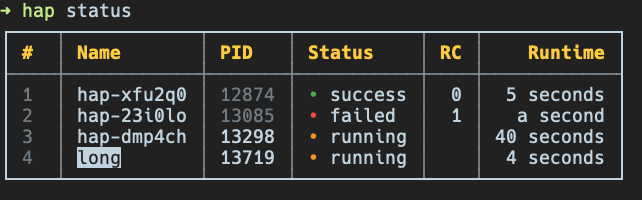
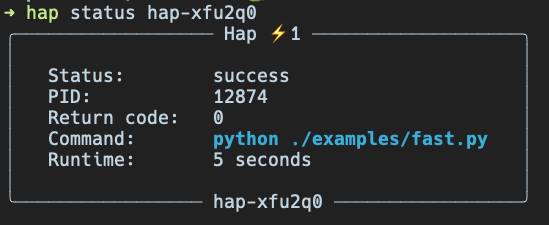
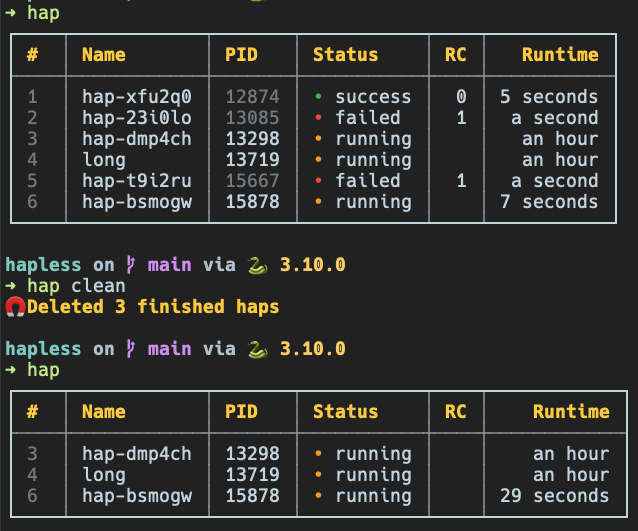
    <content type="html"><![CDATA[<p>In the <a href="/run-processes-in-background/" title="null">previous article</a> we’ve talked about running and tracking processes in the background with the tools that Linux provides. Fortunately, there is a much easier and convenient way to do that using <a href="https://pypi.org/project/hapless/">hapless</a> package. This is a Python project I’ve been recently working on and you can install it using <a href="https://pip.pypa.io/en/stable/">pip</a> like this</p><figure class="highlight bash"><table><tr><td class="gutter"><pre><span class="line">1</span><br></pre></td><td class="code"><pre><span class="line">$ pip install --upgrade hapless</span><br></pre></td></tr></table></figure><p>The only thing you need to add is a short prefix <code>hap run</code> to a command you want to run in the background</p><figure class="highlight bash"><table><tr><td class="gutter"><pre><span class="line">1</span><br><span class="line">2</span><br></pre></td><td class="code"><pre><span class="line">$ hap run ./my_long_running_script.sh</span><br><span class="line">$ hap run python another_script.py --with-flags --and-arguments=<span class="literal">true</span></span><br></pre></td></tr></table></figure><p>It will automatically handle output redirection and detach process from current shell, so it is safe to launch it within remote ssh session, close the connection and return back in a while. To retrieve status of the processes and get list of all the tracked ones simply type</p><figure class="highlight bash"><table><tr><td class="gutter"><pre><span class="line">1</span><br><span class="line">2</span><br><span class="line">3</span><br></pre></td><td class="code"><pre><span class="line">$ hap</span><br><span class="line"><span class="comment"># or</span></span><br><span class="line">$ hap status</span><br></pre></td></tr></table></figure><p>On a creation it will also generate unique id for each process started, but you can also provide your own alias using <code>-n</code>/<code>--name</code> flag to refer the process later</p><p><img src="/images/hap_status.png" alt="hap status"></p><p>Besides that you can specify process by providing its sequential number, so all the invocations below are valid</p><figure class="highlight bash"><table><tr><td class="gutter"><pre><span class="line">1</span><br><span class="line">2</span><br><span class="line">3</span><br></pre></td><td class="code"><pre><span class="line">$ hap status 1  <span class="comment"># just a number from the first column</span></span><br><span class="line">$ hap status hap-23i0lo  <span class="comment"># automatically generated ID</span></span><br><span class="line">$ hap status long  <span class="comment"># any custom name you provided when launching with -n flag</span></span><br></pre></td></tr></table></figure><p><img src="/images/hap_status_hap.png" alt="hap single status"></p><p>There is also a <code>-v</code>/<code>--verbose</code> flag for the <code>status</code>/<code>show</code> command, so you can get detailed information about the process including complete environment and paths to output files.</p><h3 id="Options-available"><a href="#Options-available" class="headerlink" title="Options available"></a>Options available</h3><p>Next thing you usually want to do is to check an output for the process (both stdout and stderr is possible). Keep in mind that you can refer to process the same way as above</p><figure class="highlight bash"><table><tr><td class="gutter"><pre><span class="line">1</span><br><span class="line">2</span><br><span class="line">3</span><br></pre></td><td class="code"><pre><span class="line">$ hap logs hap-dmp4ch  <span class="comment"># show stdout</span></span><br><span class="line">$ hap logs -f 2  <span class="comment"># follow logs, similar to `tail -f`</span></span><br><span class="line">$ hap logs --stderr long  <span class="comment"># print stderr for the process named long</span></span><br></pre></td></tr></table></figure><p>Another useful feature is the ability to pause execution of the process and resume it at any point</p><figure class="highlight bash"><table><tr><td class="gutter"><pre><span class="line">1</span><br><span class="line">2</span><br><span class="line">3</span><br><span class="line">4</span><br></pre></td><td class="code"><pre><span class="line">$ hap pause hap-23i0lo</span><br><span class="line">$ hap <span class="built_in">suspend</span> hap-23i0lo  <span class="comment"># same as above</span></span><br><span class="line"><span class="comment"># resume execution</span></span><br><span class="line">$ hap resume hap-23i0lo</span><br></pre></td></tr></table></figure><p>Moreover, you can send any arbitrary signal to the process through <em>hapless</em></p><figure class="highlight bash"><table><tr><td class="gutter"><pre><span class="line">1</span><br><span class="line">2</span><br></pre></td><td class="code"><pre><span class="line">$ hap signal hap-23i0lo 9  <span class="comment"># sends SIGKILL</span></span><br><span class="line">$ hap signal hap-xfu2q0 15  <span class="comment"># sends SIGTERM</span></span><br></pre></td></tr></table></figure><h3 id="Cleanup"><a href="#Cleanup" class="headerlink" title="Cleanup"></a>Cleanup</h3><p><em>hapless</em> stores information about processes internally and preserves data upon completion, so if you don’t care about finished processes you might want to invoke <code>hap clean</code> which will leave only ongoing ones (note that in the summary table the PID of the finished processes is dimmed as those do not exist anymore).</p><p><img src="/images/hap_clean.png" alt="hap clean"></p><p>That’s almost it as the main idea is to make launch command as easy as possible and have a convenient way to quickly check status of processes started (simply <code>hap</code>). For the rest of options available invoke <code>hap --help</code> or check the link below for the documentation.</p><h3 id="Resources"><a href="#Resources" class="headerlink" title="Resources"></a>Resources</h3><ul><li><a href="https://github.com/bmwant/hapless/blob/main/USAGE.md">Complete list of commands available</a></li></ul>]]></content>


    <summary type="html">&lt;p&gt;In the &lt;a href=&quot;/run-processes-in-background/&quot; title=&quot;null&quot;&gt;previous article&lt;/a&gt; we’ve talked about running and tracking processes in the</summary>


    <category term="python" scheme="https://bmwant.link/tags/python/"/>
    
    <category term="bash" scheme="https://bmwant.link/tags/bash/"/>
    
    <category term="jobs" scheme="https://bmwant.link/tags/jobs/"/>
    
    <category term="background" scheme="https://bmwant.link/tags/background/"/>
    
    <category term="cli" scheme="https://bmwant.link/tags/cli/"/>
    
  </entry>
  
  <entry>
    <title>Deprecation of package extras</title>
    <link href="https://bmwant.link/deprecation-of-package-extras/"/>
    <id>https://bmwant.link/deprecation-of-package-extras/</id>
    <published>2022-09-23T11:45:27.000Z</published>
    <updated>2026-01-28T09:32:18.109Z</updated>
    
    <content type="html"><![CDATA[<p>It’s a common case for the package to rely on <a href="https://peps.python.org/pep-0508/#extras">extras</a> syntax to optionally install packages which are not required for the main functionality. For example, <code>pip install &#39;black[jupyter]&#39;</code> allows you to use <a href="https://black.readthedocs.io/en/stable/index.html">black</a> formatting utility with your <a href="https://jupyter.org/">Jupyter notebooks</a>, but otherwise there is no need to bring new dependencies into your virtual environment especially if they are <em>heavy</em> to install.</p><p>With that premise sometimes you want to either completely deprecate extras or refactor them into a different name. As an aware package maintainer you should release an intermediate version with the warning about deprecation. That’s the case where you might want to consider adding <a href="https://pypi.org/project/package-extras/">package-extras</a> package. It’s a simple hack that allows you to emit a warning only when package has been installed through extras syntax invocation.</p><h3 id="How-to-use-useless-package"><a href="#How-to-use-useless-package" class="headerlink" title="How to use useless package"></a>How to use useless package</h3><p>First step is to update your project’s configuration file <code>pyproject.toml</code> and add <code>package-extras</code> into the section we want to deprecate (<code>databases</code> in the example below).</p><figure class="highlight toml"><table><tr><td class="gutter"><pre><span class="line">1</span><br><span class="line">2</span><br><span class="line">3</span><br><span class="line">4</span><br><span class="line">5</span><br><span class="line">6</span><br><span class="line">7</span><br><span class="line">8</span><br><span class="line">9</span><br></pre></td><td class="code"><pre><span class="line"><span class="section">[tool.poetry.dependencies]</span></span><br><span class="line"><span class="attr">package-extras</span> = &#123; version = <span class="string">&quot;^0.2.0&quot;</span>, optional = <span class="literal">true</span> &#125;</span><br><span class="line"><span class="comment"># your actual extras below</span></span><br><span class="line"><span class="attr">psycopg2</span> = &#123; version = <span class="string">&quot;^2.9&quot;</span>, optional = <span class="literal">true</span> &#125;</span><br><span class="line"><span class="attr">mysqlclient</span> = &#123; version = <span class="string">&quot;^1.3&quot;</span>, optional = <span class="literal">true</span> &#125;</span><br><span class="line"></span><br><span class="line"><span class="section">[tool.poetry.extras]</span></span><br><span class="line"><span class="comment"># append our package to the list</span></span><br><span class="line"><span class="attr">databases</span> = [<span class="string">&quot;package-extras&quot;</span>, <span class="string">&quot;mysqlclient&quot;</span>, <span class="string">&quot;psycopg2&quot;</span>]</span><br></pre></td></tr></table></figure><p>Same example as above, but for the case when you still maintain <code>setup.py</code> file for your project.</p><figure class="highlight python"><table><tr><td class="gutter"><pre><span class="line">1</span><br><span class="line">2</span><br><span class="line">3</span><br><span class="line">4</span><br><span class="line">5</span><br><span class="line">6</span><br><span class="line">7</span><br><span class="line">8</span><br><span class="line">9</span><br><span class="line">10</span><br><span class="line">11</span><br><span class="line">12</span><br><span class="line">13</span><br><span class="line">14</span><br><span class="line">15</span><br><span class="line">16</span><br><span class="line">17</span><br><span class="line">18</span><br><span class="line">19</span><br><span class="line">20</span><br><span class="line">21</span><br><span class="line">22</span><br><span class="line">23</span><br></pre></td><td class="code"><pre><span class="line"><span class="keyword">from</span> setuptools <span class="keyword">import</span> setup</span><br><span class="line"></span><br><span class="line">install_requires = [</span><br><span class="line">  <span class="comment"># list of your main dependencies</span></span><br><span class="line">]</span><br><span class="line"></span><br><span class="line">extras_require = &#123;</span><br><span class="line">  <span class="string">&#x27;databases&#x27;</span>: [</span><br><span class="line">    <span class="string">&#x27;psycopg2&gt;=2.9,&lt;3.0&#x27;</span>,</span><br><span class="line">    <span class="string">&#x27;mysqlclient&gt;=1.3,&lt;2.0&#x27;</span>,</span><br><span class="line">    <span class="comment"># append our package to the list</span></span><br><span class="line">    <span class="string">&#x27;package-extras&gt;=0.2.0,&lt;1.0.0&#x27;</span>,</span><br><span class="line">  ]</span><br><span class="line">&#125;</span><br><span class="line"></span><br><span class="line">setup_kwargs = &#123;</span><br><span class="line">    <span class="comment"># rest of the arguments</span></span><br><span class="line">    <span class="string">&#x27;install_requires&#x27;</span>: install_requires,</span><br><span class="line">    <span class="string">&#x27;extras_require&#x27;</span>: extras_require,</span><br><span class="line">    <span class="string">&#x27;python_requires&#x27;</span>: <span class="string">&#x27;&gt;=3.8,&lt;4.0&#x27;</span>,</span><br><span class="line">&#125;</span><br><span class="line"></span><br><span class="line">setup(**setup_kwargs)</span><br></pre></td></tr></table></figure><p>Then add this logic to your entrypoint or top-level <code>__init__.py</code> file to raise deprecation warning</p><figure class="highlight python"><table><tr><td class="gutter"><pre><span class="line">1</span><br><span class="line">2</span><br><span class="line">3</span><br><span class="line">4</span><br><span class="line">5</span><br><span class="line">6</span><br><span class="line">7</span><br><span class="line">8</span><br><span class="line">9</span><br><span class="line">10</span><br><span class="line">11</span><br><span class="line">12</span><br><span class="line">13</span><br><span class="line">14</span><br></pre></td><td class="code"><pre><span class="line"><span class="keyword">import</span> warnings</span><br><span class="line"></span><br><span class="line"><span class="keyword">try</span>:</span><br><span class="line">    <span class="keyword">import</span> package_extras</span><br><span class="line"><span class="keyword">except</span> ImportError:</span><br><span class="line">    <span class="keyword">pass</span></span><br><span class="line"><span class="keyword">else</span>:</span><br><span class="line">    warnings.warn(</span><br><span class="line">        <span class="string">&quot;&#x27;test_package[databases]&#x27; extra is deprecated and will be &quot;</span></span><br><span class="line">        <span class="string">&quot;removed in a future release. Read more in this issue: &quot;</span></span><br><span class="line">        <span class="string">&quot;https://bmwant.link/deprecation-of-package-extras/&quot;</span>,</span><br><span class="line">        category=DeprecationWarning,</span><br><span class="line">        stacklevel=<span class="number">2</span>,</span><br><span class="line">    )</span><br></pre></td></tr></table></figure><p>You might wonder why don’t we just import some package from the list and make assertion based on its presence. First of all this package might be installed by some other dependency or just be present in your virtual environment. Secondly, you might end up with a huge import block in case you decided to check <em>every package</em> that belongs to extras (even this wouldn’t guarantee mitigation of the first case). In contrast, <code>package_extras</code> is definitely present in the environment only if you have invoked installation using extra syntax, so this approach is the most resillient one.</p><h3 id="Opposite-scenario"><a href="#Opposite-scenario" class="headerlink" title="Opposite scenario"></a>Opposite scenario</h3><p>There is an opposite case where you want to make sure that some extras were installed. Imagine your CI uses a lot of tools to bump version, update release notes, publish release to artifactory and upload <em>wheel</em> to the internal S3 bucket. You don’t need this tools neither for development, nor to be packaged by default with your project.</p><figure class="highlight toml"><table><tr><td class="gutter"><pre><span class="line">1</span><br><span class="line">2</span><br><span class="line">3</span><br><span class="line">4</span><br><span class="line">5</span><br><span class="line">6</span><br><span class="line">7</span><br><span class="line">8</span><br><span class="line">9</span><br></pre></td><td class="code"><pre><span class="line"><span class="section">[tool.poetry.dependencies]</span></span><br><span class="line"><span class="attr">package-extras</span> = &#123; version = <span class="string">&quot;^0.2.0&quot;</span>, optional = <span class="literal">true</span> &#125;</span><br><span class="line"><span class="comment"># your actual extras below</span></span><br><span class="line"><span class="attr">&quot;github3.py&quot;</span> = &#123; version = <span class="string">&quot;^3.2.0&quot;</span>, optional = <span class="literal">true</span> &#125;</span><br><span class="line"></span><br><span class="line"><span class="section">[tool.poetry.extras]</span></span><br><span class="line"><span class="comment"># A lot more of other dependencies here</span></span><br><span class="line"><span class="comment"># It doesn&#x27;t make sense to use this approach for one simple library</span></span><br><span class="line"><span class="attr">ci</span> = [<span class="string">&quot;package-extras&quot;</span>, <span class="string">&quot;github3.py&quot;</span>]</span><br></pre></td></tr></table></figure><p>In the same time you might rely on the cli entrypoint that invokes all the mentioned steps within its code. So this check can warn you about missing <code>pip install test_package[ci]</code> step or just <em>fail fast</em> after this step instead of having unexpected import error somewhere in the middle of your pipeline.</p><figure class="highlight python"><table><tr><td class="gutter"><pre><span class="line">1</span><br><span class="line">2</span><br><span class="line">3</span><br><span class="line">4</span><br><span class="line">5</span><br><span class="line">6</span><br><span class="line">7</span><br><span class="line">8</span><br><span class="line">9</span><br><span class="line">10</span><br><span class="line">11</span><br></pre></td><td class="code"><pre><span class="line"><span class="keyword">import</span> warnings</span><br><span class="line"></span><br><span class="line"><span class="keyword">try</span>:</span><br><span class="line">    <span class="keyword">import</span> package_extras</span><br><span class="line"><span class="keyword">except</span> ModuleNotFoundError:</span><br><span class="line">    warnings.warn(</span><br><span class="line">        <span class="string">&quot;You are going to use functionality that depends on &#x27;ci&#x27; extras. &quot;</span></span><br><span class="line">        <span class="string">&quot;Please install &#x27;test_package[ci]&#x27; to proceed.&quot;</span>,</span><br><span class="line">        category=ImportWarning,</span><br><span class="line">        stacklevel=<span class="number">2</span>,</span><br><span class="line">    )</span><br></pre></td></tr></table></figure><blockquote><p><strong>NOTE</strong>: <code>ImportWarning</code> warnings are disabled by default, so if you want your users to actually see the error during the import it is better to use <code>RuntimeWarning</code> instead. Alternatively, you can pass extra command line flag <code>python -Walways</code> on invocation.</p></blockquote><h3 id="Resources"><a href="#Resources" class="headerlink" title="Resources"></a>Resources</h3><ul><li><a href="https://pypi.org/project/package-extras/">package-extras on PyPI</a></li><li><a href="https://docs.python.org/3/library/warnings.html#warning-categories">Python warning categories</a></li><li><a href="https://github.com/urllib3/urllib3/blob/1.26.12/src/urllib3/__init__.py#L27">Inspired by approach used in urllib3</a></li><li><a href="https://youtu.be/_jUXdX8e9Wg">asottile video on the topic</a></li></ul>]]></content>


    <summary type="html">&lt;p&gt;It’s a common case for the package to rely on &lt;a href=&quot;https://peps.python.org/pep-0508/#extras&quot;&gt;extras&lt;/a&gt; syntax to optionally install </summary>


    <category term="python" scheme="https://bmwant.link/tags/python/"/>
    
    <category term="pip" scheme="https://bmwant.link/tags/pip/"/>
    
    <category term="poetry" scheme="https://bmwant.link/tags/poetry/"/>
    
    <category term="packaging" scheme="https://bmwant.link/tags/packaging/"/>
    
    <category term="setuptools" scheme="https://bmwant.link/tags/setuptools/"/>
    
  </entry>
  
  <entry>
    <title>Run processes in the background</title>
    <link href="https://bmwant.link/run-processes-in-background/"/>
    <id>https://bmwant.link/run-processes-in-background/</id>
    <published>2022-04-28T13:22:34.000Z</published>
    <updated>2026-01-28T09:32:18.112Z</updated>
    
    <content type="html"><![CDATA[<p>Suppose you have some long running script (we’ll use Python here as an example)</p><figure class="highlight python"><table><tr><td class="gutter"><pre><span class="line">1</span><br><span class="line">2</span><br><span class="line">3</span><br><span class="line">4</span><br><span class="line">5</span><br><span class="line">6</span><br><span class="line">7</span><br><span class="line">8</span><br><span class="line">9</span><br><span class="line">10</span><br></pre></td><td class="code"><pre><span class="line"><span class="keyword">import</span> time</span><br><span class="line"></span><br><span class="line"><span class="function"><span class="keyword">def</span> <span class="title">main</span>():</span></span><br><span class="line">    <span class="keyword">for</span> i <span class="keyword">in</span> <span class="built_in">range</span>(<span class="number">1000</span>):</span><br><span class="line">        <span class="built_in">print</span>(<span class="string">f&quot;Processing <span class="subst">&#123;i&#125;</span>...&quot;</span>, flush=<span class="literal">True</span>)</span><br><span class="line">        <span class="comment"># Actual heavy-lifting instead of sleeping</span></span><br><span class="line">        time.sleep(<span class="number">10</span>)</span><br><span class="line"></span><br><span class="line"><span class="keyword">if</span> __name__ == <span class="string">&quot;__main__&quot;</span>:</span><br><span class="line">    main()</span><br></pre></td></tr></table></figure><p>and you have launched it in active terminal session like this <code>python script.py</code> (or <code>poetry run python script.py</code>).</p><p>Suddenly you’ve realized that this is going to take couple of hours to finish and you need to either exit current shell or logout from remote instance where you have your ssh connection established. Nobody wants to lose the time and work spent and in most cases you cannot just restart a process the proper way (see options below) due to the reasons:</p><ul><li>script is most likely not <a href="https://en.wikipedia.org/wiki/Idempotence#Computer_science_meaning">idempotent</a> (in other words it cannot be launched multiple times producing same output results and not causing any additional side-effects)</li><li>script is not designed to be resumed, it cannot pick up from the interrupted spot</li><li>it will break consistency between your data when invoked repeteadly</li><li>let’s face it: for simple scripts you don’t generally think about all the items above and do not handle all the possible corner cases</li></ul><h3 id="Solution"><a href="#Solution" class="headerlink" title="Solution"></a>Solution</h3><ul><li>Press <code>Ctrl</code>-<code>Z</code> in active window. This will send <a href="https://dsa.cs.tsinghua.edu.cn/oj/static/unix_signal.html">SIGTSTP</a> signal to your process causing it to suspend</li></ul><p><img src="/images/process_stopped.png" alt="stopped process"></p><ul><li>Type <code>jobs</code> in the same shell. <a href="https://ss64.com/bash/jobs.html">This utility</a> will list all jobs in current session. <code>jobs -l</code> will also display process ID or any other information available</li></ul><p><img src="/images/process_jobs.png" alt="jobs list"></p><ul><li>Now we can use another utility called <a href="https://ss64.com/bash/bg.html">bg</a> to start executing this job in background. Type <code>bg %1</code> to continue running our process in the background. Note how we reference a job by prefixing its number with <code>%</code> sign</li></ul><p><img src="/images/process_bg.png" alt="bg"></p><p>This would be enough if you process does not produce output to the terminal. Otherwise it can mess up a screen or in case messages are produced fast enough make it impossible to work properly within the session. You can type <code>stty tostop</code> to make sure that job will be stopped automatially once it writes to its standard output or standard error.</p><p>In the meanwhile we will use <a href="https://github.com/jerome-pouiller/reredirect">reredirect</a> to dynamically redirect output of an already running process.</p><figure class="highlight bash"><table><tr><td class="gutter"><pre><span class="line">1</span><br><span class="line">2</span><br><span class="line">3</span><br><span class="line">4</span><br><span class="line">5</span><br><span class="line">6</span><br></pre></td><td class="code"><pre><span class="line">$ git <span class="built_in">clone</span> https://github.com/jerome-pouiller/reredirect.git</span><br><span class="line">$ <span class="built_in">cd</span> redirect</span><br><span class="line">$ make</span><br><span class="line"></span><br><span class="line"><span class="comment"># skip this step if you do not have root permissions</span></span><br><span class="line">$ sudo make install</span><br></pre></td></tr></table></figure><p>Use process identificator obtained from <code>jobs -l</code> and launch this command</p><figure class="highlight bash"><table><tr><td class="gutter"><pre><span class="line">1</span><br><span class="line">2</span><br><span class="line">3</span><br><span class="line">4</span><br><span class="line">5</span><br></pre></td><td class="code"><pre><span class="line"><span class="comment"># reredirect -m [output-filename] [PID]</span></span><br><span class="line">$ reredirect -m output.log 22729</span><br><span class="line"></span><br><span class="line"><span class="comment"># Run from installation directory if you do not have root permissions</span></span><br><span class="line">$ ./reredirect -m output.log 22729</span><br></pre></td></tr></table></figure><p>You are still able to track progress and examine output with tail command <code>tail -f output.log</code></p><p><img src="/images/process_tail.png" alt="tail"></p><ul><li>Last step in this entangled procedure is to make sure we can drop current active session without killing the process. This might be useful in case you plan to close ssh connection to the remote and then reconnect again for the updates. Shell has <a href="https://www.cyberciti.biz/faq/unix-linux-disown-command-examples-usage-syntax/">disown</a> command which is designed for this purpose.</li></ul><figure class="highlight bash"><table><tr><td class="gutter"><pre><span class="line">1</span><br></pre></td><td class="code"><pre><span class="line">$ <span class="built_in">disown</span> %1</span><br></pre></td></tr></table></figure><p>Note that referencing is exactly the same by the job number. However after detaching the process you will not see it within <code>jobs</code> output as current shell does not own this process anymore. Still, PID will remain the same and you can track progress by inspecting output with <code>tail -f output.log</code></p><p><img src="/images/process_grep.png" alt="grep"></p><h3 id="Meet-nohup"><a href="#Meet-nohup" class="headerlink" title="Meet nohup"></a>Meet nohup</h3><p>If you want to follow a procedure described above from the very beginning you should first make sure all the output is written to a text file (to omit all the hacks with modifying processes at a runtime)</p><figure class="highlight bash"><table><tr><td class="gutter"><pre><span class="line">1</span><br></pre></td><td class="code"><pre><span class="line">$ poetry run python script.py &gt; output.log 2&gt;&amp;1</span><br></pre></td></tr></table></figure><p>In this command we redirect <em>stdout</em> to a <code>output.log</code> file and then pointing <em>stderr</em> to the same location where <em>stdout</em> goes.</p><p>Then you apply <code>Ctrl</code>-<code>Z</code> and <code>bg</code> trick to ensure process is running in the background. To simplify this you can initially add ampersand symbol (<code>&amp;</code>) to the end of the command, so it will run as a backround process in the first place.</p><figure class="highlight bash"><table><tr><td class="gutter"><pre><span class="line">1</span><br></pre></td><td class="code"><pre><span class="line">$ poetry run python script.py &gt; output.log 2&gt;&amp;1 &amp;</span><br></pre></td></tr></table></figure><p><img src="/images/process_background.png" alt="background"></p><p>Note that you can always bring any process running in the background to foreground. <a href="https://ss64.com/bash/fg.html">fg</a> does exactly this thing. Remember to refer the job by percentage sign and its number when invoking. <code>fg %1</code> will send first job to the foreground and you can again bring it to the background at any time needed.</p><p>Next step would be to call <code>disown</code> on the job (like <code>disown %1</code>) to make sure we can safely close current shell session without interrupting our process.<br>Lastly, meet <a href="https://ss64.com/bash/nohup.html">nohup</a> utility which can also help us to omit this step if we plan to launch such a long-running background process. So, final version of the invocation of your command <strong>should always look like this</strong></p><figure class="highlight bash"><table><tr><td class="gutter"><pre><span class="line">1</span><br><span class="line">2</span><br></pre></td><td class="code"><pre><span class="line"><span class="comment"># nohup [your command goes here] &gt; output.log 2&gt;&amp;1 &amp;</span></span><br><span class="line">$ nohup python script.py &gt; output.log 2&gt;&amp;1 &amp;</span><br></pre></td></tr></table></figure><p>This is the proper and safe way to execute process in the background and ensure it will not mess current session with its output or terminate unexpectedly when session is closed.</p><h3 id="Use-screen"><a href="#Use-screen" class="headerlink" title="Use screen"></a>Use screen</h3><p>There is a preferred way of running anything on the remote instance via ssh connection, so dropped connection will not affect work being done there. We can also use same tool for running background processes. First, install <a href="https://ss64.com/bash/screen.html">screen</a> program</p><figure class="highlight bash"><table><tr><td class="gutter"><pre><span class="line">1</span><br><span class="line">2</span><br><span class="line">3</span><br><span class="line">4</span><br></pre></td><td class="code"><pre><span class="line"><span class="comment"># Depending on the system you run</span></span><br><span class="line">$ sudo apt install -y screen</span><br><span class="line"><span class="comment"># or</span></span><br><span class="line">$ sudo yum install -y screen</span><br></pre></td></tr></table></figure><p>Next, type <code>screen</code> which will automatically move you into new session where you can simply run your script without any modifications</p><figure class="highlight bash"><table><tr><td class="gutter"><pre><span class="line">1</span><br></pre></td><td class="code"><pre><span class="line">$ python script.py</span><br></pre></td></tr></table></figure><p>and then detach from current screen session by typing <code>Ctrl</code>-<code>A</code> then <code>D</code>.</p><p>To check the list of all active screens (and you can launch as many of them as you like) type this</p><figure class="highlight bash"><table><tr><td class="gutter"><pre><span class="line">1</span><br></pre></td><td class="code"><pre><span class="line">$ screen -ls</span><br></pre></td></tr></table></figure><p>To restore back into your detached session you can type command below and check the progress and output of your command</p><figure class="highlight bash"><table><tr><td class="gutter"><pre><span class="line">1</span><br></pre></td><td class="code"><pre><span class="line">$ screen -r</span><br></pre></td></tr></table></figure><p>There is a lot more of this utility and it’s a really powerful tool to be used as a window manager / terminal multiplexer, but for the purpose of running a process in the background this should be enough. At this note I’m leaving you here with a bunch of extra links to check. Stay curious, fight for freedom 🇺🇦</p><h3 id="Resources"><a href="#Resources" class="headerlink" title="Resources"></a>Resources</h3><ul><li><a href="https://man7.org/linux/man-pages/man1/jobs.1p.html">jobs utility</a></li><li><a href="https://man7.org/linux/man-pages/man1/nohup.1.html">nohup utility</a></li><li><a href="https://man7.org/linux/man-pages/man1/bg.1p.html">bg command</a></li><li><a href="https://man7.org/linux/man-pages/man1/fg.1p.html">fg command</a></li><li><a href="https://linuxize.com/post/how-to-use-linux-screen/">How to use screen utility</a></li></ul>]]></content>


    <summary type="html">&lt;p&gt;Suppose you have some long running script (we’ll use Python here as an example)&lt;/p&gt;
&lt;figure class=&quot;highlight python&quot;&gt;&lt;table&gt;&lt;tr&gt;&lt;td class</summary>


    <category term="bash" scheme="https://bmwant.link/tags/bash/"/>
    
    <category term="jobs" scheme="https://bmwant.link/tags/jobs/"/>
    
    <category term="linux" scheme="https://bmwant.link/tags/linux/"/>
    
    <category term="bg" scheme="https://bmwant.link/tags/bg/"/>
    
    <category term="fg" scheme="https://bmwant.link/tags/fg/"/>
    
  </entry>
  
  <entry>
    <title>Django migrations create index</title>
    <link href="https://bmwant.link/django-migrations-create-index/"/>
    <id>https://bmwant.link/django-migrations-create-index/</id>
    <published>2022-03-23T10:09:54.000Z</published>
    <updated>2026-01-28T09:32:18.109Z</updated>
    
    <content type="html"><![CDATA[<p>Sometimes you need to add an index to already existing field within the table for performance gains. However, operation of adding index locks table by default, so on production workload you cannot afford such a thing as it might cause downtime. The bigger table you have, the longer it takes to create an index resulting in table unavailability. PostgreSQL <a href="https://www.postgresql.org/docs/current/sql-createindex.html#SQL-CREATEINDEX-CONCURRENTLY">supports</a> building indexes without locking out writes, but let’s see how Django handles this migration.</p><h3 id="Default-behaviour"><a href="#Default-behaviour" class="headerlink" title="Default behaviour"></a>Default behaviour</h3><p>Consider having this simple <code>User</code> model</p><figure class="highlight python"><table><tr><td class="gutter"><pre><span class="line">1</span><br><span class="line">2</span><br><span class="line">3</span><br><span class="line">4</span><br><span class="line">5</span><br><span class="line">6</span><br><span class="line">7</span><br></pre></td><td class="code"><pre><span class="line"><span class="keyword">from</span> django.db <span class="keyword">import</span> models</span><br><span class="line"><span class="keyword">from</span> django.contrib.auth.models <span class="keyword">import</span> AbstractBaseUser</span><br><span class="line"><span class="keyword">from</span> django.utils <span class="keyword">import</span> timezone</span><br><span class="line"></span><br><span class="line"><span class="class"><span class="keyword">class</span> <span class="title">User</span>(<span class="params">AbstractBaseUser</span>):</span></span><br><span class="line">    name = models.CharField(max_length=<span class="number">200</span>)</span><br><span class="line">    date_created = models.DateTimeField(default=timezone.now)</span><br></pre></td></tr></table></figure><p>At some point you have decided you need efficient sort on <code>date_created</code> field. Following the usual workflow you update the field like this</p><figure class="highlight python"><table><tr><td class="gutter"><pre><span class="line">1</span><br></pre></td><td class="code"><pre><span class="line">date_created = models.DateTimeField(default=timezone.now, db_index=<span class="literal">True</span>)</span><br></pre></td></tr></table></figure><p>and create corresponding migration file</p><figure class="highlight bash"><table><tr><td class="gutter"><pre><span class="line">1</span><br></pre></td><td class="code"><pre><span class="line">$ python manage.py makemigrations</span><br></pre></td></tr></table></figure><p>Somewhat similar to this migration file should be produced</p><figure class="highlight python"><table><tr><td class="gutter"><pre><span class="line">1</span><br><span class="line">2</span><br><span class="line">3</span><br><span class="line">4</span><br><span class="line">5</span><br><span class="line">6</span><br><span class="line">7</span><br><span class="line">8</span><br><span class="line">9</span><br><span class="line">10</span><br><span class="line">11</span><br><span class="line">12</span><br><span class="line">13</span><br><span class="line">14</span><br><span class="line">15</span><br><span class="line">16</span><br><span class="line">17</span><br><span class="line">18</span><br><span class="line">19</span><br></pre></td><td class="code"><pre><span class="line"><span class="keyword">import</span> django.utils.timezone</span><br><span class="line"><span class="keyword">from</span> django.db <span class="keyword">import</span> migrations, models</span><br><span class="line"></span><br><span class="line"><span class="class"><span class="keyword">class</span> <span class="title">Migration</span>(<span class="params">migrations.Migration</span>):</span></span><br><span class="line"></span><br><span class="line">    dependencies = [</span><br><span class="line">        (<span class="string">&#x27;app&#x27;</span>, <span class="string">&#x27;0001_initial&#x27;</span>),</span><br><span class="line">    ]</span><br><span class="line"></span><br><span class="line">    operations = [</span><br><span class="line">        migrations.AlterField(</span><br><span class="line">            model_name=<span class="string">&#x27;user&#x27;</span>,</span><br><span class="line">            name=<span class="string">&#x27;date_created&#x27;</span>,</span><br><span class="line">            field=models.DateTimeField(</span><br><span class="line">                db_index=<span class="literal">True</span>,</span><br><span class="line">                default=django.utils.timezone.now,</span><br><span class="line">            ),</span><br><span class="line">        ),</span><br><span class="line">    ]</span><br></pre></td></tr></table></figure><p>We can check the underlying SQL code and verify that index will be created with command<br><code>python manage.py sqlmigrate app 0002</code></p><figure class="highlight sql"><table><tr><td class="gutter"><pre><span class="line">1</span><br><span class="line">2</span><br><span class="line">3</span><br><span class="line">4</span><br><span class="line">5</span><br><span class="line">6</span><br></pre></td><td class="code"><pre><span class="line"><span class="keyword">BEGIN</span>;</span><br><span class="line"><span class="comment">--</span></span><br><span class="line"><span class="comment">-- Alter field date_created on user</span></span><br><span class="line"><span class="comment">--</span></span><br><span class="line"><span class="keyword">CREATE</span> INDEX &quot;app_user_date_created_a9e0fc3e&quot; <span class="keyword">ON</span> &quot;app_user&quot; (&quot;date_created&quot;);</span><br><span class="line"><span class="keyword">COMMIT</span>;</span><br></pre></td></tr></table></figure><p>Nonetheless, this is not exactly what we need as the operation is blocking and cannot be applied safely on the production environment. Surely, you can execute <code>CREATE INDEX CONCURRENTLY</code> directly on the database, but it’s a really bad practice to diverge code and database state when using an ORM.</p><h3 id="Proper-solution"><a href="#Proper-solution" class="headerlink" title="Proper solution"></a>Proper solution</h3><p>Here’s the correct way of applying such a migration. I’ll go over most important points below</p><figure class="highlight python"><table><tr><td class="gutter"><pre><span class="line">1</span><br><span class="line">2</span><br><span class="line">3</span><br><span class="line">4</span><br><span class="line">5</span><br><span class="line">6</span><br><span class="line">7</span><br><span class="line">8</span><br><span class="line">9</span><br><span class="line">10</span><br><span class="line">11</span><br><span class="line">12</span><br><span class="line">13</span><br><span class="line">14</span><br><span class="line">15</span><br><span class="line">16</span><br><span class="line">17</span><br><span class="line">18</span><br><span class="line">19</span><br><span class="line">20</span><br><span class="line">21</span><br><span class="line">22</span><br><span class="line">23</span><br><span class="line">24</span><br><span class="line">25</span><br><span class="line">26</span><br><span class="line">27</span><br><span class="line">28</span><br><span class="line">29</span><br><span class="line">30</span><br></pre></td><td class="code"><pre><span class="line"><span class="keyword">from</span> django.db <span class="keyword">import</span> migrations, models</span><br><span class="line"><span class="keyword">from</span> django.contrib.postgres.operations <span class="keyword">import</span> AddIndexConcurrently</span><br><span class="line"></span><br><span class="line"><span class="class"><span class="keyword">class</span> <span class="title">Migration</span>(<span class="params">migrations.Migration</span>):</span></span><br><span class="line">    atomic = <span class="literal">False</span></span><br><span class="line"></span><br><span class="line">    dependencies = []</span><br><span class="line"></span><br><span class="line">    operations = [</span><br><span class="line">        migrations.SeparateDatabaseAndState(</span><br><span class="line">            state_operations=[</span><br><span class="line">                migrations.AlterField(</span><br><span class="line">                    model_name=<span class="string">&#x27;user&#x27;</span>,</span><br><span class="line">                    name=<span class="string">&#x27;date_created&#x27;</span>,</span><br><span class="line">                    field=models.DateTimeField(</span><br><span class="line">                        db_index=<span class="literal">True</span>,</span><br><span class="line">                    ),</span><br><span class="line">                ),</span><br><span class="line">            ],</span><br><span class="line">            database_operations=[</span><br><span class="line">                AddIndexConcurrently(</span><br><span class="line">                    <span class="string">&#x27;user&#x27;</span>,</span><br><span class="line">                    models.Index(</span><br><span class="line">                        fields=[<span class="string">&#x27;date_created&#x27;</span>],</span><br><span class="line">                        name=<span class="string">&#x27;app_user_date_created_idx&#x27;</span>,</span><br><span class="line">                    )</span><br><span class="line">                ),</span><br><span class="line">            ]</span><br><span class="line">        ),</span><br><span class="line">    ]</span><br></pre></td></tr></table></figure><ol><li>We are using <a href="https://docs.djangoproject.com/en/dev/ref/migration-operations/#django.db.migrations.operations.SeparateDatabaseAndState">SeparateDatabaseAndState</a> operation to make sure any custom modification on the database schema (<code>database_operations</code>) has a corresponding change reflected within the model definition (<code>state_operations</code>)</li><li>We are using <a href="https://docs.djangoproject.com/en/dev/ref/contrib/postgres/operations/#django.contrib.postgres.operations.AddIndexConcurrently">AddIndexConcurrently</a> to leverage PostgreSQL feature of creating/dropping indexes without locking out writes.</li><li>We are setting <code>atomic = False</code> as concurrent option is not supported inside a transaction.</li></ol><p>Note that we have no <code>BEGIN</code>/<code>COMMIT</code> section when checking underlying SQL code<br><code>python manage.py sqlmigrate app 0002</code> (make sure to provide correct number for the migration)</p><figure class="highlight sql"><table><tr><td class="gutter"><pre><span class="line">1</span><br><span class="line">2</span><br><span class="line">3</span><br><span class="line">4</span><br></pre></td><td class="code"><pre><span class="line"><span class="comment">--</span></span><br><span class="line"><span class="comment">-- Custom state/database change combination</span></span><br><span class="line"><span class="comment">--</span></span><br><span class="line"><span class="keyword">CREATE</span> INDEX CONCURRENTLY &quot;app_user_date_created_idx&quot; <span class="keyword">ON</span> &quot;app_user&quot; (&quot;date_created&quot;);</span><br></pre></td></tr></table></figure><h3 id="Workaround-for-older-Django-versions"><a href="#Workaround-for-older-Django-versions" class="headerlink" title="Workaround for older Django versions"></a>Workaround for older Django versions</h3><p>Support for concurrent index operation has been added in Django 3.0 version, so in case you are using older version for some reason here’s a way you can achieve the same thing</p><figure class="highlight python"><table><tr><td class="gutter"><pre><span class="line">1</span><br><span class="line">2</span><br><span class="line">3</span><br><span class="line">4</span><br><span class="line">5</span><br><span class="line">6</span><br></pre></td><td class="code"><pre><span class="line">database_operations=[</span><br><span class="line">    migrations.RunSQL(</span><br><span class="line">        <span class="string">&#x27;CREATE INDEX CONCURRENTLY &quot;app_user_date_created_idx&quot; ON &quot;app_user&quot; (&quot;date_created&quot;);&#x27;</span>,</span><br><span class="line">        reverse_sql=<span class="string">&#x27;DROP INDEX CONCURRENTLY &quot;app_user_date_created_idx&quot;;&#x27;</span>,</span><br><span class="line">    ),</span><br><span class="line">]</span><br></pre></td></tr></table></figure><p>Now the only thing left is to apply migrations the next time you deliver your code to production.</p><figure class="highlight bash"><table><tr><td class="gutter"><pre><span class="line">1</span><br></pre></td><td class="code"><pre><span class="line">$ python manage.py migrate</span><br></pre></td></tr></table></figure><h3 id="Resources"><a href="#Resources" class="headerlink" title="Resources"></a>Resources</h3><ul><li><a href="https://docs.djangoproject.com/en/dev/howto/writing-migrations/#non-atomic-migrations">Non-atomic migrations in Django</a></li><li><a href="https://docs.djangoproject.com/en/dev/ref/django-admin/#django-admin-sqlmigrate">Django sqlmigrate command</a></li><li><a href="https://realpython.com/create-django-index-without-downtime/">More detailed article on RealPython</a></li></ul>]]></content>


    <summary type="html">&lt;p&gt;Sometimes you need to add an index to already existing field within the table for performance gains. However, operation of adding index l</summary>


    <category term="python" scheme="https://bmwant.link/tags/python/"/>
    
    <category term="sql" scheme="https://bmwant.link/tags/sql/"/>
    
    <category term="django" scheme="https://bmwant.link/tags/django/"/>
    
    <category term="migration" scheme="https://bmwant.link/tags/migration/"/>
    
    <category term="postgres" scheme="https://bmwant.link/tags/postgres/"/>
    
  </entry>
  
  <entry>
    <title>Invert binary tree in Python</title>
    <link href="https://bmwant.link/invert-binary-tree-in-python/"/>
    <id>https://bmwant.link/invert-binary-tree-in-python/</id>
    <published>2022-02-06T21:51:10.000Z</published>
    <updated>2026-01-28T09:32:18.110Z</updated>
    
    <content type="html"><![CDATA[<p><img src="/images/invert_binary_tree.png" alt="binary tree"></p><h3 id="Problem"><a href="#Problem" class="headerlink" title="Problem"></a>Problem</h3><p><a href="https://en.wikipedia.org/wiki/Binary_tree">Binary tree</a> is a data structure and one of the simplest form of <a href="https://en.wikipedia.org/wiki/Tree_(data_structure)">trees</a>. You might have heard about people complaining <a href="https://twitter.com/mxcl/status/608682016205344768?lang=en">[1]</a> that during interviews they are asked to invert a binary tree. It may sound like something difficult, but in this article I’ll show you really simple solution using recursion (see <a href="/recursion-in-python/" title="null">this article</a> for more recursion in Python). Inverting a tree basically means to switch places for right and left children of each node. Resulting tree will look like vertical mirroring of the input. Therefore if you know how to represent a tree within a code, you won’t stuck adding just a couple of extra lines invoking recursive function.</p><blockquote><p><strong>NOTE:</strong> Python <code>3.10</code> is used throughout the article.</p></blockquote><h3 id="Data-structures"><a href="#Data-structures" class="headerlink" title="Data structures"></a>Data structures</h3><p>First of all we need a data structure which represents a tree and two helper functions:<br><code>generate_tree</code> to create a target tree we plan to work with and<br><code>print_tree</code> to visualize the result and verify our solution works as intended.</p><p>To represent a tree we need to define only one class that corresponds to a <em>node</em>. Each node stores some value/identificator as well as pointers to its children or <code>None</code> in case of <em>leaf</em> nodes. An arbitrary variable assigned to the root node will state as a tree within our code.</p><figure class="highlight python"><table><tr><td class="gutter"><pre><span class="line">1</span><br><span class="line">2</span><br><span class="line">3</span><br><span class="line">4</span><br><span class="line">5</span><br><span class="line">6</span><br><span class="line">7</span><br><span class="line">8</span><br><span class="line">9</span><br><span class="line">10</span><br><span class="line">11</span><br></pre></td><td class="code"><pre><span class="line"><span class="class"><span class="keyword">class</span> <span class="title">Node</span>(<span class="params"><span class="built_in">object</span></span>):</span></span><br><span class="line">    <span class="function"><span class="keyword">def</span> <span class="title">__init__</span>(<span class="params">self, value: <span class="built_in">int</span> = <span class="literal">None</span></span>):</span></span><br><span class="line">        self.value = value</span><br><span class="line">        self.left: Node = <span class="literal">None</span></span><br><span class="line">        self.right: Node = <span class="literal">None</span></span><br><span class="line"></span><br><span class="line">    <span class="function"><span class="keyword">def</span> <span class="title">__str__</span>(<span class="params">self</span>):</span></span><br><span class="line">        <span class="keyword">return</span> <span class="string">f&#x27;<span class="subst">&#123;self.value&#125;</span>&#x27;</span></span><br><span class="line"></span><br><span class="line">    <span class="function"><span class="keyword">def</span> <span class="title">__repr__</span>(<span class="params">self</span>) -&gt; <span class="built_in">str</span>:</span></span><br><span class="line">        <span class="keyword">return</span> self.__str__()</span><br></pre></td></tr></table></figure><p>Having this class defined we can go ahead and compose some simple tree by creating couple of linked nodes.</p><figure class="highlight python"><table><tr><td class="gutter"><pre><span class="line">1</span><br><span class="line">2</span><br><span class="line">3</span><br><span class="line">4</span><br><span class="line">5</span><br><span class="line">6</span><br></pre></td><td class="code"><pre><span class="line">left_leaf = Node(<span class="number">23</span>)</span><br><span class="line">right_leaf = Node(<span class="number">42</span>)</span><br><span class="line">root = Node(<span class="number">0</span>)</span><br><span class="line">root.left = left_leaf</span><br><span class="line">root.right = right_leaf</span><br><span class="line">tree = root  <span class="comment"># this is our simple tree consisting of three nodes total</span></span><br></pre></td></tr></table></figure><p>Storing one variable (root node) is enough to represent a whole tree as the rest of nodes are linked together using pointers.</p><p>Creating a tree manually is a hassle, so we need a function that generates arbitrary tree for us. We will provide number of levels as an argument and it will return a root node for the tree requested. Each node stores sequentually incremented value for better visual grasp, but you can also fill the tree with some random numbers.</p><figure class="highlight python"><table><tr><td class="gutter"><pre><span class="line">1</span><br><span class="line">2</span><br><span class="line">3</span><br><span class="line">4</span><br><span class="line">5</span><br><span class="line">6</span><br><span class="line">7</span><br><span class="line">8</span><br><span class="line">9</span><br><span class="line">10</span><br><span class="line">11</span><br><span class="line">12</span><br><span class="line">13</span><br><span class="line">14</span><br></pre></td><td class="code"><pre><span class="line"><span class="keyword">from</span> typing <span class="keyword">import</span> <span class="type">Optional</span></span><br><span class="line"></span><br><span class="line">counter = <span class="number">0</span></span><br><span class="line"></span><br><span class="line"><span class="function"><span class="keyword">def</span> <span class="title">generate_tree</span>(<span class="params">levels: <span class="built_in">int</span></span>) -&gt; <span class="type">Optional</span>[Node]:</span></span><br><span class="line">    <span class="keyword">global</span> counter</span><br><span class="line">    <span class="keyword">if</span> levels == <span class="number">0</span>:</span><br><span class="line">        <span class="keyword">return</span> <span class="literal">None</span></span><br><span class="line"></span><br><span class="line">    counter += <span class="number">1</span></span><br><span class="line">    node = Node(counter)</span><br><span class="line">    node.left = generate_tree(levels-<span class="number">1</span>)</span><br><span class="line">    node.right = generate_tree(levels-<span class="number">1</span>)</span><br><span class="line">    <span class="keyword">return</span> node</span><br></pre></td></tr></table></figure><p>We leverage recursion to generate left and right <em>subtrees</em> until we reach leaf nodes therefore returning <code>None</code> for their children. To check whether generation was any good we need to add <code>print_tree</code> function which is going to output its target to the console.</p><figure class="highlight python"><table><tr><td class="gutter"><pre><span class="line">1</span><br><span class="line">2</span><br><span class="line">3</span><br><span class="line">4</span><br><span class="line">5</span><br><span class="line">6</span><br><span class="line">7</span><br></pre></td><td class="code"><pre><span class="line"><span class="function"><span class="keyword">def</span> <span class="title">print_tree</span>(<span class="params">node: Node, level: <span class="built_in">int</span> = <span class="number">0</span></span>):</span></span><br><span class="line">    <span class="keyword">if</span> node <span class="keyword">is</span> <span class="literal">None</span>:</span><br><span class="line">        <span class="keyword">return</span></span><br><span class="line">    print_tree(node.right, level+<span class="number">1</span>)</span><br><span class="line">    <span class="built_in">print</span>(<span class="string">&#x27;  &#x27;</span> * level, end=<span class="string">&#x27;&#x27;</span>)</span><br><span class="line">    <span class="built_in">print</span>(node)</span><br><span class="line">    print_tree(node.left, level+<span class="number">1</span>)</span><br></pre></td></tr></table></figure><p>Again, idea is to use recursion for traversing left and right subtrees and putting each node’s value to the terminal in between. <code>level</code> parameter allows to add an extra indentation, so it’s visually clear on which level the node resides. Finally, we have a tree representation which looks like tree laying on its side (rotated counter-clockwise)</p><p><img src="/images/print_tree.png" alt="print tree"></p><figure class="highlight python"><table><tr><td class="gutter"><pre><span class="line">1</span><br><span class="line">2</span><br></pre></td><td class="code"><pre><span class="line">tree = generate_tree(<span class="number">3</span>)</span><br><span class="line">print_tree(tree)</span><br></pre></td></tr></table></figure><p>Use lines above if you want to produce same output as on the screenshot.</p><h3 id="Recursive-solution"><a href="#Recursive-solution" class="headerlink" title="Recursive solution"></a>Recursive solution</h3><p>It’s no surprise that for inverting our tree we are going to use recursion again. This simple and straightforward solution requires even less code than generation itself.</p><figure class="highlight python"><table><tr><td class="gutter"><pre><span class="line">1</span><br><span class="line">2</span><br><span class="line">3</span><br><span class="line">4</span><br><span class="line">5</span><br><span class="line">6</span><br><span class="line">7</span><br><span class="line">8</span><br><span class="line">9</span><br><span class="line">10</span><br></pre></td><td class="code"><pre><span class="line"><span class="function"><span class="keyword">def</span> <span class="title">invert_tree</span>(<span class="params">node: Node</span>) -&gt; Node:</span></span><br><span class="line">    <span class="keyword">if</span> node <span class="keyword">is</span> <span class="literal">None</span>:</span><br><span class="line">        <span class="keyword">return</span></span><br><span class="line"></span><br><span class="line">    left_inverted = invert_tree(node.left)</span><br><span class="line">    right_inverted = invert_tree(node.right)</span><br><span class="line">    <span class="comment"># Switch places for left and right</span></span><br><span class="line">    node.right = left_inverted</span><br><span class="line">    node.left = right_inverted</span><br><span class="line">    <span class="keyword">return</span> node</span><br></pre></td></tr></table></figure><p>The algorithm is the following: strarting from the root we invoke this function for the left and right subtrees and then swap them with each other. Therefore we end up having symmetrical tree from the same root node.</p><figure class="highlight python"><table><tr><td class="gutter"><pre><span class="line">1</span><br><span class="line">2</span><br><span class="line">3</span><br><span class="line">4</span><br><span class="line">5</span><br><span class="line">6</span><br><span class="line">7</span><br></pre></td><td class="code"><pre><span class="line">tree = generate_tree(<span class="number">3</span>)</span><br><span class="line"><span class="built_in">print</span>(<span class="string">&#x27;Initial tree&#x27;</span>)</span><br><span class="line">print_tree(tree)</span><br><span class="line">inverted = invert_tree(tree)</span><br><span class="line"><span class="built_in">print</span>(<span class="string">&#x27;-&#x27;</span>*<span class="number">5</span>)</span><br><span class="line">print_tree(inverted)</span><br><span class="line"><span class="built_in">print</span>(<span class="string">&#x27;Inverted tree&#x27;</span>)</span><br></pre></td></tr></table></figure><p><img src="/images/inverted_tree.png" alt="inverted tree"></p><p>As you can see the resulting tree is symmetrical along the horizontal axis, so when folded on the dashed line corresponding nodes will match.</p><p>That’s basically it for the inversion itself. Clearly, there are more of extra code to help us represent and visualize the solution than within the solution itself. It gets tricky though when we want to accomplish the same without any recursion. Let’s move on to see how the same can be done using <a href="https://en.wikipedia.org/wiki/Queue_(abstract_data_type)">queue</a>.</p><h3 id="Non-recursive-solution"><a href="#Non-recursive-solution" class="headerlink" title="Non-recursive solution"></a>Non-recursive solution</h3><blockquote><p><strong>NOTE:</strong> There is also a slightly simpler solution using <a href="https://en.wikipedia.org/wiki/Stack_(abstract_data_type)">stack</a> data structure. We are not going to implement it within the article as internally recursive solution works by storing all the function invocations on the stack. Basically that solution is equivalent of maintaining own <a href="https://en.wikipedia.org/wiki/Call_stack">call stack</a> and essentially follows the exact same principle. Anyway, you can find source code for the stack-based solution within resources section in the end of the article.</p></blockquote><p>The algorithm consists of two main steps: on the first stage we use <a href="https://en.wikipedia.org/wiki/Breadth-first_search">breadth first search</a> to traverse the tree and on the way we add leaf nodes to the intermediate list; on the second stage we restore <em>tree-like</em> structure from list elements rearraged in the desired order. Let’s look at each stage in more detail.</p><p><strong>First stage</strong></p><p>This is a simple implementation of a <a href="https://www.educative.io/edpresso/how-to-implement-a-breadth-first-search-in-python">BFS</a> that converts our input tree to the linear array of nodes.</p><figure class="highlight python"><table><tr><td class="gutter"><pre><span class="line">1</span><br><span class="line">2</span><br><span class="line">3</span><br><span class="line">4</span><br><span class="line">5</span><br><span class="line">6</span><br><span class="line">7</span><br><span class="line">8</span><br><span class="line">9</span><br><span class="line">10</span><br><span class="line">11</span><br><span class="line">12</span><br></pre></td><td class="code"><pre><span class="line"><span class="function"><span class="keyword">def</span> <span class="title">flatten_tree</span>(<span class="params">node: Node</span>) -&gt; <span class="type">List</span>[Node]:</span></span><br><span class="line">    flatten = []</span><br><span class="line">    queue = [node]</span><br><span class="line">    <span class="keyword">while</span> queue:</span><br><span class="line">        node = queue.pop()</span><br><span class="line">        <span class="keyword">if</span> node:</span><br><span class="line">            flatten.append(node)</span><br><span class="line">            <span class="comment"># Add order doesn&#x27;t matter, but</span></span><br><span class="line">            <span class="comment"># it needs to be inverted on the second stage</span></span><br><span class="line">            queue.insert(<span class="number">0</span>, node.right)</span><br><span class="line">            queue.insert(<span class="number">0</span>, node.left)</span><br><span class="line">    <span class="keyword">return</span> flatten</span><br></pre></td></tr></table></figure><p>The output of the function is a list containing all the elements in a specific order. This allows us to rebuild a tree attaching leaf nodes differently thus achieving requested order.</p><p><strong>Second stage</strong></p><p>To understand better what this step does consider we are working with <code>[1, 5, 2, 7, 6, 4, 3]</code> list as an input. You can obtain this exact order by going over our example tree from left to right <em>column by column</em>. Then based on the current position (<code>counter</code>) we look ahead and mount leaf nodes back to the current node in the queue. <code>flatten</code>/<code>expand</code> stages complement each other, so we should re-mount in the order opposite to the previous step. As a result <em>left</em> and <em>right</em> leaves for the each node got swapped.</p><figure class="highlight python"><table><tr><td class="gutter"><pre><span class="line">1</span><br><span class="line">2</span><br><span class="line">3</span><br><span class="line">4</span><br><span class="line">5</span><br><span class="line">6</span><br><span class="line">7</span><br><span class="line">8</span><br><span class="line">9</span><br><span class="line">10</span><br><span class="line">11</span><br><span class="line">12</span><br><span class="line">13</span><br><span class="line">14</span><br><span class="line">15</span><br><span class="line">16</span><br><span class="line">17</span><br><span class="line">18</span><br><span class="line">19</span><br></pre></td><td class="code"><pre><span class="line"><span class="function"><span class="keyword">def</span> <span class="title">expand_into_tree</span>(<span class="params">elems: <span class="type">List</span>[Node]</span>) -&gt; Node:</span></span><br><span class="line">    queue = []</span><br><span class="line">    counter = <span class="number">0</span></span><br><span class="line">    root = Node(elems[counter])</span><br><span class="line">    queue.append(root)</span><br><span class="line">    <span class="keyword">while</span> queue:</span><br><span class="line">        node = queue.pop()</span><br><span class="line">        <span class="comment"># Note the inversed order here</span></span><br><span class="line">        <span class="keyword">if</span> left := _get(elems, counter+<span class="number">1</span>):</span><br><span class="line">            node.left = left</span><br><span class="line">            queue.insert(<span class="number">0</span>, left)</span><br><span class="line">            counter += <span class="number">1</span></span><br><span class="line"></span><br><span class="line">        <span class="keyword">if</span> right := _get(elems, counter+<span class="number">1</span>):</span><br><span class="line">            node.right = right</span><br><span class="line">            queue.insert(<span class="number">0</span>, right)</span><br><span class="line">            counter += <span class="number">1</span></span><br><span class="line"></span><br><span class="line">    <span class="keyword">return</span> root</span><br></pre></td></tr></table></figure><p>There is also a helper <code>_get</code> function simply to make <em>getitem</em> operation safe for our code. It makes sure no <code>IndexError</code> occurs when we reach the end of our list and there is no more nodes to attach.</p><figure class="highlight python"><table><tr><td class="gutter"><pre><span class="line">1</span><br><span class="line">2</span><br><span class="line">3</span><br><span class="line">4</span><br><span class="line">5</span><br><span class="line">6</span><br><span class="line">7</span><br><span class="line">8</span><br><span class="line">9</span><br></pre></td><td class="code"><pre><span class="line"><span class="keyword">from</span> typing <span class="keyword">import</span> <span class="type">List</span>, <span class="type">Optional</span>, TypeVar</span><br><span class="line"></span><br><span class="line">T = TypeVar(<span class="string">&#x27;T&#x27;</span>)</span><br><span class="line"></span><br><span class="line"><span class="function"><span class="keyword">def</span> <span class="title">_get</span>(<span class="params">array: <span class="type">List</span>[T], index: <span class="built_in">int</span></span>) -&gt; <span class="type">Optional</span>[T]:</span></span><br><span class="line">    <span class="keyword">try</span>:</span><br><span class="line">        <span class="keyword">return</span> array[index]</span><br><span class="line">    <span class="keyword">except</span> IndexError:</span><br><span class="line">        <span class="keyword">pass</span></span><br></pre></td></tr></table></figure><p>Code is a simple wrapper with <code>try</code>/<code>catch</code> block returning <code>None</code> when the index is out of bounds.</p><p>That’s everything we need to invert our tree non-recursively:</p><figure class="highlight python"><table><tr><td class="gutter"><pre><span class="line">1</span><br><span class="line">2</span><br><span class="line">3</span><br></pre></td><td class="code"><pre><span class="line"><span class="function"><span class="keyword">def</span> <span class="title">invert_tree_queue</span>(<span class="params">root: Node</span>) -&gt; Node:</span></span><br><span class="line">    linear_elems = flatten_tree(root)</span><br><span class="line">    <span class="keyword">return</span> expand_into_tree(linear_elems)</span><br></pre></td></tr></table></figure><p>Finally, confirm the solution works properly and matches previous results:</p><figure class="highlight python"><table><tr><td class="gutter"><pre><span class="line">1</span><br><span class="line">2</span><br><span class="line">3</span><br></pre></td><td class="code"><pre><span class="line">tree = generate_tree(<span class="number">3</span>)</span><br><span class="line">inverted = invert_tree_queue(tree)</span><br><span class="line">print_tree(inverted)</span><br></pre></td></tr></table></figure><blockquote><p><strong>NOTE</strong>: Solution above works only with balanced trees where each non-leaf node has two children. This restriction comes up from the relying on the explicit order or the elements in the flattened tree. As an excersise you can modify the code to make it more general.</p></blockquote><h3 id="Final-words"><a href="#Final-words" class="headerlink" title="Final words"></a>Final words</h3><p>I don’t necessarily think that knowing all the algorithms and ability to write them on the whiteboard is a required thing for the programmer to have. As long as your code does something useful or cover some business need your are valuable for the field. Nowadays, especially with tools like <a href="https://copilot.github.com/">GitHub Copilot</a> and <a href="https://alphacode.deepmind.com/">DeepMind AlphaCode</a> you can write sophisticated code only by providing description of the feature required. Nevertheless, understanding main ideas and underlying concepts would hugely help you during development/debugging process. You don’t have to implement everything yourself or follow instructions step-by-step, but at least try to keep these articles as a side-reading. Stay curious, see ya.</p><h3 id="Resources"><a href="#Resources" class="headerlink" title="Resources"></a>Resources</h3><ul><li><a href="https://www.educative.io/edpresso/how-to-invert-a-binary-tree">Article on educative.io</a></li><li><a href="https://github.com/bmwant/jaaam/blob/main/invert_binary_tree.py">Recursive solution souce code</a></li><li><a href="https://github.com/bmwant/jaaam/blob/main/invert_binary_tree_queue.py">Non-recursive solution souce code</a></li><li><a href="https://github.com/bmwant/jaaam/blob/main/invert_binary_tree_stack.py">Stack-based solution source code</a></li></ul>]]></content>


    <summary type="html">&lt;p&gt;&lt;img src=&quot;/images/invert_binary_tree.png&quot; alt=&quot;binary tree&quot;&gt;&lt;/p&gt;
&lt;h3 id=&quot;Problem&quot;&gt;&lt;a href=&quot;#Problem&quot; class=&quot;headerlink&quot; title=&quot;Problem&quot;&gt;&lt;</summary>


    <category term="python" scheme="https://bmwant.link/tags/python/"/>
    
    <category term="algorithms" scheme="https://bmwant.link/tags/algorithms/"/>
    
    <category term="snippets" scheme="https://bmwant.link/tags/snippets/"/>
    
  </entry>
  
  <entry>
    <title>Getting started with Idris 2</title>
    <link href="https://bmwant.link/getting-started-with-idris-2/"/>
    <id>https://bmwant.link/getting-started-with-idris-2/</id>
    <published>2022-01-04T09:42:23.000Z</published>
    <updated>2026-01-28T09:32:18.110Z</updated>
    
    <content type="html"><![CDATA[<p><img src="/images/idris_logo.png" alt="logo"></p><p>Idris is awesome functional programming language with dependent types. <a href="https://idris2.readthedocs.io/en/latest/">Version 2</a> is mostly backwards compatible with the previous release, but it is based on a slightly different <code>Quantitative Type Theory</code> <a href="https://arxiv.org/abs/2104.00480">[1]</a> concept. Another major change introduced is that the language is <a href="https://en.wikipedia.org/wiki/Self-hosting_(compilers)">self-hosted</a> now.</p><blockquote><p><strong>NOTE:</strong> This tutorial is written specifically for the MacOS and was tested on Big Sur 11.6 version. Although some of the commands might apply to the different platforms, please refer to the <a href="https://github.com/idris-lang/Idris2/blob/main/INSTALL.md">official documentation</a> to properly install it on other systems.</p></blockquote><h3 id="Installation"><a href="#Installation" class="headerlink" title="Installation"></a>Installation</h3><p>There is a dependency on <a href="https://racket-lang.org/">Racket</a> programming language, so make sure you have downloaded and installed it first (it’s a straightforward installation using <code>.dmg</code> file). Build process relies on Racket binaries, so don’t forget to make them available by adjusting your <code>PATH</code> variable</p><figure class="highlight bash"><table><tr><td class="gutter"><pre><span class="line">1</span><br></pre></td><td class="code"><pre><span class="line">$ <span class="built_in">export</span> PATH=<span class="variable">$PATH</span>:<span class="string">&quot;/Applications/Racket v8.3/bin&quot;</span></span><br></pre></td></tr></table></figure><p>Now download archive with a source code (or clone latest version from Github) alongside with installing required tools and setting proper environment variables.</p><figure class="highlight bash"><table><tr><td class="gutter"><pre><span class="line">1</span><br><span class="line">2</span><br><span class="line">3</span><br><span class="line">4</span><br><span class="line">5</span><br><span class="line">6</span><br><span class="line">7</span><br><span class="line">8</span><br><span class="line">9</span><br><span class="line">10</span><br></pre></td><td class="code"><pre><span class="line">$ brew update</span><br><span class="line">$ brew install coreutils gmp</span><br><span class="line">$ curl -sSL https://www.idris-lang.org/idris2-src/idris2-0.5.1.tgz -o idris2.tgz</span><br><span class="line">$ tar -xvzf idris2.tgz</span><br><span class="line">$ <span class="built_in">export</span> PREFIX=<span class="variable">$HOME</span>/.idris2</span><br><span class="line">$ <span class="built_in">export</span> PATH=<span class="variable">$PATH</span>:<span class="variable">$PREFIX</span>/bin</span><br><span class="line">$ <span class="built_in">export</span> DYLD_LIBRARY_PATH=<span class="variable">$PREFIX</span>/lib</span><br><span class="line">$ <span class="built_in">export</span> IDRIS2_CG=racket</span><br><span class="line">$ make bootstrap-racket</span><br><span class="line">$ make install</span><br></pre></td></tr></table></figure><p>Optionally, you can build a documentation by invoking yet another make target and opening <code>index.html</code> within your browser</p><figure class="highlight bash"><table><tr><td class="gutter"><pre><span class="line">1</span><br><span class="line">2</span><br></pre></td><td class="code"><pre><span class="line">$ make install-libdocs</span><br><span class="line">$ open `idris2 --libdir`/docs/index.html</span><br></pre></td></tr></table></figure><h3 id="Validating-installation"><a href="#Validating-installation" class="headerlink" title="Validating installation"></a>Validating installation</h3><p>To check whether everything works properly you can launch an extensive set of unittests with the command</p><figure class="highlight bash"><table><tr><td class="gutter"><pre><span class="line">1</span><br></pre></td><td class="code"><pre><span class="line">$ make <span class="built_in">test</span></span><br></pre></td></tr></table></figure><p>The process might take a while and you should see a bunch of <code>success</code> steps on the way as well as<br><code>472/472 tests successful</code> message in the very end</p><p><img src="/images/idris_tests.png" alt="tests"></p><h3 id="Add-to-PATH-and-install-autocompletion"><a href="#Add-to-PATH-and-install-autocompletion" class="headerlink" title="Add to PATH and install autocompletion"></a>Add to PATH and install autocompletion</h3><p>In order to get autocompletion edit your <code>.zshrc</code> file (or <code>.bashrc</code> for Bash users)</p><figure class="highlight bash"><table><tr><td class="gutter"><pre><span class="line">1</span><br><span class="line">2</span><br><span class="line">3</span><br></pre></td><td class="code"><pre><span class="line"><span class="built_in">autoload</span> -U +X compinit &amp;&amp; compinit  <span class="comment"># remove this line for bash</span></span><br><span class="line"><span class="built_in">autoload</span> -U +X bashcompinit &amp;&amp; bashcompinit</span><br><span class="line"><span class="built_in">eval</span> <span class="string">&quot;<span class="subst">$(idris2 --bash-completion-script idris2)</span>&quot;</span></span><br></pre></td></tr></table></figure><h3 id="Hello-World"><a href="#Hello-World" class="headerlink" title="Hello, World!"></a>Hello, World!</h3><p>Obviously, there is no reason to install a new programming language if we are not going to write a program in it. So create a text file <code>hello.idr</code> and open it in your favourite text editor</p><figure class="highlight plain"><table><tr><td class="gutter"><pre><span class="line">1</span><br><span class="line">2</span><br></pre></td><td class="code"><pre><span class="line">main : IO ()</span><br><span class="line">main &#x3D; putStrLn &quot;Hello, World!&quot;</span><br></pre></td></tr></table></figure><p>Save the file, compile the program and run the resulting executable</p><figure class="highlight bash"><table><tr><td class="gutter"><pre><span class="line">1</span><br><span class="line">2</span><br><span class="line">3</span><br></pre></td><td class="code"><pre><span class="line">$ idris2 hello.idr -o hello</span><br><span class="line">$ ./build/<span class="built_in">exec</span>/hello</span><br><span class="line">Hello, World!</span><br></pre></td></tr></table></figure><p>That’s it, check <a href="https://bmwant.github.io/idris-is-awesome.github.io/">this website</a> to get started with some basic code examples in Idris or scroll down to the resources to get to tutorials and other useful links.</p><h3 id="Resources"><a href="#Resources" class="headerlink" title="Resources"></a>Resources</h3><ul><li><a href="https://download.racket-lang.org/">Download Racket</a></li><li><a href="https://idris2.readthedocs.io/en/latest/tutorial/index.html">Idris 2 tutorial</a></li><li><a href="https://github.com/idris-lang/Idris2">Idris 2 official repository</a></li><li><a href="https://www.idris-lang.org/">Idris website</a></li></ul>]]></content>


    <summary type="html">&lt;p&gt;&lt;img src=&quot;/images/idris_logo.png&quot; alt=&quot;logo&quot;&gt;&lt;/p&gt;
&lt;p&gt;Idris is awesome functional programming language with dependent types. &lt;a href=&quot;http</summary>


    <category term="idris" scheme="https://bmwant.link/tags/idris/"/>
    
    <category term="fp" scheme="https://bmwant.link/tags/fp/"/>
    
    <category term="dependent" scheme="https://bmwant.link/tags/dependent/"/>
    
    <category term="types" scheme="https://bmwant.link/tags/types/"/>
    
    <category term="macos" scheme="https://bmwant.link/tags/macos/"/>
    
  </entry>
  
  <entry>
    <title>TicTacToe game in Python</title>
    <link href="https://bmwant.link/tictactoe-game-in-python/"/>
    <id>https://bmwant.link/tictactoe-game-in-python/</id>
    <published>2021-11-18T17:36:40.000Z</published>
    <updated>2026-01-28T09:32:18.113Z</updated>
    
    <content type="html"><![CDATA[<h3 id="Intro"><a href="#Intro" class="headerlink" title="Intro"></a>Intro</h3><p>Computer games are a lot of fun! They are even better when written by yourself.<br>Creating your own game gives you a wonderful journey of learning complex concepts in a playful manner. If you’ve ever wanted to develop your own game, then it’s a perfect place to begin with.</p><p><strong>By the end of the article, you’ll be able to</strong>:</p><ul><li>Create Tic Tac Toe Python game from a scratch</li><li>Create extensible applications which are easy to refactor</li><li>Draw graphical inteface for the game in a console</li><li>Create another GUI frontend for the game</li><li>Implement your own logic for the computer to play with human</li></ul><p>This article assumes you have an understanding of <a href="https://docs.python.org/3/tutorial/datastructures.html#more-on-lists">lists</a>, <a href="https://docs.python.org/3/tutorial/datastructures.html#sets">sets</a>, and <a href="https://docs.python.org/3/library/enum.html">enums</a>.<br> A basic understanding of <a href="https://realpython.com/learning-paths/object-oriented-programming-oop-python/">object-oriented Python</a> is helpful as well. Python 3.8 is recommended and used throughout this article.</p><blockquote><p><strong>NOTE:</strong> You can get all of the code in this article to follow along. <a href="https://github.com/bmwant/python-tictactoe">Source code for the Tic Tac Toe Python game on Github</a></p></blockquote><h3 id="Python-Tic-Tac-Toe-Game"><a href="#Python-Tic-Tac-Toe-Game" class="headerlink" title="Python Tic Tac Toe Game"></a>Python Tic Tac Toe Game</h3><p>The <a href="https://en.wikipedia.org/wiki/Tic-tac-toe">rules of the game</a> are pretty simple: two players <em>Xs</em> and <em>Os</em> are placing their marks on a 3 by 3 grid. In order to win the game, a player must fill a horizontal, vertical, or diagonal row with his symbol. In case no one succeeds to make a row of three a game is declared a draw. On the video you’ve seen first player managed to have three Xs on the diagonal and thus win the game.</p><video controls loop autoplay>  <source src="/images/tictactoe_play.webm" type="video/webm">  Sorry, your browser doesn't support embedded videos.</video><p>Imagine being able to create such a game and play with your friend or with a computer opponent. Sounds pretty exiting, right? Let’s move ahead and get your hands dirty by wrinting some code.</p><h2 id="Structure-of-the-application"><a href="#Structure-of-the-application" class="headerlink" title="Structure of the application"></a>Structure of the application</h2><p>Planning is the most important thing for every project. Having clear picture in mind allows you to write your code faster, make less errors and avoid stagnation. That’s why you will go through the process of describing basic building blocks for the game, then envision complete architecture for the application and glue everything together by actually writing some code.</p><h3 id="Setting-up-the-board"><a href="#Setting-up-the-board" class="headerlink" title="Setting up the board"></a>Setting up the board</h3><p>Let’s start by defining a single cell of a board which can hold either of three states. Initially it’s an empty cell and it might also be an <em>X</em> or an <em>O</em>.</p><figure class="highlight python"><table><tr><td class="gutter"><pre><span class="line">1</span><br><span class="line">2</span><br><span class="line">3</span><br><span class="line">4</span><br><span class="line">5</span><br><span class="line">6</span><br></pre></td><td class="code"><pre><span class="line"><span class="keyword">from</span> enum <span class="keyword">import</span> Enum  <span class="comment"># Python 3.4+</span></span><br><span class="line"></span><br><span class="line"><span class="class"><span class="keyword">class</span> <span class="title">Cell</span>(<span class="params">Enum</span>):</span></span><br><span class="line">    EMPTY = <span class="string">&quot; &quot;</span></span><br><span class="line">    X = <span class="string">&quot;X&quot;</span></span><br><span class="line">    O = <span class="string">&quot;O&quot;</span></span><br></pre></td></tr></table></figure><p>On the example above you can see enumeration which is a set of members bound to unique, constant values. <a href="https://docs.python.org/3/library/enum.html">enum</a> is always a great choice when you need to group a bunch of constant values together as it allows to be iterated over, compare its members, and guarantee uniqueness if needed.</p><p>Now you want to store a whole board and the easiest way to represent such a table in Python is to use list of lists. Inner lists correspond to rows of the board and outer list is just the container for them.</p><figure class="highlight python"><table><tr><td class="gutter"><pre><span class="line">1</span><br><span class="line">2</span><br><span class="line">3</span><br><span class="line">4</span><br><span class="line">5</span><br></pre></td><td class="code"><pre><span class="line">board = [</span><br><span class="line">    [Cell.EMPTY, Cell.EMPTY, Cell.EMPTY],</span><br><span class="line">    [Cell.EMPTY, Cell.EMPTY, Cell.EMPTY],</span><br><span class="line">    [Cell.EMPTY, Cell.EMPTY, Cell.EMPTY],</span><br><span class="line">]</span><br></pre></td></tr></table></figure><p>Game board is empty from the start, so you provide <code>Cell.EMPTY</code> value for each of the cells within it as in the code above.</p><p>At this point, when the basic data structures for our game are known, you can start thinking about the formation which will hold these building blocks.</p><h3 id="Game-architecture-overview"><a href="#Game-architecture-overview" class="headerlink" title="Game architecture overview"></a>Game architecture overview</h3><p>It’s always good to ponder on application design before writing any code. This kind of approach allows you to clearly understand what components of the application you’ll be working on, spot and eliminate possible flaws. Program created in such a way is easy to refactor thus you’ll spend much less time writing and debugging a code.</p><p>Take a look at the diagram below</p><p><img src="/images/app_diagram.png" alt="app components diagram"></p><p>In the center of it you can see a core of our game - this engine contains all the logic, process inputs and interactions with a user. On the both sides you can see a player that is bidirectionally connected to the game. On each turn player needs to receive an information about current game state and make a decision for the next action based on that. As you can see players derive from shared abstract class which means that you are able to create variety of custom players with different underlying logic as long as they conform to the interface. The same idea is behind <em>abstract frontend</em>: game and player are completely isolated from I/O details and you can plug any graphical user interface you want by writing an extra class for the new frontend.</p><blockquote><p><strong>NOTE:</strong> You might notice that this design generalizes really well, moreover this architecture can be applied to any <a href="https://en.wikipedia.org/wiki/Turns,_rounds_and_time-keeping_systems_in_games#Turn-based">turn-based</a> <a href="https://en.wikipedia.org/wiki/Two-player_game">two players game</a>.</p></blockquote><p>With this flexible and easy to extend blueprint you can start developing a game using <a href="https://en.wikipedia.org/wiki/Top-down_and_bottom-up_design">top-down approach</a>. Simply saying you should have shallow overview for the future application and then you fill the gaps by writing a code from high level definitions to actual implementations.</p><h3 id="Creating-Python-package-for-the-Tic-Tac-Toe-game"><a href="#Creating-Python-package-for-the-Tic-Tac-Toe-game" class="headerlink" title="Creating Python package for the Tic Tac Toe game"></a>Creating Python package for the Tic Tac Toe game</h3><p>As mentioned before skeleton for the application should be your starting point. Create a directory named <code>tictactoe</code> and three Python modules called <code>io.py</code>, <code>game.py</code>, and <code>player.py</code>.</p><figure class="highlight plain"><table><tr><td class="gutter"><pre><span class="line">1</span><br><span class="line">2</span><br><span class="line">3</span><br><span class="line">4</span><br><span class="line">5</span><br><span class="line">6</span><br></pre></td><td class="code"><pre><span class="line">tictactoe</span><br><span class="line">├── __init__.py</span><br><span class="line">├── __main__.py</span><br><span class="line">├── io.py</span><br><span class="line">├── game.py</span><br><span class="line">└── player.py</span><br></pre></td></tr></table></figure><p>Each of those files correspond to the layers on the digram: <code>io.py</code> will provide an abstract class for the frontends and their implementations, <code>game.py</code> will contain all the logic for the game engine, and <code>player.py</code> keeps code related to interactions with a player, either with real human or the computer bot. There are also two special files with double underscores in their names. <code>__init__.py</code> tells Python that all the modules within this directory belongs to the same package. <code>__main__.py</code> gives directives of how to run this package, so you can think of it as of an entrypoint for the game. To learn more about packages refer to <a href="https://packaging.python.org/tutorials/packaging-projects/">this tutorial</a>.</p><p>Next step is to create <a href="https://docs.python.org/3/tutorial/venv.html">virtual environment</a> for the application. It’s a good practice to have separate isolated environment per each project you’re working on. Command below creates and makes active virtual environment using Python’s native <a href="https://docs.python.org/3/library/venv.html">venv</a> module</p><figure class="highlight bash"><table><tr><td class="gutter"><pre><span class="line">1</span><br><span class="line">2</span><br></pre></td><td class="code"><pre><span class="line">$ python3 -m venv tictactoe  <span class="comment"># Python 3.3+</span></span><br><span class="line">$ <span class="built_in">source</span> tictactoe/bin/activate</span><br></pre></td></tr></table></figure><p>I personally prefer <a href="/using-pyenv-on-ubuntu/" title="null">pyenv</a>, so here’s an equivalent example of creating virtual environment using this nice tool</p><figure class="highlight bash"><table><tr><td class="gutter"><pre><span class="line">1</span><br><span class="line">2</span><br></pre></td><td class="code"><pre><span class="line">$ pyenv virtualenv 3.8.1 tictactoe</span><br><span class="line">$ pyenv activate tictactoe</span><br></pre></td></tr></table></figure><p>You are finally ready to get your hands dirty and start writing the most interesting part of any game - it’s engine!</p><h2 id="Implementing-game-logic"><a href="#Implementing-game-logic" class="headerlink" title="Implementing game logic"></a>Implementing game logic</h2><p>In object oriented world each entity should be defined as a class, so you do exactly the same and create <code>Game</code> class to represent our Tic Tac Toe Python game.</p><figure class="highlight python"><table><tr><td class="gutter"><pre><span class="line">1</span><br><span class="line">2</span><br><span class="line">3</span><br><span class="line">4</span><br><span class="line">5</span><br><span class="line">6</span><br><span class="line">7</span><br><span class="line">8</span><br><span class="line">9</span><br><span class="line">10</span><br><span class="line">11</span><br><span class="line">12</span><br><span class="line">13</span><br><span class="line">14</span><br><span class="line">15</span><br><span class="line">16</span><br><span class="line">17</span><br><span class="line">18</span><br></pre></td><td class="code"><pre><span class="line"><span class="class"><span class="keyword">class</span> <span class="title">Game</span>(<span class="params"><span class="built_in">object</span></span>):</span></span><br><span class="line">    <span class="function"><span class="keyword">def</span> <span class="title">__init__</span>(<span class="params">self</span>):</span></span><br><span class="line">        <span class="keyword">pass</span></span><br><span class="line"></span><br><span class="line">    <span class="function"><span class="keyword">def</span> <span class="title">make_turn</span>(<span class="params">self</span>):</span></span><br><span class="line">        <span class="keyword">pass</span></span><br><span class="line"></span><br><span class="line">    <span class="function"><span class="keyword">def</span> <span class="title">print_board</span>(<span class="params">self</span>):</span></span><br><span class="line">        <span class="keyword">pass</span></span><br><span class="line"></span><br><span class="line">    <span class="function"><span class="keyword">def</span> <span class="title">is_game_over</span>(<span class="params">self</span>):</span></span><br><span class="line">        <span class="keyword">pass</span></span><br><span class="line"></span><br><span class="line">    <span class="function"><span class="keyword">def</span> <span class="title">print_winner</span>(<span class="params">self</span>):</span></span><br><span class="line">        <span class="keyword">pass</span></span><br><span class="line"></span><br><span class="line">    <span class="function"><span class="keyword">def</span> <span class="title">play</span>(<span class="params">self</span>):</span></span><br><span class="line">        <span class="keyword">pass</span></span><br></pre></td></tr></table></figure><p>To start a game you need a board and two players, so let’s update <code>__init__</code> method to include these fields. There is an extra <code>is_x_turn</code> boolean field keeping track of alternating turns between players.</p><figure class="highlight python"><table><tr><td class="gutter"><pre><span class="line">1</span><br><span class="line">2</span><br><span class="line">3</span><br><span class="line">4</span><br><span class="line">5</span><br><span class="line">6</span><br><span class="line">7</span><br><span class="line">8</span><br><span class="line">9</span><br></pre></td><td class="code"><pre><span class="line"><span class="function"><span class="keyword">def</span> <span class="title">__init__</span>(<span class="params">self, x_player=<span class="literal">None</span>, o_player=<span class="literal">None</span></span>):</span></span><br><span class="line">    self.board = [</span><br><span class="line">        [Cell.EMPTY, Cell.EMPTY, Cell.EMPTY],</span><br><span class="line">        [Cell.EMPTY, Cell.EMPTY, Cell.EMPTY],</span><br><span class="line">        [Cell.EMPTY, Cell.EMPTY, Cell.EMPTY],</span><br><span class="line">    ]</span><br><span class="line">    self.is_x_turn = <span class="literal">True</span></span><br><span class="line">    self.x_player = x_player</span><br><span class="line">    self.o_player = o_player</span><br></pre></td></tr></table></figure><p>The rest of the methods are not implemented at this point and they are marked with special keyword <code>pass</code> meaning they will be written later.</p><h3 id="Game-loop"><a href="#Game-loop" class="headerlink" title="Game loop"></a>Game loop</h3><p>A central point of the class is <code>play</code> method which defines a flow for the game</p><figure class="highlight python"><table><tr><td class="gutter"><pre><span class="line">1</span><br><span class="line">2</span><br><span class="line">3</span><br><span class="line">4</span><br><span class="line">5</span><br><span class="line">6</span><br><span class="line">7</span><br><span class="line">8</span><br><span class="line">9</span><br><span class="line">10</span><br><span class="line">11</span><br><span class="line">12</span><br></pre></td><td class="code"><pre><span class="line"><span class="function"><span class="keyword">def</span> <span class="title">play</span>(<span class="params">self</span>):</span></span><br><span class="line">    self.print_board()</span><br><span class="line">    <span class="keyword">while</span> <span class="keyword">not</span> (winner := self.is_game_over()):  <span class="comment"># Python 3.8+</span></span><br><span class="line">        <span class="keyword">if</span> self.is_x_turn:</span><br><span class="line">            turn = self.x_player.get_turn(self.board)</span><br><span class="line">            piece = Cell.X</span><br><span class="line">        <span class="keyword">else</span>:</span><br><span class="line">            turn = self.o_player.get_turn(self.board)</span><br><span class="line">            piece = Cell.O</span><br><span class="line">        self.make_turn(turn, piece)</span><br><span class="line">        self.print_board()</span><br><span class="line">    self.print_winner(winner)</span><br></pre></td></tr></table></figure><p>It prints initial state of the board and enters the <code>while</code> loop which keeps running until a game is over. It also checks for the active player and obtains a turn either from <code>x_player</code> or from <code>o_player</code> based on <code>is_x_turn</code> flag. Then it executes a turn by placing a given piece within a chosen index provided by player. As a last step it prints the whole board to show you current game progress. Finally outside of the loop when the game is finished there is a greeting for the winner if any or draw announcement.</p><h3 id="Checking-for-game-over"><a href="#Checking-for-game-over" class="headerlink" title="Checking for game over"></a>Checking for game over</h3><p>One critical part of the game is to check game over condition. After each turn you need to know whether there is a row, a column, or a diagonal containing specifically one symbol. Python’s <a href="https://docs.python.org/3.8/library/stdtypes.html#set-types-set-frozenset">set</a> guaruantees uniqueness of elements it contains, so if all the elements added to it are equal you’ll end up having an exactly one item within it. Don’t forget to also add a condition which checks that unique element you’ve found is not an empty cell as having all equal empty values in a row doesn’t mean the game is over.</p><figure class="highlight python"><table><tr><td class="gutter"><pre><span class="line">1</span><br><span class="line">2</span><br><span class="line">3</span><br><span class="line">4</span><br></pre></td><td class="code"><pre><span class="line"><span class="comment"># check rows</span></span><br><span class="line"><span class="keyword">for</span> row <span class="keyword">in</span> self.board:</span><br><span class="line">    <span class="keyword">if</span> <span class="built_in">len</span>(<span class="built_in">set</span>(row)) == <span class="number">1</span> <span class="keyword">and</span> row[<span class="number">0</span>] != Cell.EMPTY:</span><br><span class="line">        <span class="keyword">return</span> row[<span class="number">0</span>]</span><br></pre></td></tr></table></figure><p>Next stop is a columns check and the logic is pretty much the same here. The only issue is that you cannot easily retrive all the columns for our board, so we need to apply tricky transformation using <a href="https://docs.python.org/3/library/functions.html#zip">zip</a> function</p><p><img src="/images/zip.png" alt="unpack visualization"></p><p>Look at the picture above to see how this transformation happens.</p><ol><li><em>Inner lists</em> are being extracted as individual variables corresponding to rows.</li><li><code>zip</code> function takes corresponding elements of those lists and group them together.</li><li>Unpacking and list comprehension is used one more time to generate new <em>outer list</em> which now contains <em>inner lists</em> with columns data.</li></ol><blockquote><p><strong>Technical detail:</strong> This operation is equivalent to <a href="https://en.wikipedia.org/wiki/Transpose">matrix transposing</a> and you can simpy use <code>transpose</code> method when working with <a href="https://numpy.org/doc/stable/user/quickstart.html">NumPy</a> library</p></blockquote><p>The code for the columns check look almost the same but instead of the <code>self.board</code> there is a rotated version of it.</p><figure class="highlight python"><table><tr><td class="gutter"><pre><span class="line">1</span><br><span class="line">2</span><br><span class="line">3</span><br><span class="line">4</span><br></pre></td><td class="code"><pre><span class="line"><span class="comment"># check columns</span></span><br><span class="line"><span class="keyword">for</span> column <span class="keyword">in</span> [*<span class="built_in">zip</span>(*self.board)]:</span><br><span class="line">    <span class="keyword">if</span> <span class="built_in">len</span>(<span class="built_in">set</span>(column)) == <span class="number">1</span> column[<span class="number">0</span>] != Cell.EMPTY:</span><br><span class="line">        <span class="keyword">return</span> column[<span class="number">0</span>]</span><br></pre></td></tr></table></figure><p>In case you’re not familiar with this weird-looking asterisk operator check out <a href="https://www.python.org/dev/peps/pep-0448/">this PEP</a>.</p><p>When both or the checks above fail you need to take a look at the diagonals. As usually set is responsible to track tokens on the line examined</p><figure class="highlight python"><table><tr><td class="gutter"><pre><span class="line">1</span><br><span class="line">2</span><br><span class="line">3</span><br><span class="line">4</span><br><span class="line">5</span><br><span class="line">6</span><br><span class="line">7</span><br></pre></td><td class="code"><pre><span class="line"><span class="comment"># check diagonals</span></span><br><span class="line">size = <span class="built_in">len</span>(self.board)</span><br><span class="line">major_diagonal = <span class="built_in">set</span>()</span><br><span class="line">minor_diagonal = <span class="built_in">set</span>()</span><br><span class="line"><span class="keyword">for</span> i <span class="keyword">in</span> <span class="built_in">range</span>(size):</span><br><span class="line">    major_diagonal.add(self.board[i][i])</span><br><span class="line">    minor_diagonal.add(self.board[i][size-i-<span class="number">1</span>])</span><br></pre></td></tr></table></figure><p>Last check for the size of sets and you can sign-off that the game should be still going if no criteria apply.</p><figure class="highlight python"><table><tr><td class="gutter"><pre><span class="line">1</span><br><span class="line">2</span><br><span class="line">3</span><br><span class="line">4</span><br><span class="line">5</span><br></pre></td><td class="code"><pre><span class="line"><span class="keyword">if</span> <span class="built_in">len</span>(major_diagonal) == <span class="number">1</span> <span class="keyword">and</span> self.board[<span class="number">0</span>][<span class="number">0</span>] != Cell.EMPTY:</span><br><span class="line">    <span class="keyword">return</span> self.board[<span class="number">0</span>][<span class="number">0</span>]</span><br><span class="line"></span><br><span class="line"><span class="keyword">if</span> <span class="built_in">len</span>(minor_diagonal) == <span class="number">1</span> <span class="keyword">and</span> self.board[<span class="number">0</span>][size-<span class="number">1</span>] != Cell.EMPTY:</span><br><span class="line">    <span class="keyword">return</span> self.board[<span class="number">0</span>][size-<span class="number">1</span>]</span><br></pre></td></tr></table></figure><p>Let’s put everything together into one <code>is_game_over</code> method.</p><figure class="highlight python"><table><tr><td class="gutter"><pre><span class="line">1</span><br><span class="line">2</span><br><span class="line">3</span><br><span class="line">4</span><br><span class="line">5</span><br><span class="line">6</span><br><span class="line">7</span><br></pre></td><td class="code"><pre><span class="line"><span class="comment"># game.py</span></span><br><span class="line"><span class="function"><span class="keyword">def</span> <span class="title">is_game_over</span>(<span class="params">self</span>):</span></span><br><span class="line">    winner = self._check_winner()</span><br><span class="line">    <span class="keyword">if</span> winner <span class="keyword">is</span> <span class="keyword">not</span> <span class="literal">None</span>:</span><br><span class="line">        <span class="keyword">return</span> winner</span><br><span class="line"></span><br><span class="line">    <span class="keyword">return</span> self._check_draw()</span><br></pre></td></tr></table></figure><p>Code from the checks above will go into the <code>_check_winner</code> helper function, but you’ll need extra one called <code>_check_draw</code> to meet last request: if no winner is found the game should be terminated when no empty squares left.</p><figure class="highlight python"><table><tr><td class="gutter"><pre><span class="line">1</span><br><span class="line">2</span><br><span class="line">3</span><br><span class="line">4</span><br><span class="line">5</span><br><span class="line">6</span><br></pre></td><td class="code"><pre><span class="line"><span class="function"><span class="keyword">def</span> <span class="title">_check_draw</span>(<span class="params">self</span>) -&gt; <span class="built_in">bool</span>:</span>  <span class="comment"># Python 3.5</span></span><br><span class="line">    <span class="keyword">for</span> row <span class="keyword">in</span> self.board:</span><br><span class="line">        <span class="keyword">for</span> cell <span class="keyword">in</span> row:</span><br><span class="line">            <span class="keyword">if</span> cell == Cell.EMPTY:</span><br><span class="line">                <span class="keyword">return</span> <span class="literal">False</span></span><br><span class="line">    <span class="keyword">return</span> <span class="literal">True</span></span><br></pre></td></tr></table></figure><p>Essentially that maps to code that goes over each cell row by row and inspects its value. If any cell is empty then at least one move is left, so a game can not be declared as completed.</p><p>Although you can simply compare cells elementwise but note how current code is easy to generalize: it will check rows, columns and diagonals for any table provided as long as rows count is equal to columns count.</p><h3 id="Creating-an-interface-for-a-player"><a href="#Creating-an-interface-for-a-player" class="headerlink" title="Creating an interface for a player"></a>Creating an interface for a player</h3><p>You’ve already seen <code>play</code> method which tries to obtain a move from both players and that move should be a number pointing at specific cell. In order to do that you need to define an abstract class which basically means it’s a boilerplate for other classes. You cannot create an instance of this class and only when some subclass implements all the methods required it can be instantiated. To guarantee all these constraints Python provides special <code>ABC</code> class to inherit from and <code>abstractmethod</code> decorator to mark methods as required to be implemented in child classes.</p><figure class="highlight python"><table><tr><td class="gutter"><pre><span class="line">1</span><br><span class="line">2</span><br><span class="line">3</span><br><span class="line">4</span><br><span class="line">5</span><br><span class="line">6</span><br><span class="line">7</span><br><span class="line">8</span><br><span class="line">9</span><br><span class="line">10</span><br><span class="line">11</span><br></pre></td><td class="code"><pre><span class="line"><span class="comment"># player.py</span></span><br><span class="line"><span class="keyword">from</span> abc <span class="keyword">import</span> ABC, abstractmethod</span><br><span class="line"></span><br><span class="line"><span class="class"><span class="keyword">class</span> <span class="title">Player</span>(<span class="params">ABC</span>):</span></span><br><span class="line">    <span class="function"><span class="keyword">def</span> <span class="title">__init__</span>(<span class="params">self, name=<span class="literal">None</span>, frontend=<span class="literal">None</span></span>):</span></span><br><span class="line">        self.name = name</span><br><span class="line">        self.frontend = frontend</span><br><span class="line"></span><br><span class="line"><span class="meta">    @abstractmethod</span></span><br><span class="line">    <span class="function"><span class="keyword">def</span> <span class="title">get_turn</span>(<span class="params">self, board</span>) -&gt; <span class="built_in">int</span>:</span>  <span class="comment"># Python 3.5+</span></span><br><span class="line">        <span class="keyword">pass</span></span><br></pre></td></tr></table></figure><p>The only mandatory method is <code>get_turn</code> which will retrieve from players decisions made. Another property which seems like excessive here is a <code>frontend</code>. You’ll see why it’s needed later, so currently a default <code>None</code> value has been assigned to it.<br>Now when it’s clear how you can retrieve a cell number from a player you can complete missing <code>make_turn</code> function.</p><figure class="highlight python"><table><tr><td class="gutter"><pre><span class="line">1</span><br><span class="line">2</span><br><span class="line">3</span><br><span class="line">4</span><br><span class="line">5</span><br><span class="line">6</span><br><span class="line">7</span><br></pre></td><td class="code"><pre><span class="line"><span class="comment"># game.py</span></span><br><span class="line"><span class="function"><span class="keyword">def</span> <span class="title">make_turn</span>(<span class="params">self, turn: <span class="built_in">int</span>, piece: Cell</span>):</span>  <span class="comment"># Python 3.5+</span></span><br><span class="line">    size = <span class="built_in">len</span>(self.board)</span><br><span class="line">    i = turn // size</span><br><span class="line">    j = turn % size</span><br><span class="line">    self.board[i][j] = piece</span><br><span class="line">    self.is_x_turn = <span class="keyword">not</span> self.is_x_turn</span><br></pre></td></tr></table></figure><p>Here <a href="https://en.wikipedia.org/wiki/Modular_arithmetic">modular arithmetic</a> is used to calculate row and column index for the board where a piece should be placed. One nice advantage of this code is generalization for any board size. It will work for any <em>N</em>x<em>N</em> board without any modifications required. Then flag is switched to opposite state meaning the game will ask another player to move. That’s how alternating turns are performed.</p><h3 id="Playing-with-a-computer"><a href="#Playing-with-a-computer" class="headerlink" title="Playing with a computer"></a>Playing with a computer</h3><p>The simplest way to implement first artificial opponent is to create dummy random player. It will randomly choose an empty cell without any other considerations. Update your code with a new class for a player called <code>RandomPlayer</code> and make sure it provides an implementation for the <code>get_turn</code> method.</p><figure class="highlight python"><table><tr><td class="gutter"><pre><span class="line">1</span><br><span class="line">2</span><br><span class="line">3</span><br><span class="line">4</span><br><span class="line">5</span><br><span class="line">6</span><br><span class="line">7</span><br><span class="line">8</span><br><span class="line">9</span><br><span class="line">10</span><br><span class="line">11</span><br><span class="line">12</span><br></pre></td><td class="code"><pre><span class="line"><span class="comment"># player.py</span></span><br><span class="line"><span class="keyword">import</span> string</span><br><span class="line"><span class="keyword">import</span> random</span><br><span class="line"></span><br><span class="line"><span class="class"><span class="keyword">class</span> <span class="title">RandomPlayer</span>(<span class="params">Player</span>):</span></span><br><span class="line">    <span class="function"><span class="keyword">def</span> <span class="title">__init__</span>(<span class="params">self</span>):</span></span><br><span class="line">        random_name = <span class="string">&quot;&quot;</span>.join([random.choice(string.ascii_letters)</span><br><span class="line">                               <span class="keyword">for</span> _ <span class="keyword">in</span> <span class="built_in">range</span>(<span class="number">8</span>)])</span><br><span class="line">        <span class="built_in">super</span>().__init__(name=random_name)</span><br><span class="line"></span><br><span class="line">    <span class="function"><span class="keyword">def</span> <span class="title">get_turn</span>(<span class="params">self, board</span>):</span></span><br><span class="line">        <span class="keyword">pass</span></span><br></pre></td></tr></table></figure><p>One peculiarity of this player is the ability to generate new names for each player instance. As with move choices it does that in a random manner by taking eight characters from an alphabet. Above you can see string concatenation of the chars from a list comprehension. Feel free to update the length for the name or select from a list of predefined authentic names.</p><p>Moving forward to the logic for the function. There is a loop over the board checking each cell and adding indexes for them into the list to select from. You should be already familiar with a formula to calculate index from row and column number, so here is just an inverted version of it.</p><figure class="highlight python"><table><tr><td class="gutter"><pre><span class="line">1</span><br><span class="line">2</span><br><span class="line">3</span><br><span class="line">4</span><br><span class="line">5</span><br><span class="line">6</span><br><span class="line">7</span><br><span class="line">8</span><br></pre></td><td class="code"><pre><span class="line"><span class="function"><span class="keyword">def</span> <span class="title">get_turn</span>(<span class="params">self, board</span>):</span></span><br><span class="line">    available_cells = []</span><br><span class="line">    <span class="keyword">for</span> i, row <span class="keyword">in</span> <span class="built_in">enumerate</span>(board):</span><br><span class="line">        <span class="keyword">for</span> j, column <span class="keyword">in</span> <span class="built_in">enumerate</span>(row):</span><br><span class="line">            <span class="keyword">if</span> board[i][j] == Cell.EMPTY:</span><br><span class="line">                cell_index = i * <span class="built_in">len</span>(board) + j</span><br><span class="line">                available_cells.append(cell_index)</span><br><span class="line">    <span class="keyword">return</span> random.choice(available_cells)</span><br></pre></td></tr></table></figure><p>Each empty cell index is added to the list and <a href="https://docs.python.org/3/library/random.html">random</a> module is used to select one of those.</p><p>Now you are going to create both players alongside a game instance and let them play with each other. For that you need to update an entrypoint <code>__main__.py</code> file with the following content</p><figure class="highlight python"><table><tr><td class="gutter"><pre><span class="line">1</span><br><span class="line">2</span><br><span class="line">3</span><br><span class="line">4</span><br><span class="line">5</span><br><span class="line">6</span><br><span class="line">7</span><br><span class="line">8</span><br><span class="line">9</span><br><span class="line">10</span><br><span class="line">11</span><br><span class="line">12</span><br></pre></td><td class="code"><pre><span class="line"><span class="comment"># __main__.py</span></span><br><span class="line"><span class="keyword">from</span> tictactoe.game <span class="keyword">import</span> Game</span><br><span class="line"><span class="keyword">from</span> tictactoe.player <span class="keyword">import</span> RandomPlayer</span><br><span class="line"></span><br><span class="line"><span class="function"><span class="keyword">def</span> <span class="title">main</span>():</span></span><br><span class="line">    x_player = RandomPlayer()</span><br><span class="line">    y_player = RandomPlayer()</span><br><span class="line">    game = Game(x_player=x_player, y_player=y_player)</span><br><span class="line">    game.play()</span><br><span class="line"></span><br><span class="line"><span class="keyword">if</span> __name__ == <span class="string">&quot;__main__&quot;</span>:</span><br><span class="line">    main()</span><br></pre></td></tr></table></figure><p>To launch the game for the first time you need to invoke <code>tictatoe</code> module with Python interpreter using <code>-m</code> flag. Note that command below should be executed from parent directory which contains <code>tictactoe</code> folder.</p><figure class="highlight bash"><table><tr><td class="gutter"><pre><span class="line">1</span><br></pre></td><td class="code"><pre><span class="line">$ python -m tictactoe</span><br></pre></td></tr></table></figure><p>Seems like game exited successfully but you can’t see <em>what</em> actually happened. You obviously need some way of drawing a board state after each turn to track game’s progress.</p><h2 id="Implementing-GUI-frontend"><a href="#Implementing-GUI-frontend" class="headerlink" title="Implementing GUI frontend"></a>Implementing GUI frontend</h2><p>Now it’s time to open the curtain in front of our code and visualize underlying game mechanics. To keep things simple you will be using regular systems console and print everything into the shell. Graphics will be character-based and <a href="https://en.wikipedia.org/wiki/Unicode">Unicode</a> symbols will be used to create a bit prettier look. As usually let’s think about a big picture first before diving into implementation details.</p><h3 id="Defining-abstract-frontend"><a href="#Defining-abstract-frontend" class="headerlink" title="Defining abstract frontend"></a>Defining abstract frontend</h3><p>Requirements for the input-output interface are pretty straightforward:</p><ul><li>It should be able to display a board provided.</li><li>It should print a message when the game ends.</li><li>It should retrieve an information about move decision from a user.</li></ul><figure class="highlight python"><table><tr><td class="gutter"><pre><span class="line">1</span><br><span class="line">2</span><br><span class="line">3</span><br><span class="line">4</span><br><span class="line">5</span><br><span class="line">6</span><br><span class="line">7</span><br><span class="line">8</span><br><span class="line">9</span><br><span class="line">10</span><br><span class="line">11</span><br><span class="line">12</span><br></pre></td><td class="code"><pre><span class="line"><span class="class"><span class="keyword">class</span> <span class="title">IOFrontend</span>(<span class="params">ABC</span>):</span></span><br><span class="line"><span class="meta">    @abstractmethod</span></span><br><span class="line">    <span class="function"><span class="keyword">def</span> <span class="title">print_board</span>(<span class="params">self, board</span>):</span></span><br><span class="line">        <span class="keyword">pass</span></span><br><span class="line"></span><br><span class="line"><span class="meta">    @abstractmethod</span></span><br><span class="line">    <span class="function"><span class="keyword">def</span> <span class="title">print_winner</span>(<span class="params">self, name=<span class="literal">None</span></span>):</span></span><br><span class="line">        <span class="keyword">pass</span></span><br><span class="line"></span><br><span class="line"><span class="meta">    @abstractmethod</span></span><br><span class="line">    <span class="function"><span class="keyword">def</span> <span class="title">get_input</span>(<span class="params">self</span>):</span></span><br><span class="line">        <span class="keyword">pass</span></span><br></pre></td></tr></table></figure><p>For each of the items in the list you have a corresponding abstract method declared. Frontend is completely separate entity which does not rely on any game internals. As long as you invoke its method with proper arguments it will handle interactions with a user for any game written. On the other hand it follows <a href="https://en.wikipedia.org/wiki/Single-responsibility_principle">single responsibility principle</a> which makes it independent from the rest of the application, so you can easily plug new one without affecting any other components of the program.</p><h3 id="Drawing"><a href="#Drawing" class="headerlink" title="Drawing"></a>Drawing</h3><p>Having an interface in place you can create a very first implementation of it. Begin by defining a class which inherits from <code>IOFrontend</code> and overrides all the methods required.</p><figure class="highlight python"><table><tr><td class="gutter"><pre><span class="line">1</span><br><span class="line">2</span><br><span class="line">3</span><br><span class="line">4</span><br><span class="line">5</span><br><span class="line">6</span><br><span class="line">7</span><br><span class="line">8</span><br><span class="line">9</span><br><span class="line">10</span><br><span class="line">11</span><br><span class="line">12</span><br></pre></td><td class="code"><pre><span class="line"><span class="comment"># io.py</span></span><br><span class="line"><span class="class"><span class="keyword">class</span> <span class="title">ConsoleFrontend</span>(<span class="params">IOFrontend</span>):</span></span><br><span class="line">    placeholders = [<span class="string">&quot;①&quot;</span>, <span class="string">&quot;②&quot;</span>, <span class="string">&quot;③&quot;</span>, <span class="string">&quot;④&quot;</span>, <span class="string">&quot;⑤&quot;</span>, <span class="string">&quot;⑥&quot;</span>, <span class="string">&quot;⑦&quot;</span>, <span class="string">&quot;⑧&quot;</span>, <span class="string">&quot;⑨&quot;</span>]</span><br><span class="line"></span><br><span class="line">    <span class="function"><span class="keyword">def</span> <span class="title">print_board</span>(<span class="params">self, board</span>):</span></span><br><span class="line">        <span class="keyword">pass</span></span><br><span class="line"></span><br><span class="line">    <span class="function"><span class="keyword">def</span> <span class="title">print_winner</span>(<span class="params">self, name=<span class="literal">None</span></span>):</span></span><br><span class="line">        <span class="keyword">pass</span></span><br><span class="line"></span><br><span class="line">    <span class="function"><span class="keyword">def</span> <span class="title">get_input</span>(<span class="params">self</span>):</span></span><br><span class="line">        <span class="keyword">return</span> <span class="built_in">input</span>(<span class="string">&quot;Enter a number of the cell: &quot;</span>)</span><br></pre></td></tr></table></figure><p><code>placeholder</code> property will be used to display hints on an empty cells, so you will know on which exact cell to place your mark. To query an actual choice <a href="https://docs.python.org/3/library/functions.html#input">input</a> built-in function is used which simply reads everything typed on the keyboard. <code>print_winner</code> method when given a name declares it as a winner, otherwise a draw announcement is made.</p><figure class="highlight python"><table><tr><td class="gutter"><pre><span class="line">1</span><br><span class="line">2</span><br><span class="line">3</span><br><span class="line">4</span><br></pre></td><td class="code"><pre><span class="line"><span class="keyword">if</span> name <span class="keyword">is</span> <span class="literal">None</span>:</span><br><span class="line">    <span class="built_in">print</span>(<span class="string">&quot;🌼 It is a draw! 🌼&quot;</span>)</span><br><span class="line"><span class="keyword">else</span>:</span><br><span class="line">    <span class="built_in">print</span>(<span class="string">f&quot;🎉 Player <span class="subst">&#123;name&#125;</span> wins! 🎉&quot;</span>)  <span class="comment"># Python 3.6+</span></span><br></pre></td></tr></table></figure><p>To print the board itself you need to iterate over the board and print each row line by line. You check each cell and display a corresponding mark if occupied and for empty cell you show a placeholder for a vacant place. To calculate a number for a cell modular arithmetics is used once again. It’s a simple formula <code>i * len(row) + j</code> which takes current row and current column and gives an equivalent correspondence represented as a single number.</p><figure class="highlight python"><table><tr><td class="gutter"><pre><span class="line">1</span><br><span class="line">2</span><br><span class="line">3</span><br><span class="line">4</span><br><span class="line">5</span><br><span class="line">6</span><br><span class="line">7</span><br><span class="line">8</span><br><span class="line">9</span><br><span class="line">10</span><br></pre></td><td class="code"><pre><span class="line"><span class="keyword">for</span> i, row <span class="keyword">in</span> <span class="built_in">enumerate</span>(board):</span><br><span class="line">    <span class="keyword">for</span> j, column <span class="keyword">in</span> <span class="built_in">enumerate</span>(row):</span><br><span class="line">        <span class="keyword">if</span> (cell := board[i][j]) == Cell.X:  <span class="comment"># Python 3.8+</span></span><br><span class="line">            <span class="built_in">print</span>(<span class="string">&quot;❌&quot;</span>, end=<span class="string">&quot;┃&quot;</span>)</span><br><span class="line">        <span class="keyword">elif</span> cell == Cell.O:</span><br><span class="line">            <span class="built_in">print</span>(<span class="string">&quot;🔵&quot;</span>, end=<span class="string">&quot;┃&quot;</span>)</span><br><span class="line">        <span class="keyword">else</span>:</span><br><span class="line">            <span class="built_in">print</span>(self.placeholders[i * <span class="built_in">len</span>(row) + j], end=<span class="string">&quot; ┃&quot;</span>)</span><br><span class="line">    <span class="built_in">print</span>()</span><br><span class="line"><span class="built_in">print</span>()</span><br></pre></td></tr></table></figure><p>Above you can see complete implementation of <code>print_board</code> method. Extra calls to print function without agruments are used to output new lines for cleaner look. Having that in place you can finally delegate drawing responsibilities to the frontend.</p><figure class="highlight python"><table><tr><td class="gutter"><pre><span class="line">1</span><br><span class="line">2</span><br><span class="line">3</span><br><span class="line">4</span><br><span class="line">5</span><br><span class="line">6</span><br><span class="line">7</span><br><span class="line">8</span><br><span class="line">9</span><br><span class="line">10</span><br><span class="line">11</span><br><span class="line">12</span><br><span class="line">13</span><br><span class="line">14</span><br><span class="line">15</span><br><span class="line">16</span><br><span class="line">17</span><br><span class="line">18</span><br></pre></td><td class="code"><pre><span class="line"><span class="comment"># game.py</span></span><br><span class="line"><span class="function"><span class="keyword">def</span> <span class="title">__init__</span>(<span class="params"></span></span></span><br><span class="line"><span class="function"><span class="params">        self, x_player=<span class="literal">None</span>, o_player=<span class="literal">None</span>, frontend: IOFrontend = <span class="literal">None</span></span>):</span></span><br><span class="line">    ...</span><br><span class="line">    self.x_player = x_player <span class="keyword">or</span> RandomPlayer()</span><br><span class="line">    self.o_player = o_player <span class="keyword">or</span> RandomPlayer()</span><br><span class="line">    self.frontend = frontend</span><br><span class="line"></span><br><span class="line"><span class="function"><span class="keyword">def</span> <span class="title">print_board</span>(<span class="params">self</span>):</span></span><br><span class="line">    self.frontend.print_board(self.board)</span><br><span class="line"></span><br><span class="line"><span class="function"><span class="keyword">def</span> <span class="title">print_winner</span>(<span class="params">self, winner</span>):</span></span><br><span class="line">    <span class="keyword">if</span> winner == Cell.X:</span><br><span class="line">        self.frontend.print_winner(self.x_player.name)</span><br><span class="line">    <span class="keyword">elif</span> winner == Cell.O:</span><br><span class="line">        self.frontend.print_winner(self.o_player.name)</span><br><span class="line">    <span class="keyword">else</span>:</span><br><span class="line">        self.frontend.print_winner()</span><br></pre></td></tr></table></figure><p>At this point all of the stub methods are implemented and you have finished writing <code>Game</code> engine. You are excited to see where all of this going, aren’t you? Just invoke the module one more time with</p><figure class="highlight bash"><table><tr><td class="gutter"><pre><span class="line">1</span><br></pre></td><td class="code"><pre><span class="line">$ python -m tictactoe</span><br></pre></td></tr></table></figure><p>and watch two random computer players trying to defeat each other. Final step is to replace our random players and to allow you for the first time to actually play the game. In order to do that you will need another implementation of the player which interacts with real user.</p><figure class="highlight python"><table><tr><td class="gutter"><pre><span class="line">1</span><br><span class="line">2</span><br><span class="line">3</span><br><span class="line">4</span><br><span class="line">5</span><br><span class="line">6</span><br><span class="line">7</span><br><span class="line">8</span><br><span class="line">9</span><br><span class="line">10</span><br></pre></td><td class="code"><pre><span class="line"><span class="comment"># player.py</span></span><br><span class="line"><span class="class"><span class="keyword">class</span> <span class="title">ConsolePlayer</span>(<span class="params">Player</span>):</span></span><br><span class="line">    <span class="function"><span class="keyword">def</span> <span class="title">__init__</span>(<span class="params">self, name=<span class="string">&quot;Console Player&quot;</span></span>):</span></span><br><span class="line">        frontend = ConsoleFrontend()</span><br><span class="line">        <span class="built_in">super</span>().__init__(name=name, frontend=frontend)</span><br><span class="line"></span><br><span class="line">    <span class="function"><span class="keyword">def</span> <span class="title">get_turn</span>(<span class="params">self, board</span>) -&gt; <span class="built_in">int</span>:</span></span><br><span class="line">        <span class="keyword">while</span> <span class="literal">True</span>:</span><br><span class="line">            index = self.frontend.get_input()</span><br><span class="line">            <span class="keyword">return</span> <span class="built_in">int</span>(index) - <span class="number">1</span></span><br></pre></td></tr></table></figure><p>For simplicitly any kind of validation is omitted here, but ideally you should check whether an input is a number, whether given number within a range, and whether a cell on the board is indeed empty. That’s another reason why <code>board</code> parameter is present within function definition. Plug <code>ConsolePlayer</code> into the game by one small modification</p><figure class="highlight python"><table><tr><td class="gutter"><pre><span class="line">1</span><br><span class="line">2</span><br><span class="line">3</span><br><span class="line">4</span><br><span class="line">5</span><br><span class="line">6</span><br></pre></td><td class="code"><pre><span class="line"><span class="comment"># __main__.py</span></span><br><span class="line"><span class="function"><span class="keyword">def</span> <span class="title">main</span>():</span></span><br><span class="line">    console_frontend = ConsoleFrontend()</span><br><span class="line">    player = ConsolePlayer(<span class="string">&quot;Doge&quot;</span>)  <span class="comment"># enter desired name here</span></span><br><span class="line">    game = Game(x_player=player, frontend=console_frontend)</span><br><span class="line">    game.play()</span><br></pre></td></tr></table></figure><p>You can also replace <code>x_player</code> parameter with <code>o_player</code> if you want to play for the <em>Os</em> team and even create a two-humans game. Start by creating another instance for a new player and pass both of them to the game constructor.</p><figure class="highlight python"><table><tr><td class="gutter"><pre><span class="line">1</span><br><span class="line">2</span><br><span class="line">3</span><br><span class="line">4</span><br></pre></td><td class="code"><pre><span class="line"><span class="comment"># __main__.py</span></span><br><span class="line">player1 = ConsolePlayer(<span class="string">&quot;First player&quot;</span>)</span><br><span class="line">player2 = ConsolePlayer(<span class="string">&quot;Second player&quot;</span>)</span><br><span class="line">game = Game(x_player=player1, o_player=player2, frontend=console_frontend)</span><br></pre></td></tr></table></figure><p>Try it with your friend, play for both sides, or just oversee random battles.</p><p><img src="/images/frontend1.png" alt="new frontend"></p><p>You should be able to see how easy is to modify game’s behaviour due to proper structure of the application and how little changes it requires. To prove this statement one more time you are going to implement another frontend and redraw a look for the game.</p><h3 id="Alternative-frontend"><a href="#Alternative-frontend" class="headerlink" title="Alternative frontend"></a>Alternative frontend</h3><p>You’ve made a good job putting everything together, so . There are two extra libraries which can help you adjusting overall appearance, namely <a href="https://click.palletsprojects.com/en/7.x/utils/#ansi-colors">click</a> and <a href="https://robpol86.github.io/terminaltables/">terminal tables</a>. First one provides an ability to play around with colors and clearing the screen between moves, so only the current state of the board is visible at any given moment. Second library draws simple tables in a console and handles evrything related to alignment and borders. Install them within virtual environment using <code>pip</code> executable.</p><figure class="highlight bash"><table><tr><td class="gutter"><pre><span class="line">1</span><br><span class="line">2</span><br></pre></td><td class="code"><pre><span class="line">$ pip install click</span><br><span class="line">$ pip install terminaltables</span><br></pre></td></tr></table></figure><p>You are ready to import these libraries and sketch a class for the new frontend. Logic for printing winner and handling input is exactly the same, the only thing you add here is colorization for the background when printing a text.</p><figure class="highlight python"><table><tr><td class="gutter"><pre><span class="line">1</span><br><span class="line">2</span><br><span class="line">3</span><br><span class="line">4</span><br><span class="line">5</span><br><span class="line">6</span><br><span class="line">7</span><br><span class="line">8</span><br><span class="line">9</span><br><span class="line">10</span><br><span class="line">11</span><br><span class="line">12</span><br><span class="line">13</span><br><span class="line">14</span><br><span class="line">15</span><br><span class="line">16</span><br></pre></td><td class="code"><pre><span class="line"><span class="comment"># io.py</span></span><br><span class="line"><span class="keyword">import</span> click</span><br><span class="line"><span class="keyword">from</span> terminaltables <span class="keyword">import</span> SingleTable</span><br><span class="line"></span><br><span class="line"><span class="class"><span class="keyword">class</span> <span class="title">TableConsoleFrontend</span>(<span class="params">IOFrontend</span>):</span></span><br><span class="line">    <span class="function"><span class="keyword">def</span> <span class="title">print_board</span>(<span class="params">self, board</span>):</span></span><br><span class="line">        <span class="keyword">pass</span></span><br><span class="line"></span><br><span class="line">    <span class="function"><span class="keyword">def</span> <span class="title">print_winner</span>(<span class="params">self, name=<span class="literal">None</span></span>):</span></span><br><span class="line">        <span class="keyword">if</span> name <span class="keyword">is</span> <span class="keyword">not</span> <span class="literal">None</span>:</span><br><span class="line">            click.secho(<span class="string">f&quot;<span class="subst">&#123;name&#125;</span> is a winner!&quot;</span>, fg=<span class="string">&quot;black&quot;</span>, bg=<span class="string">&quot;green&quot;</span>)  <span class="comment"># Python 3.6+</span></span><br><span class="line">        <span class="keyword">else</span>:</span><br><span class="line">            click.secho(<span class="string">f&quot;A draw on the board!&quot;</span>, fg=<span class="string">&quot;black&quot;</span>, bg=<span class="string">&quot;cyan&quot;</span>)  <span class="comment"># Python 3.6+</span></span><br><span class="line"></span><br><span class="line">    <span class="function"><span class="keyword">def</span> <span class="title">get_input</span>(<span class="params">self</span>):</span></span><br><span class="line">        <span class="keyword">return</span> <span class="built_in">input</span>(<span class="string">&quot;Enter a number of the cell: &quot;</span>)</span><br></pre></td></tr></table></figure><p>The same applies to the <code>print_board</code> method - no major differences besides clearing the screen before drawing the board and making sure all the data is printed within a nice grid.</p><figure class="highlight python"><table><tr><td class="gutter"><pre><span class="line">1</span><br><span class="line">2</span><br><span class="line">3</span><br><span class="line">4</span><br><span class="line">5</span><br><span class="line">6</span><br><span class="line">7</span><br><span class="line">8</span><br><span class="line">9</span><br><span class="line">10</span><br><span class="line">11</span><br><span class="line">12</span><br><span class="line">13</span><br><span class="line">14</span><br><span class="line">15</span><br><span class="line">16</span><br><span class="line">17</span><br><span class="line">18</span><br><span class="line">19</span><br><span class="line">20</span><br></pre></td><td class="code"><pre><span class="line"><span class="comment"># io.py</span></span><br><span class="line"><span class="function"><span class="keyword">def</span> <span class="title">print_board</span>(<span class="params">self, board</span>):</span></span><br><span class="line">    table_data = []</span><br><span class="line">    click.clear()</span><br><span class="line">    <span class="keyword">for</span> i, row <span class="keyword">in</span> <span class="built_in">enumerate</span>(board):</span><br><span class="line">        table_row = []</span><br><span class="line">        <span class="keyword">for</span> j, column <span class="keyword">in</span> <span class="built_in">enumerate</span>(row):</span><br><span class="line">            <span class="keyword">if</span> (cell := board[i][j]) == Cell.X:  <span class="comment"># Python 3.8+</span></span><br><span class="line">                text = click.style(cell.value, fg=<span class="string">&quot;red&quot;</span>, bold=<span class="literal">True</span>)</span><br><span class="line">            <span class="keyword">elif</span> cell == Cell.O:</span><br><span class="line">                text = click.style(cell.value, fg=<span class="string">&quot;blue&quot;</span>, bold=<span class="literal">True</span>)</span><br><span class="line">            <span class="keyword">else</span>:</span><br><span class="line">                text = <span class="built_in">str</span>(i * <span class="built_in">len</span>(row) + j + <span class="number">1</span>)</span><br><span class="line">            table_row.append(text)</span><br><span class="line">        table_data.append(table_row)</span><br><span class="line">    table = SingleTable(table_data=table_data)</span><br><span class="line">    table.outer_border = <span class="literal">False</span></span><br><span class="line">    table.inner_row_border = <span class="literal">True</span></span><br><span class="line">    <span class="built_in">print</span>(table.table)</span><br><span class="line">    <span class="built_in">print</span>()</span><br></pre></td></tr></table></figure><p>In order to print game board as a table you need to prepare the data for it first. There is an extra list called <code>table_data</code> which contains the text for each cell groupped by rows. Then you create an instance for the <code>SingleTable</code> and remove outer borders while preserving lines inside. That makes an exact look for the Tic Tac Toe board as you used to see on a paper. Just two lines to hook up table-based frontend to our code and you are ready to play again.</p><figure class="highlight python"><table><tr><td class="gutter"><pre><span class="line">1</span><br><span class="line">2</span><br><span class="line">3</span><br></pre></td><td class="code"><pre><span class="line"><span class="comment"># __main__.py</span></span><br><span class="line">table_frontend = TableConsoleFrontend()  <span class="comment"># this is our new frontend</span></span><br><span class="line">game = Game(x_player=player, frontend=table_frontend)</span><br></pre></td></tr></table></figure><p>If everything is done properly you should be able to see this wonderful small board on your screen the same way as below</p><p><img src="/images/frontend2.png" alt="new frontend"></p><h2 id="Conclusion"><a href="#Conclusion" class="headerlink" title="Conclusion"></a>Conclusion</h2><p>Every journey comes to an end, but that doesn’t mean you have to stop here. There are a lot of possible improvements you might bring into the game. In case you are interested in developing nice user interface you can check <a href="https://www.pygame.org/wiki/tutorials">PyGame</a> framework or become familiar with <a href="https://www.riverbankcomputing.com/software/pyqt/">PyQt</a>. If you want to extend a game with some new feature you can begin with storing a statistics for the game, for example number of wins, loses, and total games played. You can either store everything in a file on the disk or connect your application to the <a href="https://docs.python.org/3/library/sqlite3.html">real database</a>. As the last suggestion I’d like to point you to the <a href="https://en.wikipedia.org/wiki/Minimax">minimax</a> algorithm with the help of which you can create a perfect computer player for the game impossible to beat.</p><p>With a knowledge gained in this article you’ll be able to write any game you want and continue this exciting adventure of game development. Just keep in mind one thing: patterns in programming are always the same, learning them once well will pay off handsomely on the hundreds of applications.<br>Take care!</p>]]></content>
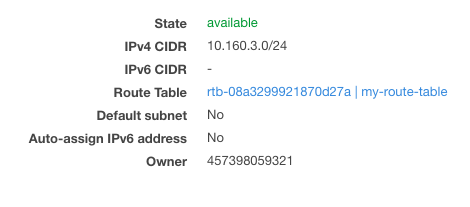


    <summary type="html">&lt;h3 id=&quot;Intro&quot;&gt;&lt;a href=&quot;#Intro&quot; class=&quot;headerlink&quot; title=&quot;Intro&quot;&gt;&lt;/a&gt;Intro&lt;/h3&gt;&lt;p&gt;Computer games are a lot of fun! They are even better when</summary>


    <category term="python" scheme="https://bmwant.link/tags/python/"/>
    
    <category term="gamedev" scheme="https://bmwant.link/tags/gamedev/"/>
    
    <category term="tutorial" scheme="https://bmwant.link/tags/tutorial/"/>
    
  </entry>
  
  <entry>
    <title>Redis scripting</title>
    <link href="https://bmwant.link/redis-scripting/"/>
    <id>https://bmwant.link/redis-scripting/</id>
    <published>2021-10-01T13:39:25.000Z</published>
    <updated>2026-01-28T09:32:18.112Z</updated>
    
    <content type="html"><![CDATA[<p>Redis has built in Lua interpreter allowing to evaluate scripts in the context of Redis server. I want to show you a couple of examples where this scripting feature might be helpful.<br>So imagine the following scenario (<strong>use case #1</strong>):</p><ul><li>you have decided to introduce <a href="https://en.wikipedia.org/wiki/Time_to_live">TTL</a> to you records for optimization reasons. There is no default TTL in Redis, so keys are set to live forever. This might clog your memory resulting in frequent <a href="https://redis.io/topics/lru-cache">evictions</a> affecting the performance. Therefore it’s much more preferable to expire your items earlier and keep overall memory usage about <em>70-80%</em> level.</li><li>you cannot <a href="https://redis.io/commands/FLUSHALL">delete all the data</a> at once as your application relies on that. Needless to say you have already created same keys with <em>ttl</em> attribute set on them. The only issue you have right now is to delete old records without expiration date.</li></ul><p>Normally you would go over all <a href="https://redis.io/commands/KEYS">keys</a> within database, <a href="https://redis.io/commands/ttl">check their ttl</a> value and <a href="https://redis.io/commands/del">remove keys</a> without expiration one by one.</p><figure class="highlight bash"><table><tr><td class="gutter"><pre><span class="line">1</span><br><span class="line">2</span><br><span class="line">3</span><br><span class="line">4</span><br><span class="line">5</span><br><span class="line">6</span><br><span class="line">7</span><br><span class="line">8</span><br><span class="line">9</span><br><span class="line">10</span><br></pre></td><td class="code"><pre><span class="line">REDIS_ENDPOINT=<span class="string">&quot;redis-cache.abcde1.ng.0001.use1.cache.amazonaws.com&quot;</span></span><br><span class="line">KEYS=$(redis-cli -h <span class="string">&quot;<span class="variable">$REDIS_ENDPOINT</span>&quot;</span> keys <span class="string">&#x27;*&#x27;</span>)</span><br><span class="line"></span><br><span class="line"><span class="keyword">for</span> k <span class="keyword">in</span> <span class="variable">$KEYS</span>; <span class="keyword">do</span></span><br><span class="line">  TTL=$(redis-cli -h <span class="string">&quot;<span class="variable">$REDIS_ENDPOINT</span>&quot;</span> ttl <span class="string">&quot;<span class="variable">$k</span>&quot;</span>)</span><br><span class="line">  <span class="keyword">if</span> [[ <span class="variable">$TTL</span> -ne -1 ]]; <span class="keyword">then</span></span><br><span class="line">    <span class="built_in">echo</span> <span class="string">&quot;.&quot;</span></span><br><span class="line">    redis-cli -h <span class="string">&quot;<span class="variable">$REDIS_ENDPOINT</span>&quot;</span> del <span class="string">&quot;<span class="variable">$k</span>&quot;</span></span><br><span class="line">  <span class="keyword">fi</span></span><br><span class="line"><span class="keyword">done</span></span><br></pre></td></tr></table></figure><p>Make sure you have <code>redis-cli</code> executable installed before running the script</p><figure class="highlight bash"><table><tr><td class="gutter"><pre><span class="line">1</span><br><span class="line">2</span><br></pre></td><td class="code"><pre><span class="line">$ apt update &amp;&amp; apt install -y redis-tools</span><br><span class="line">$ ./delete_without_expiration.sh  <span class="comment"># save the content above into the file</span></span><br></pre></td></tr></table></figure><p>This shell script would do the jobs, but it has some major drawbacks:</p><ul><li><code>keys</code> operation is blocking and is not recommended to be used on production environments<blockquote><p>It may ruin performance when it is executed against large databases</p></blockquote></li><li>for each key it requires at least one extra connection to be made (for the <em>ttl</em> check) and then one more in case deletion is required;</li><li>this script is not <em>atomic</em>: it might need to be relaunched in case some network flakiness occurs;</li><li>this is <em>horribly slow</em>: it will not perform well on any database with more than 1 million keys (which is not even a big number for any application heavily relying on the cache).</li></ul><p>Let’s rewrite these steps to the native Lua script</p><figure class="highlight lua"><table><tr><td class="gutter"><pre><span class="line">1</span><br><span class="line">2</span><br><span class="line">3</span><br><span class="line">4</span><br><span class="line">5</span><br><span class="line">6</span><br><span class="line">7</span><br></pre></td><td class="code"><pre><span class="line"><span class="keyword">local</span> pattern = <span class="string">&#x27;*&#x27;</span></span><br><span class="line"><span class="keyword">for</span> _, k <span class="keyword">in</span> <span class="built_in">ipairs</span>(redis.call(<span class="string">&#x27;keys&#x27;</span>, pattern)) <span class="keyword">do</span></span><br><span class="line">  <span class="keyword">local</span> ttl = redis.call(<span class="string">&#x27;ttl&#x27;</span>, k)</span><br><span class="line">  <span class="keyword">if</span> (ttl == <span class="number">-1</span>) <span class="keyword">then</span></span><br><span class="line">    redis.call(<span class="string">&#x27;del&#x27;</span>, k)</span><br><span class="line">  <span class="keyword">end</span></span><br><span class="line"><span class="keyword">end</span></span><br></pre></td></tr></table></figure><p>Although the algorithm is identical it will not suffer from extra network delays as it is ran directly by the engine itself. To be fair the latter solution is bettern in case you are running hosted Redis solution such as <a href="https://aws.amazon.com/elasticache/">AWS Elasticache</a> otherwise network delays will not be noticable as you can run the script on the same machine where the Redis resides.</p><p>To trigger the script execute the command below</p><figure class="highlight bash"><table><tr><td class="gutter"><pre><span class="line">1</span><br><span class="line">2</span><br></pre></td><td class="code"><pre><span class="line">$ <span class="built_in">export</span> REDIS_ENDPOINT=<span class="string">&quot;redis-cache.abcde1.ng.0001.use1.cache.amazonaws.com&quot;</span></span><br><span class="line">$ redis-cli -h <span class="string">&quot;<span class="variable">$REDIS_ENDPOINT</span>&quot;</span> --<span class="built_in">eval</span> delete_without_expiration.lua</span><br></pre></td></tr></table></figure><p>Moving forward to the next example (<strong>use case #2</strong>) consider the following scenario:</p><ul><li>you need to downscale instance size in order to save costs (obviously you have collected all the metrics needed, monitored the usage over certain period of time and concluded it would not impact performance or any other critical APM metric);</li><li>you cannot remove all the records at once, scale back down and then re-populate the cache with new items as it would disrupt application running causing possible downtime.</li></ul><p>Normally you would do</p><figure class="highlight bash"><table><tr><td class="gutter"><pre><span class="line">1</span><br><span class="line">2</span><br><span class="line">3</span><br></pre></td><td class="code"><pre><span class="line">$ <span class="built_in">export</span> REDIS_ENDPOINT=<span class="string">&quot;redis-cache.abcde1.ng.0001.use1.cache.amazonaws.com&quot;</span></span><br><span class="line">$ redis-cli -h <span class="string">&quot;<span class="variable">$REDIS_ENDPOINT</span>&quot;</span> flushall</span><br><span class="line">$ redis-cli -h <span class="string">&quot;<span class="variable">$REDIS_ENDPOINT</span>&quot;</span> flushall async  <span class="comment"># to run in non-blocking manner</span></span><br></pre></td></tr></table></figure><p>With our custom script we will be able to delete only subset of keys. Moreover we are going to introduce two new features: to be able to provide keys pattern as a <a href="https://redis.io/commands/eval">command line argument</a> and to return total number of deleted items.</p><figure class="highlight lua"><table><tr><td class="gutter"><pre><span class="line">1</span><br><span class="line">2</span><br><span class="line">3</span><br><span class="line">4</span><br><span class="line">5</span><br><span class="line">6</span><br><span class="line">7</span><br></pre></td><td class="code"><pre><span class="line"><span class="keyword">local</span> counter = <span class="number">0</span></span><br><span class="line"><span class="keyword">local</span> pattern = ARGV[<span class="number">1</span>]</span><br><span class="line"><span class="keyword">for</span> c, k <span class="keyword">in</span> <span class="built_in">ipairs</span>(redis.call(<span class="string">&#x27;keys&#x27;</span>, pattern)) <span class="keyword">do</span></span><br><span class="line">  redis.call(<span class="string">&#x27;del&#x27;</span>, k)</span><br><span class="line">  counter = c</span><br><span class="line"><span class="keyword">end</span></span><br><span class="line"><span class="keyword">return</span> counter</span><br></pre></td></tr></table></figure><p>This is really useful when you know exactly the underlying naming for the most of your keys, meaning you can safely drop them provinding the known prefix/pattern. As a result total number of affected records will be printed back to the console.</p><figure class="highlight bash"><table><tr><td class="gutter"><pre><span class="line">1</span><br><span class="line">2</span><br></pre></td><td class="code"><pre><span class="line">$ redis-cli -h <span class="string">&quot;<span class="variable">$REDIS_ENDPOINT</span>&quot;</span> --<span class="built_in">eval</span> delete_keys.lua , <span class="string">&#x27;:1:f*&#x27;</span>  <span class="comment"># note comma in the middle</span></span><br><span class="line">$ redis-cli -h <span class="string">&quot;<span class="variable">$REDIS_ENDPOINT</span>&quot;</span> --<span class="built_in">eval</span> delete_keys.lua , <span class="string">&#x27;:1:pattern*only&#x27;</span></span><br></pre></td></tr></table></figure><blockquote><p><strong>NOTE</strong>: make sure to insert comma in the command above as it serves as a delimiter between <em>KEYS</em> and <em>ARGV</em> and we are using only the latter within our script</p></blockquote><p>Below you can see a chart of four subsequent invocations using different patterns that we’ve applied to the our database before downscaling procedure.</p><p><img src="/images/redis_items.png" alt="items count"></p><p>This script helped us to drop half of the items in cache allowing to migrate to the twice as small instance size as the original one.</p><h3 id="Resources"><a href="#Resources" class="headerlink" title="Resources"></a>Resources</h3><ul><li><a href="https://www.compose.com/articles/a-quick-guide-to-redis-lua-scripting/">Guide to Redis Lua scripting</a></li><li><a href="https://redis.com/ebook/part-3-next-steps/chapter-11-scripting-redis-with-lua/">Advanced Redis scripting with Lua</a></li></ul>]]></content>


    <summary type="html">&lt;p&gt;Redis has built in Lua interpreter allowing to evaluate scripts in the context of Redis server. I want to show you a couple of examples w</summary>


    <category term="redis" scheme="https://bmwant.link/tags/redis/"/>
    
    <category term="lua" scheme="https://bmwant.link/tags/lua/"/>
    
  </entry>
  
  <entry>
    <title>Recursion in Python</title>
    <link href="https://bmwant.link/recursion-in-python/"/>
    <id>https://bmwant.link/recursion-in-python/</id>
    <published>2021-09-07T21:00:24.000Z</published>
    <updated>2026-01-28T09:32:18.112Z</updated>
    
    <content type="html"><![CDATA[<p><img src="/images/y_combinator.png" alt="y-combinator"></p><blockquote><p><strong>NOTE</strong>: All the code below has been tested using Python <strong>3.8.12</strong> and some of the syntax might not be compatible with older versions.</p></blockquote><p>One of the main selling points of any functional programming language is recursion or rather an elegant way you can implement recursive function using one’s syntax. In this article I want to show that Python can be easily adapted to be written in a functional way proving it’s a trully multi-paradigm language.<br>Everyone knows classical example of recursion using <a href="https://en.wikipedia.org/wiki/Fibonacci_number">Fibonacci sequence</a>, so let’s take a look at the corresponding Python code for it.</p><figure class="highlight python"><table><tr><td class="gutter"><pre><span class="line">1</span><br><span class="line">2</span><br><span class="line">3</span><br><span class="line">4</span><br><span class="line">5</span><br></pre></td><td class="code"><pre><span class="line"><span class="function"><span class="keyword">def</span> <span class="title">fib</span>(<span class="params">n: <span class="built_in">int</span></span>) -&gt; <span class="built_in">int</span>:</span></span><br><span class="line">    <span class="keyword">if</span> n == <span class="number">0</span> <span class="keyword">or</span> n == <span class="number">1</span>:  <span class="comment"># base case</span></span><br><span class="line">        <span class="keyword">return</span> n</span><br><span class="line"></span><br><span class="line">    <span class="keyword">return</span> fib(n-<span class="number">2</span>) + fib(n-<span class="number">1</span>)</span><br></pre></td></tr></table></figure><p>We have a function accepting a number and returning an element of the Fibonacci sequence corresponding to that number. Each recursive function should have a <strong>base case</strong> (also known as <strong>edge case</strong>) and essentially it’s a branch of code which halts or returns something immediatelly without making any subsequent recursive calls. Then we have two recursive function calls calculating two previous numbers of the sequence and basically that corresponds to the definition where each number is just a sum of two prior ones in a sequence.<br>Most of the functional languages are also known to be <a href="https://en.wikipedia.org/wiki/Type_system#STATIC">statically typed</a>, so we are also using type annotations within our code examples to make them look more <em>functional-ish</em>.</p><h3 id="Minimum-efforts"><a href="#Minimum-efforts" class="headerlink" title="Minimum efforts"></a>Minimum efforts</h3><p>Now let’s implement a couple of frequently used common functions to illustrate such things can be implemented concisely in a recursive fashion.</p><p>Our first subject is <code>maximum</code> / <code>minimum</code> function returning target element from the list.</p><figure class="highlight python"><table><tr><td class="gutter"><pre><span class="line">1</span><br><span class="line">2</span><br><span class="line">3</span><br><span class="line">4</span><br><span class="line">5</span><br><span class="line">6</span><br><span class="line">7</span><br><span class="line">8</span><br><span class="line">9</span><br><span class="line">10</span><br></pre></td><td class="code"><pre><span class="line"><span class="function"><span class="keyword">def</span> <span class="title">maximum</span>(<span class="params">arr</span>):</span></span><br><span class="line">    <span class="keyword">if</span> <span class="keyword">not</span> arr:</span><br><span class="line">        <span class="keyword">raise</span> ValueError(<span class="string">&#x27;Cannot find maximum in an empty list&#x27;</span>)</span><br><span class="line"></span><br><span class="line">    <span class="keyword">if</span> <span class="built_in">len</span>(arr) == <span class="number">1</span>:</span><br><span class="line">        <span class="keyword">return</span> arr[<span class="number">0</span>]</span><br><span class="line"></span><br><span class="line">    x, *tail = arr</span><br><span class="line">    max_tail = maximum(tail)</span><br><span class="line">    <span class="keyword">return</span> x <span class="keyword">if</span> x &gt; max_tail <span class="keyword">else</span> max_tail</span><br></pre></td></tr></table></figure><p>As usually we start from a base case knowing that maximum element of the list containing only one element is the element itself.<br>The biggest element of the whole list is either current one or the biggest element from the rest of the sequence. Here we use <a href="https://www.python.org/dev/peps/pep-3132/">list destructuring</a> to seamlessly extract first element from the list as well as its tail into two different variables.<br>Same result can be accomplished using approach below (in case you are not comfortable with such a syntax):</p><figure class="highlight python"><table><tr><td class="gutter"><pre><span class="line">1</span><br><span class="line">2</span><br><span class="line">3</span><br></pre></td><td class="code"><pre><span class="line">arr = [<span class="number">1</span>, <span class="number">2</span>, <span class="number">3</span>, <span class="number">4</span>]</span><br><span class="line">x, tail = arr.pop(<span class="number">0</span>), arr</span><br><span class="line"><span class="comment"># (1, [2, 3, 4])</span></span><br></pre></td></tr></table></figure><p>Another option is to use <a href="https://docs.python.org/3/library/functions.html#slice">slices</a> on the list:</p><figure class="highlight python"><table><tr><td class="gutter"><pre><span class="line">1</span><br><span class="line">2</span><br><span class="line">3</span><br></pre></td><td class="code"><pre><span class="line">arr = [<span class="number">1</span>, <span class="number">2</span>, <span class="number">3</span>, <span class="number">4</span>]</span><br><span class="line">x, tail = arr[<span class="number">0</span>], arr[<span class="number">1</span>:]</span><br><span class="line"><span class="comment"># (1, [2, 3, 4])</span></span><br></pre></td></tr></table></figure><p>Same logic applies to the <code>minimum</code> function, but here instead of comparison we invoke <a href="https://docs.python.org/3/library/functions.html#min">min</a> built-in function.</p><figure class="highlight python"><table><tr><td class="gutter"><pre><span class="line">1</span><br><span class="line">2</span><br><span class="line">3</span><br><span class="line">4</span><br><span class="line">5</span><br><span class="line">6</span><br><span class="line">7</span><br><span class="line">8</span><br></pre></td><td class="code"><pre><span class="line"><span class="keyword">from</span> typing <span class="keyword">import</span> <span class="type">List</span></span><br><span class="line"></span><br><span class="line"><span class="function"><span class="keyword">def</span> <span class="title">minimum</span>(<span class="params">arr: <span class="type">List</span>[<span class="built_in">int</span>]</span>) -&gt; <span class="built_in">int</span>:</span>  <span class="comment"># type annotations for clarity</span></span><br><span class="line">    x, *tail = arr  <span class="comment"># list unpacking</span></span><br><span class="line">    <span class="keyword">if</span> <span class="keyword">not</span> tail:  <span class="comment"># base case</span></span><br><span class="line">        <span class="keyword">return</span> x</span><br><span class="line"></span><br><span class="line">    <span class="keyword">return</span> <span class="built_in">min</span>(x, minimum(tail))  <span class="comment"># recursive call</span></span><br></pre></td></tr></table></figure><h3 id="Rewrite-everything-with-recursion"><a href="#Rewrite-everything-with-recursion" class="headerlink" title="Rewrite everything with recursion"></a>Rewrite everything with recursion</h3><p>Below you can find couple of extra functions just to demonstrate how similar their structure is and how fluently any structure can be translated into recursive calls.</p><ul><li><code>replicate</code> takes a number <code>n</code> and a value <code>val</code> and returns a list containing <code>n</code> copies of the same <code>val</code> value</li></ul><figure class="highlight python"><table><tr><td class="gutter"><pre><span class="line">1</span><br><span class="line">2</span><br><span class="line">3</span><br><span class="line">4</span><br><span class="line">5</span><br></pre></td><td class="code"><pre><span class="line"><span class="function"><span class="keyword">def</span> <span class="title">replicate</span>(<span class="params">n, val</span>):</span></span><br><span class="line">    <span class="keyword">if</span> n &lt;= <span class="number">0</span>:</span><br><span class="line">        <span class="keyword">return</span> []</span><br><span class="line"></span><br><span class="line">    <span class="keyword">return</span> [val, *replicate(n-<span class="number">1</span>, val)]</span><br></pre></td></tr></table></figure><p>Example invocation:</p><figure class="highlight python"><table><tr><td class="gutter"><pre><span class="line">1</span><br><span class="line">2</span><br></pre></td><td class="code"><pre><span class="line"><span class="meta">&gt;&gt;&gt; </span>replicate(<span class="number">3</span>, <span class="number">42</span>)</span><br><span class="line">[<span class="number">42</span>, <span class="number">42</span>, <span class="number">42</span>]</span><br></pre></td></tr></table></figure><ul><li><code>take</code> - given a number <code>n</code> and a list <code>arr</code> it returns first <code>n</code> elements from that list</li></ul><figure class="highlight python"><table><tr><td class="gutter"><pre><span class="line">1</span><br><span class="line">2</span><br><span class="line">3</span><br><span class="line">4</span><br><span class="line">5</span><br><span class="line">6</span><br></pre></td><td class="code"><pre><span class="line"><span class="function"><span class="keyword">def</span> <span class="title">take</span>(<span class="params">n, arr</span>):</span></span><br><span class="line">    <span class="keyword">if</span> n &lt;= <span class="number">0</span> <span class="keyword">or</span> <span class="keyword">not</span> arr:</span><br><span class="line">        <span class="keyword">return</span> []</span><br><span class="line"></span><br><span class="line">    x, *tail = arr</span><br><span class="line">    <span class="keyword">return</span> [x, *take(n-<span class="number">1</span>, tail)]</span><br></pre></td></tr></table></figure><p>Example invocation:</p><figure class="highlight python"><table><tr><td class="gutter"><pre><span class="line">1</span><br><span class="line">2</span><br><span class="line">3</span><br><span class="line">4</span><br></pre></td><td class="code"><pre><span class="line"><span class="meta">&gt;&gt;&gt; </span>take(<span class="number">3</span>, [<span class="number">0</span>, <span class="number">1</span>, <span class="number">2</span>, <span class="number">3</span>, <span class="number">4</span>])</span><br><span class="line">[<span class="number">0</span>, <span class="number">1</span>, <span class="number">2</span>]</span><br><span class="line"><span class="meta">&gt;&gt;&gt; </span>take(<span class="number">5</span>, [])</span><br><span class="line">[]</span><br></pre></td></tr></table></figure><ul><li><code>elem</code> - for the value <code>val</code> provided and a list <code>arr</code> it returns whether a list contains that element</li></ul><figure class="highlight python"><table><tr><td class="gutter"><pre><span class="line">1</span><br><span class="line">2</span><br><span class="line">3</span><br><span class="line">4</span><br><span class="line">5</span><br><span class="line">6</span><br><span class="line">7</span><br><span class="line">8</span><br></pre></td><td class="code"><pre><span class="line"><span class="function"><span class="keyword">def</span> <span class="title">elem</span>(<span class="params">val, arr</span>) -&gt; <span class="built_in">bool</span>:</span></span><br><span class="line">    <span class="keyword">if</span> <span class="keyword">not</span> arr:</span><br><span class="line">        <span class="keyword">return</span> <span class="literal">False</span></span><br><span class="line"></span><br><span class="line">    x, *tail = arr</span><br><span class="line">    <span class="keyword">if</span> val == x:</span><br><span class="line">        <span class="keyword">return</span> <span class="literal">True</span></span><br><span class="line">    <span class="keyword">return</span> elem(val, tail)</span><br></pre></td></tr></table></figure><p>Example invocation:</p><figure class="highlight python"><table><tr><td class="gutter"><pre><span class="line">1</span><br><span class="line">2</span><br><span class="line">3</span><br><span class="line">4</span><br><span class="line">5</span><br><span class="line">6</span><br></pre></td><td class="code"><pre><span class="line"><span class="meta">&gt;&gt;&gt; </span>arr1 = [<span class="number">1</span>, <span class="number">2</span>, <span class="number">3</span>]</span><br><span class="line"><span class="meta">&gt;&gt;&gt; </span>arr2 = [<span class="string">&#x27;a&#x27;</span>, <span class="string">&#x27;b&#x27;</span>, <span class="string">&#x27;c&#x27;</span>, <span class="string">&#x27;d&#x27;</span>]</span><br><span class="line"><span class="meta">&gt;&gt;&gt; </span>elem(<span class="number">0</span>, arr1)</span><br><span class="line"><span class="literal">False</span></span><br><span class="line"><span class="meta">&gt;&gt;&gt; </span>elem(<span class="string">&#x27;d&#x27;</span>, arr2))</span><br><span class="line"><span class="literal">True</span></span><br></pre></td></tr></table></figure><ul><li><code>reverse</code> simply reverses a list</li></ul><figure class="highlight python"><table><tr><td class="gutter"><pre><span class="line">1</span><br><span class="line">2</span><br><span class="line">3</span><br><span class="line">4</span><br><span class="line">5</span><br><span class="line">6</span><br></pre></td><td class="code"><pre><span class="line"><span class="function"><span class="keyword">def</span> <span class="title">reverse</span>(<span class="params">arr</span>):</span></span><br><span class="line">    <span class="keyword">if</span> <span class="keyword">not</span> arr:</span><br><span class="line">        <span class="keyword">return</span> []</span><br><span class="line"></span><br><span class="line">    x, *tail = arr</span><br><span class="line">    <span class="keyword">return</span> [*reverse(tail), x]</span><br></pre></td></tr></table></figure><p>Example invocation:</p><figure class="highlight python"><table><tr><td class="gutter"><pre><span class="line">1</span><br><span class="line">2</span><br><span class="line">3</span><br><span class="line">4</span><br></pre></td><td class="code"><pre><span class="line"><span class="meta">&gt;&gt;&gt; </span>reverse([<span class="number">1</span>, <span class="number">2</span>, <span class="number">3</span>, <span class="number">4</span>, <span class="number">5</span>])</span><br><span class="line">[<span class="number">5</span>, <span class="number">4</span>, <span class="number">3</span>, <span class="number">2</span>, <span class="number">1</span>]</span><br><span class="line"><span class="meta">&gt;&gt;&gt; </span>reverse([])</span><br><span class="line">[]</span><br></pre></td></tr></table></figure><ul><li><code>zip</code> takes two lists and <em>zips</em> them together. It returns one list each element being a pair of matching elements from input lists. In case one list is shorter the resulting list would not contain items from the longer list that do not match with anything in the end.</li></ul><figure class="highlight python"><table><tr><td class="gutter"><pre><span class="line">1</span><br><span class="line">2</span><br><span class="line">3</span><br><span class="line">4</span><br><span class="line">5</span><br><span class="line">6</span><br><span class="line">7</span><br></pre></td><td class="code"><pre><span class="line"><span class="function"><span class="keyword">def</span> <span class="title">zip</span>(<span class="params">xs, ys</span>):</span></span><br><span class="line">    <span class="keyword">if</span> <span class="keyword">not</span> xs <span class="keyword">or</span> <span class="keyword">not</span> ys:</span><br><span class="line">        <span class="keyword">return</span> []</span><br><span class="line"></span><br><span class="line">    x, *x_tail = xs</span><br><span class="line">    y, *y_tail = ys</span><br><span class="line">    <span class="keyword">return</span> [(x, y), *<span class="built_in">zip</span>(x_tail, y_tail)]</span><br></pre></td></tr></table></figure><p>Example invocation (resulting list does not contain <code>d</code> element as it doesn’t match with anything from the first list):</p><figure class="highlight python"><table><tr><td class="gutter"><pre><span class="line">1</span><br><span class="line">2</span><br><span class="line">3</span><br><span class="line">4</span><br></pre></td><td class="code"><pre><span class="line"><span class="meta">&gt;&gt;&gt; </span>arr1 = [<span class="number">1</span>, <span class="number">2</span>, <span class="number">3</span>]</span><br><span class="line"><span class="meta">&gt;&gt;&gt; </span>arr2 = [<span class="string">&#x27;a&#x27;</span>, <span class="string">&#x27;b&#x27;</span>, <span class="string">&#x27;c&#x27;</span>, <span class="string">&#x27;d&#x27;</span>]</span><br><span class="line"><span class="meta">&gt;&gt;&gt; </span><span class="built_in">zip</span>(arr1, arr2)</span><br><span class="line">[(<span class="number">1</span>, <span class="string">&#x27;a&#x27;</span>), (<span class="number">2</span>, <span class="string">&#x27;b&#x27;</span>), (<span class="number">3</span>, <span class="string">&#x27;c&#x27;</span>)]</span><br></pre></td></tr></table></figure><blockquote><p>As an extra exercise you can start by taking any function from <a href="https://docs.python.org/3/library/itertools.html">itertools</a> module and trying to come up with equivalent recursive code. Most of the functions there have rough code implementation provided within the documentation page above, so it would be much easier to understand what kind of logic you are trying to achieve.</p></blockquote><h3 id="Quick-sort"><a href="#Quick-sort" class="headerlink" title="Quick, sort!"></a>Quick, sort!</h3><p>There are a lot of <a href="https://en.wikipedia.org/wiki/Graph_traversal">graph traversal</a> algorithms which are easier to implement using recursive functions as well as this example of <a href="https://en.wikipedia.org/wiki/Quicksort">quicksort</a> algorithm because their own definitions are declared in recursive terms. To accomplish sorting we start with <em>pivot</em> element which in the simplest case is just a first element of our list and place it between two partitions: first one is an array of sorted elements which are less or equal to our <em>pivot</em> and the second one is an array of sorted elements greater than that.</p><figure class="highlight python"><table><tr><td class="gutter"><pre><span class="line">1</span><br><span class="line">2</span><br><span class="line">3</span><br><span class="line">4</span><br><span class="line">5</span><br><span class="line">6</span><br><span class="line">7</span><br></pre></td><td class="code"><pre><span class="line"><span class="function"><span class="keyword">def</span> <span class="title">quicksort</span>(<span class="params">arr</span>):</span></span><br><span class="line">    <span class="keyword">if</span> <span class="keyword">not</span> arr:</span><br><span class="line">        <span class="keyword">return</span> []</span><br><span class="line">    x, *tail = arr</span><br><span class="line">    smaller_sorted = quicksort([t <span class="keyword">for</span> t <span class="keyword">in</span> tail <span class="keyword">if</span> t &lt;= x])</span><br><span class="line">    bigger_sorted = quicksort([t <span class="keyword">for</span> t <span class="keyword">in</span> tail <span class="keyword">if</span> t &gt; x])</span><br><span class="line">    <span class="keyword">return</span> [*smaller_sorted, x, *bigger_sorted]</span><br></pre></td></tr></table></figure><p>As you can see there is nothing complex about recursion and some implementations can be even simpler then their iterative counterparts. Sometimes recursive code might be a bit harder to debug, so when in doubt always stick with the solution that is easier for you to understand and maintain. Otherwise go ahead and implement your new feature using recursive functions. Happy coding!</p><h3 id="Resources"><a href="#Resources" class="headerlink" title="Resources"></a>Resources</h3><ul><li><a href="https://realpython.com/python-recursion/">RealPython article on recursion</a></li><li><a href="http://learnyouahaskell.com/recursion">Same functions implemented in Haskell</a></li><li><a href="https://en.wikipedia.org/wiki/Fixed-point_combinator">Y-combinator (advanced)</a></li><li><a href="http://comonad.com/reader/2009/recursion-schemes/">Recursion schemes (advanced)</a></li><li><a href="https://youtu.be/pkCLMl0e_0k">Great talk on lambda calculus from David Beazley</a></li></ul>]]></content>


    <summary type="html">&lt;p&gt;&lt;img src=&quot;/images/y_combinator.png&quot; alt=&quot;y-combinator&quot;&gt;&lt;/p&gt;
&lt;blockquote&gt;
&lt;p&gt;&lt;strong&gt;NOTE&lt;/strong&gt;: All the code below has been tested usi</summary>


    <category term="python" scheme="https://bmwant.link/tags/python/"/>
    
    <category term="algorithms" scheme="https://bmwant.link/tags/algorithms/"/>
    
    <category term="recursion" scheme="https://bmwant.link/tags/recursion/"/>
    
    <category term="functional" scheme="https://bmwant.link/tags/functional/"/>
    
  </entry>
  
  <entry>
    <title>Use NFS for docker volumes on Mac</title>
    <link href="https://bmwant.link/use-nfs-for-docker-volumes-on-mac/"/>
    <id>https://bmwant.link/use-nfs-for-docker-volumes-on-mac/</id>
    <published>2021-06-09T12:10:38.000Z</published>
    <updated>2026-01-28T09:32:18.113Z</updated>
    
    <content type="html"><![CDATA[<p>We are using docker/<a href="https://docs.docker.com/compose/">docker-compose</a> as a development environment for our project and to sync the code between container and IDE <a href="https://docs.docker.com/reference/compose-file/volumes/">volume</a> is used. Unfortunately, performance for the file-related operations on MacOS is really horrible and it’s kinda a <a href="https://github.com/docker/for-mac/issues/1592">well-known issue</a>.</p><p>Common solution usually is to set <code>cached</code> option on a volume like this (<code>.</code> is a current working directory for the project)</p><figure class="highlight yaml"><table><tr><td class="gutter"><pre><span class="line">1</span><br><span class="line">2</span><br><span class="line">3</span><br><span class="line">4</span><br><span class="line">5</span><br><span class="line">6</span><br></pre></td><td class="code"><pre><span class="line"><span class="attr">version:</span> <span class="string">&#x27;3&#x27;</span></span><br><span class="line"><span class="attr">services:</span></span><br><span class="line">  <span class="attr">app:</span></span><br><span class="line">    <span class="attr">image:</span> <span class="string">&#x27;python:3.9-slim&#x27;</span></span><br><span class="line">    <span class="attr">volumes:</span></span><br><span class="line">      <span class="bullet">-</span> <span class="string">.:/var/www/html:cached</span></span><br></pre></td></tr></table></figure><p>It gives some of improvement, but couple of commands might gain you another extra seconds while developing, so meet <a href="https://en.wikipedia.org/wiki/Network_File_System">NFS</a>.</p><h3 id="Using-NFS-volume-instead"><a href="#Using-NFS-volume-instead" class="headerlink" title="Using NFS volume instead"></a>Using NFS volume instead</h3><p>First of all create this file (or edit it if exists) <code>sudo vim /etc/exports</code></p><figure class="highlight plain"><table><tr><td class="gutter"><pre><span class="line">1</span><br></pre></td><td class="code"><pre><span class="line">&#x2F;Users&#x2F;username&#x2F;workspace -alldirs -mapall&#x3D;501:20 localhost</span><br></pre></td></tr></table></figure><p>where <code>/Users/username/workspace</code> is a path to the directory where all of your projects reside. It allows sharing any directory within folder specified (so you might specify just a single project’s dir here).</p><p>Next edit this file <code>sudo vim /etc/nfs.conf</code> to allow Docker’s NFS connections by the daemon</p><figure class="highlight plain"><table><tr><td class="gutter"><pre><span class="line">1</span><br></pre></td><td class="code"><pre><span class="line">nfs.server.mount.require_resv_port &#x3D; 0</span><br></pre></td></tr></table></figure><p>Now restart the daemon to pick up added changes</p><figure class="highlight bash"><table><tr><td class="gutter"><pre><span class="line">1</span><br><span class="line">2</span><br></pre></td><td class="code"><pre><span class="line">sudo nfsd restart</span><br><span class="line">sudo nfsd status</span><br></pre></td></tr></table></figure><p>We are ready to adjust <code>docker-compose.yml</code> file and mount volume the new way</p><figure class="highlight bash"><table><tr><td class="gutter"><pre><span class="line">1</span><br></pre></td><td class="code"><pre><span class="line">cp docker-compose.yml docker-compose-nfs.yml</span><br></pre></td></tr></table></figure><p>A copy of configuration is created not to conflict with your teammates who have different operating systems and this configration will be invalid for them. If you are doing this just for yourself it’s probably a good idea to even add this file to <code>.gitignore</code>.</p><figure class="highlight yaml"><table><tr><td class="gutter"><pre><span class="line">1</span><br><span class="line">2</span><br><span class="line">3</span><br><span class="line">4</span><br><span class="line">5</span><br><span class="line">6</span><br><span class="line">7</span><br><span class="line">8</span><br><span class="line">9</span><br><span class="line">10</span><br><span class="line">11</span><br><span class="line">12</span><br><span class="line">13</span><br><span class="line">14</span><br><span class="line">15</span><br><span class="line">16</span><br></pre></td><td class="code"><pre><span class="line"><span class="attr">version:</span> <span class="string">&#x27;3&#x27;</span></span><br><span class="line"><span class="attr">services:</span></span><br><span class="line">  <span class="attr">app:</span></span><br><span class="line">    <span class="attr">build:</span></span><br><span class="line">      <span class="attr">context:</span> <span class="string">.</span></span><br><span class="line">      <span class="attr">dockerfile:</span> <span class="string">Dockerfile</span></span><br><span class="line">    <span class="attr">volumes:</span></span><br><span class="line">      <span class="bullet">-</span> <span class="string">nfsmount:/var/www/html</span></span><br><span class="line"></span><br><span class="line"><span class="attr">volumes:</span></span><br><span class="line">  <span class="attr">nfsmount:</span></span><br><span class="line">    <span class="attr">driver:</span> <span class="string">local</span></span><br><span class="line">    <span class="attr">driver_opts:</span></span><br><span class="line">      <span class="attr">type:</span> <span class="string">nfs</span></span><br><span class="line">      <span class="attr">o:</span> <span class="string">addr=host.docker.internal,rw,nolock,hard,nointr,nfsvers=3</span></span><br><span class="line">      <span class="attr">device:</span> <span class="string">&quot;:$&#123;PWD&#125;&quot;</span></span><br></pre></td></tr></table></figure><p>And start your project as usually explicitly providing compose configuration via <code>-f</code> flag</p><figure class="highlight bash"><table><tr><td class="gutter"><pre><span class="line">1</span><br></pre></td><td class="code"><pre><span class="line">docker-compose -f docker-compose-nfs.yml up -d</span><br></pre></td></tr></table></figure><p>That’s it, let’s check what has been changed about performance.</p><h3 id="Comparison"><a href="#Comparison" class="headerlink" title="Comparison"></a>Comparison</h3><p>I have selected couple of popular commands used when developing simple Django/React based web application. Those do a lot of file-related operations, so will be indicative for our tests.</p><ul><li><strong>cmd1</strong>: <code>poetry run python manage.py collectstatic</code></li><li><strong>cmd2</strong>: <code>rm -rf `find . -name __pycache__` </code></li><li><strong>cmd3</strong>: <code>npm run build</code></li><li><strong>cmd4</strong>: <code>NODE_ENV=production npm run build</code></li></ul><p>As you can see on a chart below NFS configuration clearly wins (not significantly, but noticable when frequently execute them during the day)</p><p><img src="/images/nfsvscachecomparison.png" alt="chart"></p><p>So as a conclusion it’s worth trying to set up NFS volume for your local dev env. You can also take a look at <a href="https://docker-sync.readthedocs.io/en/latest/getting-started/installation.html#installation-osx">docker-sync</a> and <a href="https://github.com/cweagans/docker-bg-sync">docker-bg-sync</a> projects to try different approaches and see what works better for you.</p><h3 id="Resources"><a href="#Resources" class="headerlink" title="Resources"></a>Resources</h3><ul><li><a href="https://www.jeffgeerling.com/blog/2020/revisiting-docker-macs-performance-nfs-volumes">Revisiting Docker for Mac’s performance with NFS volumes</a></li></ul>]]></content>


    <summary type="html">&lt;p&gt;We are using docker/&lt;a href=&quot;https://docs.docker.com/compose/&quot;&gt;docker-compose&lt;/a&gt; as a development environment for our project and to syn</summary>


    <category term="mac" scheme="https://bmwant.link/tags/mac/"/>
    
    <category term="docker" scheme="https://bmwant.link/tags/docker/"/>
    
    <category term="osx" scheme="https://bmwant.link/tags/osx/"/>
    
    <category term="nfs" scheme="https://bmwant.link/tags/nfs/"/>
    
  </entry>
  
  <entry>
    <title>Setup Dogecoin network node on Ubuntu</title>
    <link href="https://bmwant.link/setup-dogecoin-network-node-on-ubuntu/"/>
    <id>https://bmwant.link/setup-dogecoin-network-node-on-ubuntu/</id>
    <published>2021-05-15T15:45:12.000Z</published>
    <updated>2026-01-28T09:32:18.112Z</updated>
    
    <content type="html"><![CDATA[<p><img src="/images/dh7sjwznlgx61.jpg" alt="doge pic"></p><h3 id="Intro"><a href="#Intro" class="headerlink" title="Intro"></a>Intro</h3><p>In this article I’ll be showing how to setup a full <a href="https://dogecoin.com/">Dogecoin</a> network node on <a href="https://releases.ubuntu.com/20.04/">Ubuntu 20.04</a>. This might be useful if you want to interact directly with blockhain (e.g. create transaction, send/receive coins, validate network addresses) or just help community providing your server to make network stable and operable.<br>Your instance should have at least <code>2Gb</code> of memory and <code>80-100Gb</code> of free disk space (current <a href="https://blockchair.com/dogecoin">blockchain size</a> is about 50Gb). Setup should also apply for previous versions of Ubuntu but I have verified it only for <em>Focal Fossa</em>, so there is no guarantees for these exact commands to work. Reach to the <a href="https://github.com/dogecoin/dogecoin/blob/master/doc/build-unix.md">official build notes</a> to adjust commands if needed.</p><h3 id="Prerequisites"><a href="#Prerequisites" class="headerlink" title="Prerequisites"></a>Prerequisites</h3><p>It’s always a good idea due to security reasons to create separate user that will be running the daemon process and will be isolated from the rest of the system.</p><figure class="highlight bash"><table><tr><td class="gutter"><pre><span class="line">1</span><br><span class="line">2</span><br></pre></td><td class="code"><pre><span class="line">$ sudo adduser doge</span><br><span class="line">$ sudo usermod -aG sudo doge</span><br></pre></td></tr></table></figure><p>The rest of the article assumes that we are working as a <code>doge</code> user. To switch user (e.g. if you are <code>root</code> currently) type this command</p><figure class="highlight bash"><table><tr><td class="gutter"><pre><span class="line">1</span><br></pre></td><td class="code"><pre><span class="line">$ sudo su - doge</span><br></pre></td></tr></table></figure><p>Now we are ready to proceed with installation. First of all we need to ensure all the dependencies required are in place</p><figure class="highlight bash"><table><tr><td class="gutter"><pre><span class="line">1</span><br><span class="line">2</span><br><span class="line">3</span><br><span class="line">4</span><br></pre></td><td class="code"><pre><span class="line">$ sudo apt update</span><br><span class="line">$ sudo apt install git build-essential libtool autotools-dev \</span><br><span class="line">  automake pkg-config libssl-dev libevent-dev bsdmainutils \</span><br><span class="line">  libdb5.1-dev libdb5.1++-dev</span><br></pre></td></tr></table></figure><p>We’ll be working from home directory <code>/home/doge</code>, so make sure you have navigated to your target dir if you plan to install everything elsewhere. Clone source code and define a shell variable to be used within build process</p><figure class="highlight bash"><table><tr><td class="gutter"><pre><span class="line">1</span><br><span class="line">2</span><br></pre></td><td class="code"><pre><span class="line">$ git <span class="built_in">clone</span> https://github.com/dogecoin/dogecoin.git</span><br><span class="line">$ <span class="built_in">export</span> DOGECOIN_ROOT=/home/doge/dogecoin</span><br></pre></td></tr></table></figure><h3 id="Install-Berkeley-DB"><a href="#Install-Berkeley-DB" class="headerlink" title="Install Berkeley DB"></a>Install Berkeley DB</h3><p>Another dependency is <a href="https://www.oracle.com/database/technologies/related/berkeleydb.html">Berkeley DB</a> which is used to store wallet data. Although you can install different version of it <code>5.1</code> is recommended in order to maintain portability of the wallet between the standard Dogecoin Core distributions.<br>The easiest way to install it is by using this <a href="https://gist.github.com/bmwant/adc877cb667a22ff458078118c0bcea8">automation script</a></p><figure class="highlight bash"><table><tr><td class="gutter"><pre><span class="line">1</span><br><span class="line">2</span><br><span class="line">3</span><br><span class="line">4</span><br></pre></td><td class="code"><pre><span class="line">$ curl -SL -O https://gist.githubusercontent.com/bmwant/adc877cb667a22ff458078118c0bcea8/raw/043b54931ca851094e3dc10875db34042605ad6a/install_db5.sh</span><br><span class="line">$ chmod +x install_db5.sh</span><br><span class="line">$ ./install_db5.sh <span class="variable">$DOGECOIN_ROOT</span></span><br><span class="line">$ <span class="built_in">export</span> BDB_PREFIX=<span class="string">&quot;/home/doge/dogecoin/db5&quot;</span></span><br></pre></td></tr></table></figure><p>In case you want to have a full control over the process you can do that manually by following <a href="https://github.com/dogecoin/dogecoin/blob/master/doc/build-unix.md#berkeley-db">these steps</a> from build docs.</p><h3 id="Build-Dogecoin-core"><a href="#Build-Dogecoin-core" class="headerlink" title="Build Dogecoin core"></a>Build Dogecoin core</h3><p>Make sure you have already exported variable for the <code>BDB_PREFIX</code> in current shell. If you are not sure you can always check by typing</p><figure class="highlight bash"><table><tr><td class="gutter"><pre><span class="line">1</span><br><span class="line">2</span><br></pre></td><td class="code"><pre><span class="line">$ printenv | grep -i bdb</span><br><span class="line"><span class="comment"># BDB_PREFIX=/home/doge/dogecoin/db5</span></span><br></pre></td></tr></table></figure><p>Compile binaries from source code with steps below</p><figure class="highlight bash"><table><tr><td class="gutter"><pre><span class="line">1</span><br><span class="line">2</span><br><span class="line">3</span><br><span class="line">4</span><br></pre></td><td class="code"><pre><span class="line">$ <span class="built_in">cd</span> <span class="variable">$DOGECOIN_ROOT</span></span><br><span class="line">$ ./autogen.sh</span><br><span class="line">$ ./configure LDFLAGS=<span class="string">&quot;-L<span class="variable">$&#123;BDB_PREFIX&#125;</span>/lib/&quot;</span> CPPFLAGS=<span class="string">&quot;-I<span class="variable">$&#123;BDB_PREFIX&#125;</span>/include/&quot;</span> --without-gui</span><br><span class="line">$ make</span><br></pre></td></tr></table></figure><blockquote><p><strong>Note</strong>: We are not installing graphical user interface here which requires <a href="https://www.qt.io/">Qt</a> and other dependencies to be installed.<br>In case you want to have UI to interact with your wallet you have to include <a href="https://github.com/dogecoin/dogecoin/blob/master/doc/build-unix.md#dependencies-for-the-gui-ubuntu--debian">these steps</a> and remove<br><code>--without-gui</code> flag from instructions above.</p></blockquote><p>Installation is finished, so run this command to install executables and make them available within <code>PATH</code></p><figure class="highlight bash"><table><tr><td class="gutter"><pre><span class="line">1</span><br></pre></td><td class="code"><pre><span class="line">$ sudo make install</span><br></pre></td></tr></table></figure><p><em>Optionally</em> you can run tests to confirm that everything works properly for the codebase downloaded</p><figure class="highlight bash"><table><tr><td class="gutter"><pre><span class="line">1</span><br></pre></td><td class="code"><pre><span class="line">$ make check</span><br></pre></td></tr></table></figure><h3 id="Launch"><a href="#Launch" class="headerlink" title="Launch"></a>Launch</h3><p>Daemon will start downloading full blockchain, so confirm that you have enough space on your disk by running <code>df -h</code>.<br>Additionally you might want to store the data on a separate volume to isolate from the rest of the system and that’s exactly what I’ll be doing here. In order to accomplish this we need to pass extra flags prior to launch</p><figure class="highlight bash"><table><tr><td class="gutter"><pre><span class="line">1</span><br><span class="line">2</span><br><span class="line">3</span><br></pre></td><td class="code"><pre><span class="line">$ <span class="built_in">which</span> dogecoind  <span class="comment"># make sure executable is reachable</span></span><br><span class="line"><span class="comment"># /usr/local/bin/dogecoind</span></span><br><span class="line">$ dogecoind -printtoconsole -conf=<span class="string">&quot;/home/doge/.dogecoin/dogecoin.conf&quot;</span> -datadir=<span class="string">&quot;/mnt/data/dogecoindata&quot;</span></span><br></pre></td></tr></table></figure><p>If you are ok to store everything within home directory you can omit both <code>-conf</code> and <code>-datadir</code> options.<br><code>-datadir</code> is a path to a directory (possibly on a separate volume) where all the blockchain data will be stored.<br><code>-conf</code> parameter needed to specify configuration file which will be created within the abovementioned data directory, so we override that back to default location.<br><code>-printtoconsole</code> allows for the output to be displayed right back to console instead of being written to the file. If you skip that you can still get logs later with <code>tail -f /mnt/data/dogecoindata/debug.log</code> (or <code>/home/doge/.dogecoin/debug.log</code> for default location).</p><p>The process on blockchain synchronization might take a while, so if you are using remote instance it’s better to run everything using <a href="https://linux.die.net/man/1/screen">screen</a> utility. It will keep your shell alive as well as the processes spawned within it in case of connection loss or other issues with <code>ssh</code>.</p><figure class="highlight bash"><table><tr><td class="gutter"><pre><span class="line">1</span><br></pre></td><td class="code"><pre><span class="line">$ screen -S doge</span><br></pre></td></tr></table></figure><p>will create a named <code>doge</code> session and <code>Ctrl+A</code>, <code>D</code> sequence will deattach from it keeping everything in the background.</p><figure class="highlight bash"><table><tr><td class="gutter"><pre><span class="line">1</span><br><span class="line">2</span><br></pre></td><td class="code"><pre><span class="line">$ screen -ls  <span class="comment"># list all active sessions</span></span><br><span class="line">$ screen -r doge  <span class="comment"># connect back to our shell</span></span><br></pre></td></tr></table></figure><p>Here <code>-ls</code> option lists all active session and <code>-r</code> flag restores a session specified by it’s name.</p><h3 id="Creating-a-service"><a href="#Creating-a-service" class="headerlink" title="Creating a service"></a>Creating a service</h3><p>Launching process manually and maintaining screen sessions might be a bit unconvenient, so we want a deamon to start on system startup and to be restarted in case of any issues. For that create a systemd configuration file</p><figure class="highlight bash"><table><tr><td class="gutter"><pre><span class="line">1</span><br></pre></td><td class="code"><pre><span class="line">$ sudo vim /etc/systemd/system/dogecoind.service</span><br></pre></td></tr></table></figure><p>and put the content below into that file</p><figure class="highlight plain"><table><tr><td class="gutter"><pre><span class="line">1</span><br><span class="line">2</span><br><span class="line">3</span><br><span class="line">4</span><br><span class="line">5</span><br><span class="line">6</span><br><span class="line">7</span><br><span class="line">8</span><br><span class="line">9</span><br><span class="line">10</span><br><span class="line">11</span><br><span class="line">12</span><br><span class="line">13</span><br><span class="line">14</span><br><span class="line">15</span><br><span class="line">16</span><br><span class="line">17</span><br><span class="line">18</span><br><span class="line">19</span><br><span class="line">20</span><br><span class="line">21</span><br><span class="line">22</span><br><span class="line">23</span><br><span class="line">24</span><br><span class="line">25</span><br><span class="line">26</span><br><span class="line">27</span><br><span class="line">28</span><br><span class="line">29</span><br></pre></td><td class="code"><pre><span class="line">[Unit]</span><br><span class="line">Description&#x3D;Dogecoin daemon</span><br><span class="line">Documentation&#x3D;https:&#x2F;&#x2F;github.com&#x2F;dogecoin&#x2F;dogecoin&#x2F;blob&#x2F;master&#x2F;doc&#x2F;init.md</span><br><span class="line"></span><br><span class="line">After&#x3D;network-online.target</span><br><span class="line">Wants&#x3D;network-online.target</span><br><span class="line"></span><br><span class="line">[Service]</span><br><span class="line">ExecStart&#x3D;&#x2F;usr&#x2F;local&#x2F;bin&#x2F;dogecoind -daemon \</span><br><span class="line">            -pid&#x3D;&#x2F;run&#x2F;doge&#x2F;dogecoind.pid \</span><br><span class="line">            -conf&#x3D;&#x2F;home&#x2F;doge&#x2F;.dogecoin&#x2F;dogecoin.conf \</span><br><span class="line">            -datadir&#x3D;&#x2F;mnt&#x2F;data&#x2F;dogecoindata</span><br><span class="line"></span><br><span class="line">ExecStartPre&#x3D;&#x2F;bin&#x2F;chgrp doge &#x2F;run&#x2F;doge</span><br><span class="line"></span><br><span class="line">Type&#x3D;forking</span><br><span class="line">Restart&#x3D;on-failure</span><br><span class="line">TimeoutStartSec&#x3D;2s</span><br><span class="line">TimeoutStopSec&#x3D;30s</span><br><span class="line"></span><br><span class="line"># Run as doge:doge</span><br><span class="line">User&#x3D;doge</span><br><span class="line">Group&#x3D;doge</span><br><span class="line"></span><br><span class="line">RuntimeDirectory&#x3D;doge</span><br><span class="line">RuntimeDirectoryMode&#x3D;0710</span><br><span class="line"></span><br><span class="line">[Install]</span><br><span class="line">WantedBy&#x3D;multi-user.target</span><br></pre></td></tr></table></figure><p>Two most important things here are command that launches a daemon (slightly modified version of what you’ve already seen) and definition of user/group pair owning the process. Now we need to launch it and enable service on startup.</p><figure class="highlight bash"><table><tr><td class="gutter"><pre><span class="line">1</span><br><span class="line">2</span><br><span class="line">3</span><br></pre></td><td class="code"><pre><span class="line">$ sudo systemctl start dogecoind</span><br><span class="line">$ sudo systemctl <span class="built_in">enable</span> dogecoind</span><br><span class="line">$ sudo systemctl status dogecoind</span><br></pre></td></tr></table></figure><p>Last statement checks status of the process and you are looking for <code>active (running)</code> state in the output. Again, to check logs we need to look at <code>debug.log</code> file</p><figure class="highlight bash"><table><tr><td class="gutter"><pre><span class="line">1</span><br><span class="line">2</span><br><span class="line">3</span><br></pre></td><td class="code"><pre><span class="line">$ tail -f /mnt/data/dogecoindata/debug.log</span><br><span class="line"><span class="comment"># or for default location</span></span><br><span class="line">$ tail -f /home/doge/.dogecoin/debug.log</span><br></pre></td></tr></table></figure><p>Go for a long coffee-break as downloading of all the blocks might take from couple of hours up to a full day.</p><h3 id="Configuration-file"><a href="#Configuration-file" class="headerlink" title="Configuration file"></a>Configuration file</h3><p>Create configuration file for your daemon if hadn’t have yet <code>vim /home/doge/.dogecoin/dogecoin.conf</code> and put these content into it</p><figure class="highlight plain"><table><tr><td class="gutter"><pre><span class="line">1</span><br><span class="line">2</span><br></pre></td><td class="code"><pre><span class="line">rpcuser&#x3D;dogerpcuser</span><br><span class="line">rpcpassword&#x3D;c09417d8d454dff21664a30f1e734149</span><br></pre></td></tr></table></figure><p>Do not reuse password provided as an example here and generate something from your random string with</p><figure class="highlight bash"><table><tr><td class="gutter"><pre><span class="line">1</span><br><span class="line">2</span><br></pre></td><td class="code"><pre><span class="line">$ <span class="built_in">echo</span> <span class="string">&quot;my random string&quot;</span> | md5sum</span><br><span class="line"><span class="comment"># c09417d8d454dff21664a30f1e734149</span></span><br></pre></td></tr></table></figure><p>Current config file will be mostly used by RPC clients like native <code>dogecoin-cli</code> or <a href="https://github.com/bmwant/python-dogecoin">python-dogecoin</a>. For other parameters see <a href="https://github.com/dogecoin/dogecoin/blob/master/contrib/debian/examples/dogecoin.conf">complete list</a> of available options.</p><p>You might need to restart your current <code>dogecoind</code> service in case you have modified any of the settings within configuration file</p><figure class="highlight bash"><table><tr><td class="gutter"><pre><span class="line">1</span><br></pre></td><td class="code"><pre><span class="line">$ sudo systemctl restart dogecoind</span><br></pre></td></tr></table></figure><h3 id="Validation"><a href="#Validation" class="headerlink" title="Validation"></a>Validation</h3><p>Once you see <code>progress=1.000000</code> in the logfile it means that the full blockchain has been downloaded and you are ready to interact with it.</p><p><img src="/images/photo_2021-05-06_14-03-21.png" alt="logs"></p><p>Here’s couple of commands you can use to test your installation</p><ul><li>validate Dogecoin address</li></ul><figure class="highlight bash"><table><tr><td class="gutter"><pre><span class="line">1</span><br><span class="line">2</span><br><span class="line">3</span><br></pre></td><td class="code"><pre><span class="line">$ <span class="built_in">which</span> dogecoin-cli</span><br><span class="line"><span class="comment"># /usr/local/bin/dogecoin-cli</span></span><br><span class="line">$ dogecoin-cli validateaddress <span class="string">&quot;D7DA74qzZUyh9cctCxWovPTEovUSjGzL2S&quot;</span></span><br></pre></td></tr></table></figure><ul><li>get wallet address for the account (creates new acc if doen’t exist)</li></ul><figure class="highlight bash"><table><tr><td class="gutter"><pre><span class="line">1</span><br></pre></td><td class="code"><pre><span class="line">$ dogecoin-cli getaccountaddress <span class="string">&quot;myaccount&quot;</span></span><br></pre></td></tr></table></figure><ul><li>check balance for the account</li></ul><figure class="highlight bash"><table><tr><td class="gutter"><pre><span class="line">1</span><br></pre></td><td class="code"><pre><span class="line">$ dogecoin-cli getbalance <span class="string">&quot;myaccount&quot;</span></span><br></pre></td></tr></table></figure><h3 id="Conclusion"><a href="#Conclusion" class="headerlink" title="Conclusion"></a>Conclusion</h3><p>I hope this tutorial was detailed enough to give all information needed to create fully working Dogecoin network node from bare Ubuntu instance. Now you can start building applications to interact with blockchain or just <a href="https://blockchair.com/dogecoin/nodes">participate in supporting</a> the network.<br>If you still have questions you can post in this <a href="https://www.reddit.com/r/dogecoindev/">amazing Reddit community</a> or create new issue <a href="https://github.com/dogecoin/dogecoin/issues">on Github</a>.</p><blockquote><p><strong>Note</strong>: running a network node is not equal to mining Dogecoins, so you will not receive anything like transaction fee or block reward for doing this. Personally, I’m not encouraging mining at all (see my position on that in <a href="#">INVALID POST SLUG PROVIDED /crypto-is-the-future-afc2e832bb5b/</a>), so if you are looking to do that it’s better to check services like <a href="https://unmineable.com/?ref=ae34-qq0m">unMineable</a>.</p></blockquote><p>See you later and remember</p><p><strong>D</strong>o <strong>O</strong>nly <strong>G</strong>ood <strong>E</strong>veryday!</p>]]></content>


    <summary type="html">&lt;p&gt;&lt;img src=&quot;/images/dh7sjwznlgx61.jpg&quot; alt=&quot;doge pic&quot;&gt;&lt;/p&gt;
&lt;h3 id=&quot;Intro&quot;&gt;&lt;a href=&quot;#Intro&quot; class=&quot;headerlink&quot; title=&quot;Intro&quot;&gt;&lt;/a&gt;Intro&lt;/h3&gt;&lt;</summary>


    <category term="crypto" scheme="https://bmwant.link/tags/crypto/"/>
    
    <category term="dogecoin" scheme="https://bmwant.link/tags/dogecoin/"/>
    
    <category term="ubuntu" scheme="https://bmwant.link/tags/ubuntu/"/>
    
    <category term="doge" scheme="https://bmwant.link/tags/doge/"/>
    
  </entry>
  
  <entry>
    <title>Blog migration</title>
    <link href="https://bmwant.link/blog-migration/"/>
    <id>https://bmwant.link/blog-migration/</id>
    <published>2021-04-27T15:15:10.000Z</published>
    <updated>2026-01-28T09:32:18.109Z</updated>
    
    <content type="html"><![CDATA[<p>Recently I’ve decided to migrate my blog written with <a href="https://flask.palletsprojects.com/en/latest/">Flask</a>/Python 3 to be a SPA using <a href="https://vuejs.org/">Vue.js</a>. Due to a lack of free time I don’t see this migration to be finished in the nearest future.</p><p>To continue publishing some notes online I went for <a href="https://hexo.io/">Hexo</a> static site generator which allows quickly create new posts using simple <a href="https://www.markdownguide.org/">Markdown</a> syntax and deploy them either to <a href="https://pages.github.com/">Github Pages</a> or to <a href="https://firebase.google.com/docs/hosting">Firebase Hosting</a> (the latter one was chosen).</p><p>Below you can find a couple of screenshots for the previous version of the blog to have a taste of how it was looking back the good old days.</p><h3 id="Index-posts-page"><a href="#Index-posts-page" class="headerlink" title="Index/posts page"></a>Index/posts page</h3><p><img src="/images/blog1.png" alt="index"></p><h3 id="Instagram-zone-page"><a href="#Instagram-zone-page" class="headerlink" title="Instagram zone page"></a>Instagram zone page</h3><p><img src="/images/blog2.png" alt="gallery"></p><h3 id="About-page"><a href="#About-page" class="headerlink" title="About page"></a>About page</h3><p><img src="/images/blog3.png" alt="about"></p>]]></content>


    <summary type="html">&lt;p&gt;Recently I’ve decided to migrate my blog written with &lt;a href=&quot;https://flask.palletsprojects.com/en/latest/&quot;&gt;Flask&lt;/a&gt;/Python 3 to be a S</summary>


  </entry>
  
  <entry>
    <title>You know what I meme part 1</title>
    <link href="https://bmwant.link/you-know-what-i-meme-1/"/>
    <id>https://bmwant.link/you-know-what-i-meme-1/</id>
    <published>2020-04-04T13:05:10.000Z</published>
    <updated>2026-01-28T09:32:18.114Z</updated>
    
    <content type="html"><![CDATA[<p>Something <em>very</em> important that I have to store somewhere, so here we go</p><p><img src="/old/memes/b827c6736eb63f5582eca87699208c66.jpg" alt="dog vietnam"></p><p><img src="/old/memes/3c3990ff2a12371e8796060df344b927.png" alt="no hands"></p><p><img src="/old/memes/03bfe82b36773abb97ae3c328a93615d.jpg" alt="dont care"></p><p><img src="/old/memes/91b1b3c9c0ac3c63a2b16937dc365c38.jpg" alt="magician"></p><p>Some of them are in Russian but nevertheless</p><p><img src="/old/memes/3be93e6e5809303c8b5ed16e58a60b72.jpg" alt="tuesday"></p><p><img src="/old/memes/8c533ce4a6df3309895b78003b5cc190.jpg" alt="naked men"></p><p><img src="/old/memes/ddd096be72e0395ebe531907af6e6318.jpg" alt="suicide"></p><p><img src="/old/memes/6eca5b8df156315f83bf7a4dddae3675.jpg" alt="be wise"></p><p><img src="/old/memes/898aade4c16f3229a37be1bb95349c49.jpg" alt="web devs"></p><p><img src="/old/memes/f0caaf98809c36278a3485f3f5ccb8a6.jpg" alt="do not die"></p><p>Have fun, see you!</p>]]></content>


    <summary type="html">&lt;p&gt;Something &lt;em&gt;very&lt;/em&gt; important that I have to store somewhere, so here we go&lt;/p&gt;
&lt;p&gt;&lt;img src=&quot;/old/memes/b827c6736eb63f5582eca87699208</summary>


    <category term="important" scheme="https://bmwant.link/tags/important/"/>
    
    <category term="fun" scheme="https://bmwant.link/tags/fun/"/>
    
    <category term="meme" scheme="https://bmwant.link/tags/meme/"/>
    
    <category term="pics" scheme="https://bmwant.link/tags/pics/"/>
    
  </entry>
  
  <entry>
    <title>Simple FFI in Idris</title>
    <link href="https://bmwant.link/simple-ffi-in-idris/"/>
    <id>https://bmwant.link/simple-ffi-in-idris/</id>
    <published>2020-03-26T18:41:40.000Z</published>
    <updated>2026-01-28T09:32:18.113Z</updated>
    
    <content type="html"><![CDATA[<p><a href="https://en.wikipedia.org/wiki/Foreign_function_interface">FFI</a> <em>Foreign Functions Inerface</em> allows you to call a code written in one language from a code written in another language. In this post I will show you how to do that in <a href="https://wiki.haskell.org/Dependent_type">dependently typed</a> programming language called <a href="https://www.idris-lang.org/">Idris</a>. We will be able to call C code from Idris and vice versa.</p><h3 id="Invoking-C-code-from-Idris"><a href="#Invoking-C-code-from-Idris" class="headerlink" title="Invoking C code from Idris"></a>Invoking C code from Idris</h3><p>First let’s create simple program in C which will allow us to calculate factorial (file <code>factorial.c</code>)</p><figure class="highlight c"><table><tr><td class="gutter"><pre><span class="line">1</span><br><span class="line">2</span><br><span class="line">3</span><br><span class="line">4</span><br><span class="line">5</span><br><span class="line">6</span><br></pre></td><td class="code"><pre><span class="line"><span class="meta">#<span class="meta-keyword">include</span> <span class="meta-string">&quot;factorial.h&quot;</span></span></span><br><span class="line"></span><br><span class="line"><span class="function"><span class="keyword">int</span> <span class="title">factorial</span><span class="params">(<span class="keyword">int</span> number)</span> </span>&#123;</span><br><span class="line">    <span class="keyword">if</span>(number == <span class="number">0</span>) <span class="keyword">return</span> <span class="number">1</span>;</span><br><span class="line">    <span class="keyword">return</span> number * factorial(number<span class="number">-1</span>);</span><br><span class="line">&#125;</span><br></pre></td></tr></table></figure><p>Header file is also required as it will provide a function declaration for our exposed factorial function (file <code>factorial.h</code>)</p><figure class="highlight c"><table><tr><td class="gutter"><pre><span class="line">1</span><br></pre></td><td class="code"><pre><span class="line"><span class="function"><span class="keyword">int</span> <span class="title">factorial</span><span class="params">(<span class="keyword">int</span>)</span></span>;</span><br></pre></td></tr></table></figure><p>Now you should be able to compile it with <a href="https://gcc.gnu.org/">GCC</a> like this</p><figure class="highlight bash"><table><tr><td class="gutter"><pre><span class="line">1</span><br></pre></td><td class="code"><pre><span class="line">$ gcc -c factorial.c</span><br></pre></td></tr></table></figure><p>Once that done let’s look at Idris code which needs only two extra directives to make everything works</p><figure class="highlight plain"><table><tr><td class="gutter"><pre><span class="line">1</span><br><span class="line">2</span><br><span class="line">3</span><br><span class="line">4</span><br><span class="line">5</span><br><span class="line">6</span><br><span class="line">7</span><br><span class="line">8</span><br><span class="line">9</span><br><span class="line">10</span><br><span class="line">11</span><br></pre></td><td class="code"><pre><span class="line">module Main</span><br><span class="line"></span><br><span class="line">%include C &quot;factorial.h&quot;</span><br><span class="line">%link C &quot;factorial.o&quot;</span><br><span class="line"></span><br><span class="line">factorial : Int -&gt; IO Int</span><br><span class="line">factorial x &#x3D; foreign FFI_C &quot;factorial&quot; (Int -&gt; IO Int) x</span><br><span class="line"></span><br><span class="line">main : IO ()</span><br><span class="line">main &#x3D; do result &lt;- factorial 9</span><br><span class="line">          putStrLn (&quot;factorial 9 &#x3D; &quot; ++ show result)</span><br></pre></td></tr></table></figure><p>As you can see we define a function as usually with a special call to <em>foreign</em> and the rest is handled by the underlying runtime implementation.</p><p><img src="/old/article/50c28852f2173f9baa8a8cb19ae450a9.png" alt="type of foreign"></p><p>Now you are able to either compile your code or call it directly from a REPL</p><figure class="highlight plain"><table><tr><td class="gutter"><pre><span class="line">1</span><br><span class="line">2</span><br><span class="line">3</span><br><span class="line">4</span><br><span class="line">5</span><br><span class="line">6</span><br><span class="line">7</span><br></pre></td><td class="code"><pre><span class="line">$ idris ffi.idr -o ffi</span><br><span class="line">$ .&#x2F;ffi</span><br><span class="line">factorial 9 &#x3D; 362880</span><br><span class="line"></span><br><span class="line">$ idris ffi.idr</span><br><span class="line">*ffi&gt; :exec main</span><br><span class="line">factorial 9 &#x3D; 362880</span><br></pre></td></tr></table></figure><h3 id="Calling-bulletproof-Idris-code-from-C"><a href="#Calling-bulletproof-Idris-code-from-C" class="headerlink" title="Calling bulletproof Idris code from C"></a>Calling bulletproof Idris code from C</h3><p>For this example we are going to create Idris data type which is equivalent to the list of integers (file <code>list.idr</code>)</p><figure class="highlight plain"><table><tr><td class="gutter"><pre><span class="line">1</span><br><span class="line">2</span><br><span class="line">3</span><br><span class="line">4</span><br><span class="line">5</span><br><span class="line">6</span><br><span class="line">7</span><br><span class="line">8</span><br><span class="line">9</span><br><span class="line">10</span><br><span class="line">11</span><br><span class="line">12</span><br><span class="line">13</span><br><span class="line">14</span><br><span class="line">15</span><br><span class="line">16</span><br></pre></td><td class="code"><pre><span class="line">nil : List Int</span><br><span class="line">nil &#x3D; []</span><br><span class="line"></span><br><span class="line">cons : Int -&gt; List Int -&gt; List Int</span><br><span class="line">cons x xs &#x3D; x :: xs</span><br><span class="line"></span><br><span class="line">showList : List Int -&gt; IO String</span><br><span class="line">showList xs &#x3D; do putStrLn &quot;Our list is: &quot;</span><br><span class="line">                 pure $ show xs</span><br><span class="line"></span><br><span class="line">exportList : FFI_Export FFI_C &quot;list.h&quot; []</span><br><span class="line">exportList &#x3D; Data (List Int) &quot;ListInt&quot;</span><br><span class="line">  $ Fun nil &quot;nil&quot;</span><br><span class="line">  $ Fun cons &quot;cons&quot;</span><br><span class="line">  $ Fun showList &quot;showList&quot;</span><br><span class="line">  $ End</span><br></pre></td></tr></table></figure><p>We provide <code>nil</code> and <code>cons</code> functions allowing to construct a list and helper <code>showList</code> function which displays our list on a screen. As opposed to C header file which declares functions we need to have special export functions (<code>exportList</code> from the above) which defines functions and types alongside their aliases as a return value. To proceed type <code>idris list.idr --interface -o list.o</code> into a shell. This code will generate object file and a header which we are going to include into our C source code</p><figure class="highlight c"><table><tr><td class="gutter"><pre><span class="line">1</span><br><span class="line">2</span><br><span class="line">3</span><br><span class="line">4</span><br><span class="line">5</span><br><span class="line">6</span><br><span class="line">7</span><br><span class="line">8</span><br><span class="line">9</span><br></pre></td><td class="code"><pre><span class="line"><span class="meta">#<span class="meta-keyword">include</span> <span class="meta-string">&quot;list.h&quot;</span></span></span><br><span class="line"></span><br><span class="line"><span class="function"><span class="keyword">int</span> <span class="title">main</span><span class="params">()</span> </span>&#123;</span><br><span class="line">  VM* vm = idris_vm();</span><br><span class="line">  ListInt lst = cons(vm, <span class="number">10</span>, cons(vm, <span class="number">20</span>, nil(vm)));</span><br><span class="line">  <span class="built_in">printf</span>(<span class="string">&quot;%s\n&quot;</span>, showList(vm, lst));</span><br><span class="line">  close_vm(vm);</span><br><span class="line">  <span class="keyword">return</span> <span class="number">0</span>;</span><br><span class="line">&#125;</span><br></pre></td></tr></table></figure><p>C part is a bit trickier as we need to create an Idris virtual machine which will be running our functions and every function call also expects <code>vm</code> as a first parameter. At the end we need to free resources, so there is a <code>close_vm</code> call as well.</p><p>Finally back to our compilation command which is a bit complex this time</p><figure class="highlight bash"><table><tr><td class="gutter"><pre><span class="line">1</span><br></pre></td><td class="code"><pre><span class="line">$ gcc idris_list.c list.o `idris <span class="variable">$@</span> --include` `idris <span class="variable">$@</span> --link` -o list</span><br></pre></td></tr></table></figure><p>and if nothing goes wrong you should be able to run <code>list</code> executable</p><figure class="highlight bash"><table><tr><td class="gutter"><pre><span class="line">1</span><br><span class="line">2</span><br><span class="line">3</span><br></pre></td><td class="code"><pre><span class="line">$ ./list</span><br><span class="line">Our list is:</span><br><span class="line">[10, 20]</span><br></pre></td></tr></table></figure><p>Ok, at this point you should have an overall idea of how to do inter-language calls. This might be useful for creating language bindings for popular libraries in Idris (like <a href="http://www.isptech.co.uk/qtHaskell/index.html">this Qt binding for Haskell</a> for example). So if you are interested in developing ecosystem for this amazing language here’s your next adventure. Happy coding!</p><h3 id="Resources"><a href="#Resources" class="headerlink" title="Resources"></a>Resources</h3><ul><li><a href="http://docs.idris-lang.org/en/latest/reference/ffi.html">Idris documentation on FFI</a></li><li><a href="https://bmwant.github.io/idris-is-awesome.github.io/">Programming in Idris by examples</a></li></ul>]]></content>


    <summary type="html">&lt;p&gt;&lt;a href=&quot;https://en.wikipedia.org/wiki/Foreign_function_interface&quot;&gt;FFI&lt;/a&gt; &lt;em&gt;Foreign Functions Inerface&lt;/em&gt; allows you to call a code </summary>


    <category term="idris" scheme="https://bmwant.link/tags/idris/"/>
    
    <category term="functional" scheme="https://bmwant.link/tags/functional/"/>
    
    <category term="ffi" scheme="https://bmwant.link/tags/ffi/"/>
    
    <category term="c" scheme="https://bmwant.link/tags/c/"/>
    
  </entry>
  
  <entry>
    <title>Connect to your RDS instance from another VPC</title>
    <link href="https://bmwant.link/connect-to-your-rds-instance-from-another-vpc/"/>
    <id>https://bmwant.link/connect-to-your-rds-instance-from-another-vpc/</id>
    <published>2020-03-05T14:49:05.000Z</published>
    <updated>2026-01-28T09:32:18.109Z</updated>
    
    <content type="html"><![CDATA[<p>Suppose you have created a PostgreSQL database without public accessibility (we are talking about <a href="https://aws.amazon.com/rds/">AWS RDS</a> right now) within some VPC (e.g. <code>VPC B</code>) and you have a regular EC2 instance in another VPC (e.g. <code>VPC A</code>). Now you want to connect a client (e.g. <a href="https://www.postgresql.org/docs/9.6/app-psql.html">psql</a>) from an instance to database. VPC peering is a tool that you need to use in such a case</p><p><img src="/old/article/b09bcabcc27936b3ab95ae567b7a2276.png" alt="vpc peering"></p><p>Check <a href="https://docs.aws.amazon.com/AmazonRDS/latest/UserGuide/USER_VPC.Scenarios.html">different scenarios here</a> if you want to connect from different VPC or without it altogether.</p><p>First of all you need to have a peering connection in place. Go to <code>Services</code> -&gt; <code>VPC</code> -&gt; <code>Peering Connections</code> and create new connection. Select <em>requester</em> (<code>VPC B</code>) and <em>accepter</em> (<code>VPC B</code>) and click <em>Create</em>. Then choose <code>Actions</code> -&gt; <code>Accept Request</code> to activate created connection.</p><h3 id="Update-route-tables"><a href="#Update-route-tables" class="headerlink" title="Update route tables"></a>Update route tables</h3><p>Go to <code>Subnets</code> and check the subnet where you EC2 instance is launched. It should have route table associated with it.</p><p><img src="/old/article/60c2372c1bf83e889ce4e0b22f57e32a.png" alt="route table"></p><p>Click on the target route table and choose <code>Actions</code> -&gt; <code>Edit routes</code>.</p><p><img src="/old/article/b7d95dd0bf083181b3d10ab7c463a579.png" alt="add route"></p><p>For the first VPC enter CIDR block of second VPC as a <em>Destination</em> and our <em>Target</em> is the peered connection we have already created. Do the same for the route tables of the second VPC. Now you have established routes between both of your VPCs.</p><p>You might have multiple subnets within the same VPC, so make sure to update all of them. Keep in mind that we are allowing resources to be accessed for the entire CIDR block because it’s just a bit easier to setup but you can limit that to particular subnet/resources (check links in resources below) if you need to.</p><h3 id="Update-security-groups"><a href="#Update-security-groups" class="headerlink" title="Update security groups"></a>Update security groups</h3><p>Last thing is to actually allow incoming connections from your instance to a port database is listening on (in our case it’s <code>5432</code>). Go to <code>RDS</code> -&gt; <code>Databases</code> and click on your target database</p><p><img src="/old/article/58ca8979e135341ca7cc1c59678b7530.png" alt="database sg"></p><p>Then select security group used and add a <strong>private</strong> IP address of your instance to the inbound rules like this</p><p><img src="/old/article/b899ad8d9f883889b6c3fd0053ea1fff.png" alt="update sg"></p><h3 id="Final-steps"><a href="#Final-steps" class="headerlink" title="Final steps"></a>Final steps</h3><p>Now you should be able to test connectivity to your database from an instance. Connect to it first</p><figure class="highlight bash"><table><tr><td class="gutter"><pre><span class="line">1</span><br><span class="line">2</span><br></pre></td><td class="code"><pre><span class="line">$ ssh ec2-user@&lt;public-ip&gt; -i ~/.ssh/your-key.pem</span><br><span class="line"><span class="comment"># e.g. ssh ec2-user@54.146.176.116 -i ~/.ssh/key.pem</span></span><br></pre></td></tr></table></figure><p>and use either a <a href="https://en.wikipedia.org/wiki/Netcat">netcat utility</a> to check if the connection is possible</p><figure class="highlight bash"><table><tr><td class="gutter"><pre><span class="line">1</span><br></pre></td><td class="code"><pre><span class="line">$ nc -v mydb.abczdrihzcxr.us-east-1.rds.amazonaws.com 5432</span><br></pre></td></tr></table></figure><p>or a regular client</p><figure class="highlight bash"><table><tr><td class="gutter"><pre><span class="line">1</span><br></pre></td><td class="code"><pre><span class="line">$ psql postgres://user:password@mydb.abczdrihzcxr.us-east-1.rds.amazonaws.com:5432/database</span><br></pre></td></tr></table></figure><p>That’s it, database is available and ready to be used from an instance.</p><h3 id="Resources"><a href="#Resources" class="headerlink" title="Resources"></a>Resources</h3><ul><li><a href="https://docs.aws.amazon.com/vpc/latest/peering/create-vpc-peering-connection.html">AWS docs: create peering connection</a></li><li><a href="https://docs.aws.amazon.com/vpc/latest/peering/peering-configurations-full-access.html#two-vpcs-full-access">AWS docs: peering configuration for entire CIDR</a></li></ul>]]></content>


    <summary type="html">&lt;p&gt;Suppose you have created a PostgreSQL database without public accessibility (we are talking about &lt;a href=&quot;https://aws.amazon.com/rds/&quot;&gt;A</summary>


    <category term="aws" scheme="https://bmwant.link/tags/aws/"/>
    
    <category term="rds" scheme="https://bmwant.link/tags/rds/"/>
    
    <category term="vpc" scheme="https://bmwant.link/tags/vpc/"/>
    
    <category term="devops" scheme="https://bmwant.link/tags/devops/"/>
    
  </entry>
  
  <entry>
    <title>Creating desktop screenshots with Python</title>
    <link href="https://bmwant.link/creating-desktop-screenshots-with-python/"/>
    <id>https://bmwant.link/creating-desktop-screenshots-with-python/</id>
    <published>2020-03-05T11:29:52.000Z</published>
    <updated>2026-01-28T09:32:18.109Z</updated>
    
    <content type="html"><![CDATA[<p>In this article I’m going to show how to accomplish a simple task of creating a screenshot using various Python tools. Alongside we’ll see other useful methods of working with pictures. Let’s start with the simplest way possible.</p><p>We’ll be using <a href="https://github.com/ponty/pyscreenshot">pyscreenshot</a> package <code>pip install pyscreenshot</code></p><figure class="highlight python"><table><tr><td class="gutter"><pre><span class="line">1</span><br><span class="line">2</span><br><span class="line">3</span><br><span class="line">4</span><br><span class="line">5</span><br><span class="line">6</span><br><span class="line">7</span><br><span class="line">8</span><br><span class="line">9</span><br></pre></td><td class="code"><pre><span class="line"><span class="keyword">import</span> pyscreenshot</span><br><span class="line"></span><br><span class="line">im = pyscreenshot.grab()</span><br><span class="line"></span><br><span class="line"><span class="comment"># save image file</span></span><br><span class="line">im.save(<span class="string">&#x27;screenshot1.png&#x27;</span>)</span><br><span class="line"></span><br><span class="line"><span class="comment"># show image in a window</span></span><br><span class="line">im.show()</span><br></pre></td></tr></table></figure><p>Three lines of code (importing/instantiating/saving). Is there anything easier than that? Actually, pyscreenshot is a wrapper around various backends, so to make it work you have to have at least one of it installed. <code>pip install Pillow</code> will work for this example by using popular Python fork for <a href="https://www.pythonware.com/products/pil/">PIL</a> called <a href="https://github.com/python-pillow/Pillow">Pillow</a>.</p><h3 id="PyAutoGui"><a href="#PyAutoGui" class="headerlink" title="PyAutoGui"></a>PyAutoGui</h3><p><a href="https://github.com/asweigart/pyautogui">PyAutoGUI</a> is really powerful module for automation. It’s capable of moving your mouse, control keyboard and handle user inputs. It also has a handy way of creating a screenshot but basically it’s again a wrapper around Pillow. So go with <code>pip install pyautogui</code> and add another three simple lines of code</p><figure class="highlight python"><table><tr><td class="gutter"><pre><span class="line">1</span><br><span class="line">2</span><br><span class="line">3</span><br><span class="line">4</span><br></pre></td><td class="code"><pre><span class="line"><span class="keyword">import</span> pyautogui</span><br><span class="line"></span><br><span class="line">im = pyautogui.screenshot()</span><br><span class="line">im.save(<span class="string">&#x27;screenshot2.png&#x27;</span>)</span><br></pre></td></tr></table></figure><h3 id="PyQt"><a href="#PyQt" class="headerlink" title="PyQt"></a>PyQt</h3><p><a href="https://www.riverbankcomputing.com/software/pyqt/intro">PyQt</a> is even more powerful toolkit allowing you to create complex GUI applications. It’s a set of binding for <a href="https://en.wikipedia.org/wiki/Qt_(software)">Qt</a> framework which Python users can utilize. The program will be a little longer because you need to instantiate your application object but really you might want to use this snippet only if you already have some code written PyQt or plan to develop graphical application. As usually we start by installing package with <code>pip install pyqt5</code>. There is an older version PyQt4, so make sure you didn’t accidentally install that because they are not totally compatible and you should be using newer release.</p><figure class="highlight python"><table><tr><td class="gutter"><pre><span class="line">1</span><br><span class="line">2</span><br><span class="line">3</span><br><span class="line">4</span><br><span class="line">5</span><br><span class="line">6</span><br><span class="line">7</span><br><span class="line">8</span><br><span class="line">9</span><br><span class="line">10</span><br></pre></td><td class="code"><pre><span class="line"><span class="keyword">import</span> sys</span><br><span class="line"><span class="keyword">from</span> PyQt5.QtWidgets <span class="keyword">import</span> QApplication</span><br><span class="line"><span class="keyword">from</span> PyQt5.QtGui <span class="keyword">import</span> QScreen</span><br><span class="line"></span><br><span class="line">app = QApplication(sys.argv)</span><br><span class="line">im = QScreen.grabWindow(</span><br><span class="line">    app.primaryScreen(),</span><br><span class="line">    QApplication.desktop().winId()</span><br><span class="line">)</span><br><span class="line">im.save(<span class="string">&#x27;screenshot3.png&#x27;</span>)</span><br></pre></td></tr></table></figure><h3 id="wxPython"><a href="#wxPython" class="headerlink" title="wxPython?"></a>wxPython?</h3><p>If for some reason you happen to use <a href="https://wxpython.org/">wxPython</a> there is a recipe for you as well.</p><figure class="highlight python"><table><tr><td class="gutter"><pre><span class="line">1</span><br><span class="line">2</span><br><span class="line">3</span><br><span class="line">4</span><br><span class="line">5</span><br><span class="line">6</span><br><span class="line">7</span><br><span class="line">8</span><br><span class="line">9</span><br><span class="line">10</span><br><span class="line">11</span><br><span class="line">12</span><br><span class="line">13</span><br><span class="line">14</span><br><span class="line">15</span><br><span class="line">16</span><br><span class="line">17</span><br><span class="line">18</span><br><span class="line">19</span><br><span class="line">20</span><br><span class="line">21</span><br><span class="line">22</span><br><span class="line">23</span><br><span class="line">24</span><br><span class="line">25</span><br><span class="line">26</span><br></pre></td><td class="code"><pre><span class="line"><span class="keyword">import</span> wx</span><br><span class="line"></span><br><span class="line">app = wx.App(<span class="literal">False</span>)</span><br><span class="line">screen = wx.ScreenDC()</span><br><span class="line"></span><br><span class="line">size = screen.GetSize()</span><br><span class="line">width = size.width</span><br><span class="line">height = size.height</span><br><span class="line">bmp = wx.Bitmap(width, height)</span><br><span class="line"></span><br><span class="line"><span class="comment"># Create a memory DC that will be used for actually taking the screenshot</span></span><br><span class="line">memDC = wx.MemoryDC()</span><br><span class="line"><span class="comment"># Tell the memory DC to use our Bitmap</span></span><br><span class="line"><span class="comment"># all drawing action on the memory DC will go to the Bitmap now</span></span><br><span class="line">memDC.SelectObject(bmp)</span><br><span class="line"><span class="comment"># Blit (in this case copy) the actual screen on the memory DC</span></span><br><span class="line">memDC.Blit(</span><br><span class="line">    <span class="number">0</span>, <span class="number">0</span>,</span><br><span class="line">    width, height,</span><br><span class="line">    screen,</span><br><span class="line">    <span class="number">0</span>, <span class="number">0</span></span><br><span class="line">)</span><br><span class="line"><span class="comment"># Select the Bitmap out of the memory DC by selecting a new bitmap</span></span><br><span class="line">memDC.SelectObject(wx.NullBitmap)</span><br><span class="line">im = bmp.ConvertToImage()</span><br><span class="line">im.SaveFile(<span class="string">&#x27;screenshot4.png&#x27;</span>, wx.BITMAP_TYPE_PNG)</span><br></pre></td></tr></table></figure><p>The only important note is that you should install/build your Python distribution <a href="https://github.com/pyenv/pyenv/wiki#how-to-build-cpython-with-framework-support-on-os-x">with framework support enabled</a>. With <a href="https://github.com/pyenv/pyenv">pyenv</a> it’s simple as the following</p><figure class="highlight bash"><table><tr><td class="gutter"><pre><span class="line">1</span><br><span class="line">2</span><br></pre></td><td class="code"><pre><span class="line">$ <span class="built_in">export</span> PYTHON_CONFIGURE_OPTS=<span class="string">&quot;--enable-framework&quot;</span></span><br><span class="line">$ pyenv install 3.7.6</span><br></pre></td></tr></table></figure><p>Otherwise you might get annoying error which prevents you from running the code, error message example from my laptop below</p><figure class="highlight plain"><table><tr><td class="gutter"><pre><span class="line">1</span><br><span class="line">2</span><br><span class="line">3</span><br></pre></td><td class="code"><pre><span class="line">This program needs access to the screen. Please run with a</span><br><span class="line">Framework build of python, and only when you are logged in</span><br><span class="line">on the main display of your Mac.</span><br></pre></td></tr></table></figure><h3 id="Cropping-a-screenshot"><a href="#Cropping-a-screenshot" class="headerlink" title="Cropping a screenshot"></a>Cropping a screenshot</h3><p>Usually you are interested in some specific region of the image (called ROI/box) not the fullscreen. Here’s couple of method how that can be done. First one does the job with OpenCV <code>pip install opencv-contrib-python</code></p><figure class="highlight python"><table><tr><td class="gutter"><pre><span class="line">1</span><br><span class="line">2</span><br><span class="line">3</span><br><span class="line">4</span><br><span class="line">5</span><br><span class="line">6</span><br><span class="line">7</span><br><span class="line">8</span><br><span class="line">9</span><br><span class="line">10</span><br><span class="line">11</span><br></pre></td><td class="code"><pre><span class="line"><span class="keyword">import</span> cv2</span><br><span class="line"></span><br><span class="line">im = cv2.imread(<span class="string">&#x27;screenshot.png&#x27;</span>)</span><br><span class="line"><span class="comment"># initial point</span></span><br><span class="line">x = <span class="number">0</span></span><br><span class="line">y = <span class="number">0</span></span><br><span class="line"><span class="comment"># size of the resulting image</span></span><br><span class="line">height = <span class="number">200</span></span><br><span class="line">width = <span class="number">400</span></span><br><span class="line">cropped = im[y:y + height, x:x + width]</span><br><span class="line">cv2.imwrite(<span class="string">&#x27;cropped.png&#x27;</span>, cropped)</span><br></pre></td></tr></table></figure><p>Note that <code>x</code> and <code>y</code> indexing within <code>im</code> is swapped here, so double-check your code.</p><p>Second method use Qt</p><figure class="highlight python"><table><tr><td class="gutter"><pre><span class="line">1</span><br><span class="line">2</span><br><span class="line">3</span><br><span class="line">4</span><br><span class="line">5</span><br><span class="line">6</span><br><span class="line">7</span><br><span class="line">8</span><br><span class="line">9</span><br><span class="line">10</span><br></pre></td><td class="code"><pre><span class="line"><span class="keyword">from</span> PyQt5.QtCore <span class="keyword">import</span> QRect, QPoint, QSize</span><br><span class="line"></span><br><span class="line">height = <span class="number">200</span></span><br><span class="line">width = <span class="number">400</span></span><br><span class="line">roi = QRect(</span><br><span class="line">    QPoint(<span class="number">10</span>, <span class="number">10</span>),</span><br><span class="line">    QSize(width, height)</span><br><span class="line">)</span><br><span class="line">cropped = im.copy(roi)</span><br><span class="line">cropped.save(<span class="string">&#x27;cropped.png&#x27;</span>)</span><br></pre></td></tr></table></figure><p>You can also omit using <code>QPoint</code> and <code>QSize</code> structures and pass numbers as arguments directly</p><figure class="highlight python"><table><tr><td class="gutter"><pre><span class="line">1</span><br><span class="line">2</span><br><span class="line">3</span><br><span class="line">4</span><br><span class="line">5</span><br><span class="line">6</span><br><span class="line">7</span><br><span class="line">8</span><br></pre></td><td class="code"><pre><span class="line">x = <span class="number">0</span></span><br><span class="line">y = <span class="number">0</span></span><br><span class="line">height = <span class="number">200</span></span><br><span class="line">width = <span class="number">400</span></span><br><span class="line">roi = QRect(</span><br><span class="line">    x, y,</span><br><span class="line">    width, height</span><br><span class="line">)</span><br></pre></td></tr></table></figure><p>or even <code>cropped = im.copy(x, y, width, height)</code>.</p><p>I hope with such variety of methods everybody will be able to find approach to fit their toolset. Happy coding and see you soon.</p><h3 id="Resources"><a href="#Resources" class="headerlink" title="Resources"></a>Resources</h3><ul><li><a href="https://pyscreenshot.readthedocs.io/en/latest/">Documentation for pyscreenshot</a></li><li><a href="https://pillow.readthedocs.io/en/stable/">Pillow documentation</a></li><li><a href="https://pyautogui.readthedocs.io/en/latest/">PyAutoGUI documentation</a></li><li><a href="https://stackoverflow.com/questions/10705712/screenshot-of-a-window-using-python/60020534">Related StackOverflow question</a></li><li><a href="https://www.pyimagesearch.com/2018/09/19/pip-install-opencv/">Installing opencv on different platforms</a></li><li><a href="/using-pyenv-on-ubuntu/" title="null">How to use pyenv</a></li></ul>]]></content>


    <summary type="html">&lt;p&gt;In this article I’m going to show how to accomplish a simple task of creating a screenshot using various Python tools. Alongside we’ll se</summary>


    <category term="python" scheme="https://bmwant.link/tags/python/"/>
    
    <category term="qt" scheme="https://bmwant.link/tags/qt/"/>
    
    <category term="opencv" scheme="https://bmwant.link/tags/opencv/"/>
    
    <category term="image" scheme="https://bmwant.link/tags/image/"/>
    
  </entry>
  
  <entry>
    <title>Quick introduction to DataDog agent</title>
    <link href="https://bmwant.link/quick-introduction-to-datadog-agent/"/>
    <id>https://bmwant.link/quick-introduction-to-datadog-agent/</id>
    <published>2019-12-23T17:22:34.000Z</published>
    <updated>2026-01-28T09:32:18.112Z</updated>
    
    <content type="html"><![CDATA[<p><a href="https://www.datadoghq.com/">DataDog</a> is a very powerful monitoring platform. In this article I’m going to show couple of the most frequently used commands for a new developer who has a little experience working with it previously. So let’s go over main things and create a simple configuration for monitoring disk space. Imagine that we have an Ubuntu instance up and running an agent. Visit <a href="https://docs.datadoghq.com/getting_started/agent/?tab=datadogussite#installation">installation page</a> if don’t have it already or provision your instance with Ansible using <a href="https://galaxy.ansible.com/DataDog/datadog">Galaxy playbook</a>.</p><h3 id="Check-the-agent-is-up-and-running"><a href="#Check-the-agent-is-up-and-running" class="headerlink" title="Check the agent is up and running"></a>Check the agent is up and running</h3><p>First we want to make sure that the corresponding service is up and running</p><figure class="highlight bash"><table><tr><td class="gutter"><pre><span class="line">1</span><br></pre></td><td class="code"><pre><span class="line">$ sudo service datadog-agent status</span><br></pre></td></tr></table></figure><p>In case something went wrong check out system logs as well</p><figure class="highlight bash"><table><tr><td class="gutter"><pre><span class="line">1</span><br></pre></td><td class="code"><pre><span class="line">$ sudo journalctl -u datadog-agent.service</span><br></pre></td></tr></table></figure><p>Remember, that main configuration file is stored here <code>/etc/datadog-agent/datadog.yaml</code> (default location), so double check it and update settings according to error messages if any.</p><p>Now when the service is running we want to check its self-reporting status with</p><figure class="highlight bash"><table><tr><td class="gutter"><pre><span class="line">1</span><br></pre></td><td class="code"><pre><span class="line">$ sudo datadog-agent status</span><br></pre></td></tr></table></figure><h3 id="Implementing-a-check"><a href="#Implementing-a-check" class="headerlink" title="Implementing a check"></a>Implementing a check</h3><p>DataDog can monitor dozens of instances at the same time, so the first thing you might want to get is the unique identifier of your current instance. You can do that with a simple command</p><figure class="highlight bash"><table><tr><td class="gutter"><pre><span class="line">1</span><br></pre></td><td class="code"><pre><span class="line">$ sudo datadog-agent hostname</span><br></pre></td></tr></table></figure><p>Now we know which hostname to use when looking up an instance in your dashboard.</p><p>By default agent collects metrics from all the devices available (output from <code>df -h</code>)</p><p><img src="/old/article/726350524c38334d99498eb05d334e41.png" alt="list of devices"></p><p>So information from your dashboard might be misleading and you would have false alerts even when the disk is not full. To monitor only the device that mounted to the root <code>/</code> we want to replace a default configuration with the following</p><figure class="highlight yaml"><table><tr><td class="gutter"><pre><span class="line">1</span><br><span class="line">2</span><br><span class="line">3</span><br><span class="line">4</span><br><span class="line">5</span><br><span class="line">6</span><br><span class="line">7</span><br><span class="line">8</span><br><span class="line">9</span><br></pre></td><td class="code"><pre><span class="line"><span class="attr">init_config:</span></span><br><span class="line"></span><br><span class="line"><span class="attr">instances:</span></span><br><span class="line">    <span class="comment">## Instruct the check to collect using mount points instead of volumes.</span></span><br><span class="line">  <span class="bullet">-</span> <span class="attr">use_mount:</span> <span class="literal">true</span></span><br><span class="line"></span><br><span class="line">    <span class="comment">## Collect data from root mountpoint (regex)</span></span><br><span class="line">    <span class="attr">mount_point_whitelist:</span></span><br><span class="line">      <span class="bullet">-</span> <span class="string">^/$</span></span><br></pre></td></tr></table></figure><p>Save the content to the file <code>/etc/datadog-agent/conf.d/disk.d/conf.yaml</code>. Remember that all the configuration is stored within the subfolders of <code>conf.d</code> directory, so it’s the place where you want to edit existing or to put newly created checks. Do not worry about <code>conf.yaml.default</code> file, it’s not taken into account once file without <code>.default</code> extension is placed within the same directory.</p><p>Ok, now we are going to launch our disk check to make sure everything works properly</p><figure class="highlight bash"><table><tr><td class="gutter"><pre><span class="line">1</span><br></pre></td><td class="code"><pre><span class="line">$ sudo -u dd-agent -- datadog-agent check disk</span><br></pre></td></tr></table></figure><p>You will receive series information and a short summary, so it’s time to visit a web page for the host’s dashboard</p><p><img src="/old/article/b8d6e30b2b8738e591f5d9761fa68dd4.png" alt="host dashboard"></p><p>You can see that the value is exactly the same as in <code>Use%</code> column, so now host reports correct metric with proper information. Just make sure that you have monitors for all the critical metrics for your infrastructure and you will be alerted if something goes wrong.</p><h3 id="Further-debugging"><a href="#Further-debugging" class="headerlink" title="Further debugging"></a>Further debugging</h3><p>If you still have some issues and need another extra bit of information commands below might help</p><figure class="highlight bash"><table><tr><td class="gutter"><pre><span class="line">1</span><br><span class="line">2</span><br><span class="line">3</span><br></pre></td><td class="code"><pre><span class="line">$ sudo datadog-agent version</span><br><span class="line">$ sudo datadog-agent health</span><br><span class="line">$ sudo datadog-agent configcheck</span><br></pre></td></tr></table></figure><p>Those will show you current version/commit of the agent running, its health and the validation for the whole configuration is made. If nothing helps at this point as a last resort you might want to send the complete dump of debugging information straight to the <a href="https://docs.datadoghq.com/agent/troubleshooting/send_a_flare">DataDog support</a> with</p><figure class="highlight bash"><table><tr><td class="gutter"><pre><span class="line">1</span><br></pre></td><td class="code"><pre><span class="line">$ sudo datadog-agent flare</span><br></pre></td></tr></table></figure><p>This will create new support case and send all the troubleshooting information needed.</p><h3 id="Resources"><a href="#Resources" class="headerlink" title="Resources"></a>Resources</h3><ul><li><a href="/monitoring-celery-queue-with-datadog/" title="null">Monitoring Celery queue with DataDog</a></li><li><a href="https://docs.datadoghq.com/monitors/check_summary/">DataDog check documentation</a></li></ul>]]></content>


    <summary type="html">&lt;p&gt;&lt;a href=&quot;https://www.datadoghq.com/&quot;&gt;DataDog&lt;/a&gt; is a very powerful monitoring platform. In this article I’m going to show couple of the </summary>


    <category term="ansible" scheme="https://bmwant.link/tags/ansible/"/>
    
    <category term="ubuntu" scheme="https://bmwant.link/tags/ubuntu/"/>
    
    <category term="devops" scheme="https://bmwant.link/tags/devops/"/>
    
    <category term="centos" scheme="https://bmwant.link/tags/centos/"/>
    
    <category term="monitoring" scheme="https://bmwant.link/tags/monitoring/"/>
    
  </entry>
  
  <entry>
    <title>Monitoring Celery queue with Datadog</title>
    <link href="https://bmwant.link/monitoring-celery-queue-with-datadog/"/>
    <id>https://bmwant.link/monitoring-celery-queue-with-datadog/</id>
    <published>2019-12-23T17:02:50.000Z</published>
    <updated>2026-01-28T09:32:18.111Z</updated>
    
    <content type="html"><![CDATA[<p><img src="/old/article/1614ef4e1efa3faa912a721cdb81c90c.png" alt="queue graphs"></p><p>Sometimes your Celery workers are having hard time processing all the tasks from a queue. It might be due to your tasks being <em>long running</em> or due to a high load on workers themselves. Obviously you need to consider <a href="http://docs.celeryproject.org/en/latest/reference/celery.bin.worker.html#cmdoption-celery-worker-autoscale">autoscaling</a> in order to handle this issue but in a first place you need to know is something going wrong. For this purpose we will setup monitoring with <a href="https://www.datadoghq.com/">Datadog platform</a>. The easiest way to know when your queue is getting bigger is by restricting your workers of fetching more than one task at once (set <a href="http://docs.celeryproject.org/en/latest/userguide/optimizing.html#prefetch-limits">prefetch limit</a> to 1: pass <code>--prefetch-multiplier=1</code> when launching your worker). This way tasks would be hanging in a queue if no worker is able to process it and therefore it will be easy to monitor queue size.</p><p>I’m assuming that you have already <a href="https://docs.datadoghq.com/agent/?tab=agentv6">installed datadog agent</a> and you are using <a href="https://redis.io/">Redis</a> as <a href="http://docs.celeryproject.org/en/latest/getting-started/brokers/redis.html">a broker</a>. Celery will create a list for your queue with a key named after your queue name (default one is <code>celery</code> in case you do not have an <a href="http://docs.celeryproject.org/en/latest/userguide/routing.html#changing-the-name-of-the-default-queue">extra routing</a>). The only thing you need to do is to create a file with content</p><figure class="highlight yaml"><table><tr><td class="gutter"><pre><span class="line">1</span><br><span class="line">2</span><br><span class="line">3</span><br><span class="line">4</span><br><span class="line">5</span><br><span class="line">6</span><br><span class="line">7</span><br><span class="line">8</span><br></pre></td><td class="code"><pre><span class="line"><span class="attr">init_config:</span></span><br><span class="line"></span><br><span class="line"><span class="attr">instances:</span></span><br><span class="line">  <span class="bullet">-</span> <span class="attr">host:</span> <span class="string">&quot;your.redis.host.com&quot;</span></span><br><span class="line">    <span class="attr">port:</span> <span class="string">&quot;6379&quot;</span></span><br><span class="line"></span><br><span class="line">    <span class="attr">keys:</span></span><br><span class="line">      <span class="bullet">-</span> <span class="string">celery</span></span><br></pre></td></tr></table></figure><p>and place it at the <code>/etc/datadog-agent/conf.d/redisdb.d/conf.yaml</code> destination. Now restart agent and verify check was discovered and works properly</p><figure class="highlight bash"><table><tr><td class="gutter"><pre><span class="line">1</span><br><span class="line">2</span><br><span class="line">3</span><br><span class="line">4</span><br></pre></td><td class="code"><pre><span class="line">$ sudo service datadog-agent restart  <span class="comment"># restart agent</span></span><br><span class="line">$ sudo datadog-agent status</span><br><span class="line">$ sudo datadog-agent status | grep redis  <span class="comment"># verify redis check config was loaded</span></span><br><span class="line">$ sudo datadog-agent check redisdb  <span class="comment"># send check to Datadog manually</span></span><br></pre></td></tr></table></figure><p>Now go to you Datadog dashboard and add new timeseries chart for <code>redis.key.length</code> metric.</p><p><img src="/old/article/b58a0fc5130331648151793e01689563.png" alt="adding a chart"></p><p>Specify error/warning thresholds according to number of workers available. Ideally queue size should not grow at all, so do not set this value higher than <code>20</code>. Finally you should set up a <a href="https://docs.datadoghq.com/monitors/">monitor</a> for the same metric and send notifications to email/messengers when queue is bigger than it should be.</p><h3 id="Update-for-Ansible-users"><a href="#Update-for-Ansible-users" class="headerlink" title="Update for Ansible users"></a>Update for Ansible users</h3><p>In case you need to add monitoring to multiple instances and you are using <a href="https://docs.ansible.com/ansible/latest/index.html">Ansible</a> to provision your infrastructure you can add just one task that will automate all the thing for the process above.</p><figure class="highlight yaml"><table><tr><td class="gutter"><pre><span class="line">1</span><br><span class="line">2</span><br><span class="line">3</span><br><span class="line">4</span><br><span class="line">5</span><br><span class="line">6</span><br><span class="line">7</span><br><span class="line">8</span><br><span class="line">9</span><br><span class="line">10</span><br><span class="line">11</span><br><span class="line">12</span><br><span class="line">13</span><br><span class="line">14</span><br><span class="line">15</span><br><span class="line">16</span><br><span class="line">17</span><br><span class="line">18</span><br></pre></td><td class="code"><pre><span class="line"><span class="meta">---</span></span><br><span class="line"></span><br><span class="line"><span class="bullet">-</span> <span class="attr">tasks:</span></span><br><span class="line">  <span class="bullet">-</span> <span class="attr">name:</span> <span class="string">install</span> <span class="string">check</span> <span class="string">for</span> <span class="string">redis</span></span><br><span class="line">    <span class="attr">template:</span></span><br><span class="line">      <span class="attr">src:</span> <span class="string">dd_redis_conf.yaml.j2</span></span><br><span class="line">      <span class="attr">dest:</span> <span class="string">/etc/datadog-agent/conf.d/redisdb.d/conf.yaml</span></span><br><span class="line">      <span class="attr">owner:</span> <span class="string">&quot;dd-agent&quot;</span></span><br><span class="line">      <span class="attr">group:</span> <span class="string">&quot;dd-agent&quot;</span></span><br><span class="line">    <span class="attr">notify:</span></span><br><span class="line">      <span class="bullet">-</span> <span class="string">restart</span> <span class="string">datadog-agent</span></span><br><span class="line"></span><br><span class="line"><span class="bullet">-</span> <span class="attr">handlers:</span></span><br><span class="line">  <span class="bullet">-</span> <span class="attr">name:</span> <span class="string">restart</span> <span class="string">datadog-agent</span></span><br><span class="line">    <span class="attr">service:</span></span><br><span class="line">      <span class="attr">name:</span> <span class="string">&quot;datadog-agent&quot;</span></span><br><span class="line">      <span class="attr">state:</span> <span class="string">restarted</span></span><br><span class="line">    <span class="attr">become:</span> <span class="literal">yes</span></span><br></pre></td></tr></table></figure><p>Now you can feel a bit relaxed and think about optimizing/refactoring your tasks and scaling infrastructure for workers. Do not forget to add other tools for Celery monitoring such as <a href="https://flower.readthedocs.io/en/latest/">Flower</a>!</p><h3 id="Resources"><a href="#Resources" class="headerlink" title="Resources"></a>Resources</h3><ul><li><a href="https://github.com/DataDog/ansible-datadog">Ansible role for installing Datadog agent</a></li><li><a href="https://gist.github.com/conorbranagan/87307c4376f64895f54c">Submitting other custom metrics with Python</a></li></ul>]]></content>


    <summary type="html">&lt;p&gt;&lt;img src=&quot;/old/article/1614ef4e1efa3faa912a721cdb81c90c.png&quot; alt=&quot;queue graphs&quot;&gt;&lt;/p&gt;
&lt;p&gt;Sometimes your Celery workers are having hard tim</summary>


    <category term="ansible" scheme="https://bmwant.link/tags/ansible/"/>
    
    <category term="devops" scheme="https://bmwant.link/tags/devops/"/>
    
    <category term="celery" scheme="https://bmwant.link/tags/celery/"/>
    
    <category term="monitoring" scheme="https://bmwant.link/tags/monitoring/"/>
    
    <category term="datadog" scheme="https://bmwant.link/tags/datadog/"/>
    
  </entry>
  
</feed>