
Go language is well known for its native support and handy methods of communicating and synchronizing built into the language.

Python is a multi-paradigm language on its own and also shines when writing concurrent code with asyncio. In this article we will implement Go channels in Python to provide as similar an experience to writing concurrent code in Python as you would using Go.

Requirements

Go approach

Let’s now look at the classical producer-consumer example which is often used to showcase synchronization using exit/done channel.

1
2
3
4
5
6
7
8
9
10
11
12
13
14
15
16
17
18
19
20
21
22
23
24
25
26
27
28
29
30
31
32
33
34
35
36
37
38
39
40
package main

import (
"time"
"log"
)

func main() {
ch := make(chan int, 2)
exit := make(chan struct{})

producer := func() {
for i := 0; i < 5; i++ {
log.Println("Sending", i)
ch <- i
log.Println("Sent", i)

time.Sleep(1 * time.Second)
}

log.Println("Finished producing")

close(ch)
}

consumer := func() {
for v := range ch {
log.Println("Received", v)
}
log.Println("Finished consuming")
close(exit)
}

go producer()
go consumer()

log.Println("Waiting for everything to complete")
<-exit
log.Println("All done, exiting!")
}

Let’s write some Python

Due to language limitations, some syntax adaptations are necessary, but we can get remarkably close to Go’s elegant channel interface. First, we need to implement a Channel class that wraps Python’s asyncio.Queue and a Value class to hold received data.

1
2
3
4
5
6
7
8
9
10
11
12
13
14
15
16
17
18
19
20
21
22
23
24
25
import asyncio
from typing import Any

class Channel:
def __init__(self, size: int = 0):
self._queue = asyncio.Queue(maxsize=size)
self._closed = False

async def __lshift__(self, value: Any):
"""Send value to channel"""
if self._closed:
raise RuntimeError("Cannot send to closed channel")
await self._queue.put(value)

async def get(self):
"""Receive value from channel"""
return await self._queue.get()

def close(self):
"""Close the channel"""
self._closed = True

@property
def closed(self):
return self._closed

Now let’s create the Value class that will allow us to receive data using the arrow syntax:

1
2
3
4
5
6
7
8
9
10
11
from typing import Any

class Value:
def __init__(self, value: Any = None):
self.value = value

def __str__(self):
return str(self.value)

def __repr__(self):
return repr(self.value)

In order to be able to receive values from a channel using value << channel syntax, we need to implement the __lshift__ method on the Value class.

1
2
3
async def __lshift__(self, channel: Channel):
new_value = await channel.get()
self.value = new_value

Now let’s check both sending and receiving data to a channel:

1
2
3
4
5
6
7
8
9
10
11
12
ch = Channel()
v = Value()

# Sending values to a channel
ch << 23
ch << "this is a string"

# Receiving values from channel
v << ch
print(f"v holds '{v}' value")
v << ch
print(f"v now holds '{v}' value")

When running this code as-is you will get the error below:

1
2
RuntimeWarning: coroutine 'Channel.__lshift__' was never awaited
RuntimeWarning: coroutine 'Value.__lshift__' was never awaited

That’s the limitation we’ve talked about, as we have to explicitly run the coroutine using await, so exact syntax is not possible to achieve. To make everything work, update the lines as shown here:

1
2
3
4
5
await (ch << 23)
await (ch << "this is a string")

await (v << ch)
await (v << ch)

Finally, the output looks as expected, so we can move forward and implement more complex logic.

1
2
v holds '23' value
v now holds 'this is a string' value

To support range and close operations on channels, we need a few helper functions:

1
2
3
4
5
6
7
8
9
10
11
12
13
14
15
16
def Close(channel: Channel):
"""Close a channel (Go-style syntax)"""
channel.close()

class Range:
"""Async iterator for receiving all values from a channel"""
def __init__(self, channel: Channel):
self.channel = channel

def __aiter__(self):
return self

async def __anext__(self):
if self.channel.closed and self.channel._queue.empty():
raise StopAsyncIteration
return await self.channel.get()

Put everything together

Now we can recreate the producer-consumer example from Go in Python:

1
2
3
4
5
6
7
8
9
10
11
12
13
14
15
16
17
18
19
20
21
22
23
24
25
26
27
28
29
30
31
32
async def main():
ch = Channel(size=2)
exit = Channel()
_ = Value()

async def producer():
for i in range(5):
logging.info(f"Sending {i}")
await (ch << i)
logging.info(f"Sent {i}")
await asyncio.sleep(1)

logging.info("Finished producing")
Close(ch)

async def consumer():
async for i in Range(ch):
logging.info(f"Received {i}")

logging.info("Finished consuming")
Close(exit)

go(producer())
go(consumer())

logging.info("Waiting for everything to complete")
await (_ << exit)
logging.info("All done, exiting!")


if __name__ == "__main__":
asyncio.run(main())

As you can see, the code is almost identical and visually undoubtedly similar to the Go variant (wrt syntax differences). There is also a minor change to the logging configuration (to make output look similar) and adding of the go alias for create_task function to schedule an execution of a coroutine.

1
2
3
4
5
6
7
8
9
10
11
import asyncio
import logging

logging.basicConfig(
level=logging.INFO,
format="%(asctime)s %(message)s",
datefmt="%Y/%m/%d %H:%M:%S",
)

# Launch coroutines with `go` syntax
go = asyncio.create_task

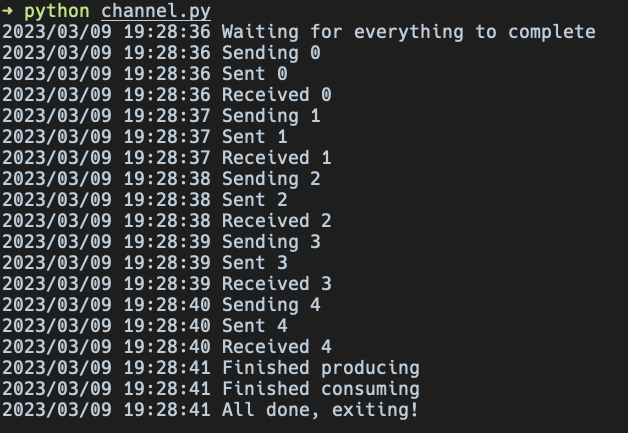
Here’s the output produced when running the program:
python output

The buffered channel with size 2 allows the producer to send values ahead of consumption, which is why you see “Sent 0” and “Sent 1” appearing before the consumer starts receiving. This demonstrates that our Python implementation successfully mimics Go’s channel behavior including buffering and synchronization.

Resources